


Have you ever wondered where actually all your business data lives today? It’s no longer stored in one database or on a single server. It’s spread across cloud applications, SaaS platforms, data warehouses, and external systems that teams use every day. As businesses move more data to the cloud, the real challenge is no longer about collecting data, it’s about how to connect it in a way that it stays flexible and also easy to use.
That’s exactly where cloud data integration fits in. Instead of building complicated pipelines, cloud based data integrations actually focus on moving data freely across systems without slowing teams down. If the data is flowing from operational tools to analytics platforms or between multiple cloud services, integration in the cloud needs to be fast and accurate.
At the same time, cloud environments work in their own complex environments. Different platforms, security models and even data formats make these integration decisions more architectural than ever. This is why many organizations turn to data integration consulting services to design integration approaches that align with cloud native systems.
In this guide, we’ll walk you through what data integration cloud really means, why businesses should integrate their data in the cloud, and what are the tools can help to set up a cloud-based data integration.
“Cloud data integration provides the foundation for keeping data accessible, trusted and usable wherever it resides, especially as enterprises adopt AI and real-time analytics.”
— Industry perspective from IBM on cloud data integration importance
What is Cloud Data Integration?
Cloud data integration is the process of connecting, moving, and synchronizing data across cloud based systems, applications, and platforms. This doesn’t rely on fixed, on-premise data integration pipelines, instead integration happens within cloud environments where data can flow between SaaS tools, cloud databases, analytics platforms and also external services.
Data integration in the cloud is all about designing data flow that can scale, adapt, and stay stable even when the systems change. It can support both batch and real time data flows, works across multiple cloud providers, and fits naturally into modern, API driven ecosystems. This results in an integration layer that keeps this data accessible and consistent without being hard to maintain.
Make Cloud Data Integration Work for You
From scalability to compliance, master the essentials of modern cloud data workflows.
Start Your Integration Journey
Importance of Cloud Data Integration
When it comes to cloud environments, they change quickly, new data integration tools get added, data volumes grow, and businesses should understand that managing cloud integration should become a backend task. Without proper integration, even the most advanced cloud stack could feel disconnected.
Data integration cloud computing helps businesses keep the data flowing across platforms, reduces friction between systems, and creates a strong foundation that can keep evolving if businesses need any change.
Why Should Business Integrate Data in the Cloud?
If you are building a cloud datalakes to get real time analytics then lets understand few needs, why you integrate data in the cloud for your business
- Agility – Cloud based data integration makes it easier to add new data sources, applications or even workflows and no rebuilding from scratch is required. Teams can respond faster to changing business requirements.
- Speed– Data moves faster in the cloud and that’s true. Integration pipelines can support near real time data flows, helping systems to stay in sync without long delays or any manual intervention.
- Flexibility– Cloud integration supports different types, formats and workloads. Whether data comes from SaaS tools, databases, or external platforms, it can be handled with no rigid constraints.
- Scalability– As data volumes grow, cloud integration keeps scaling up naturally. There’s no need to constantly look into infrastructure or rework pipelines to handle increased workloads.
- Alignment– Integrated cloud data ensures that analytics, operations, and business teams are working together on the same data and up to date information across systems.
Cloud Data Integration Architecture Diagram
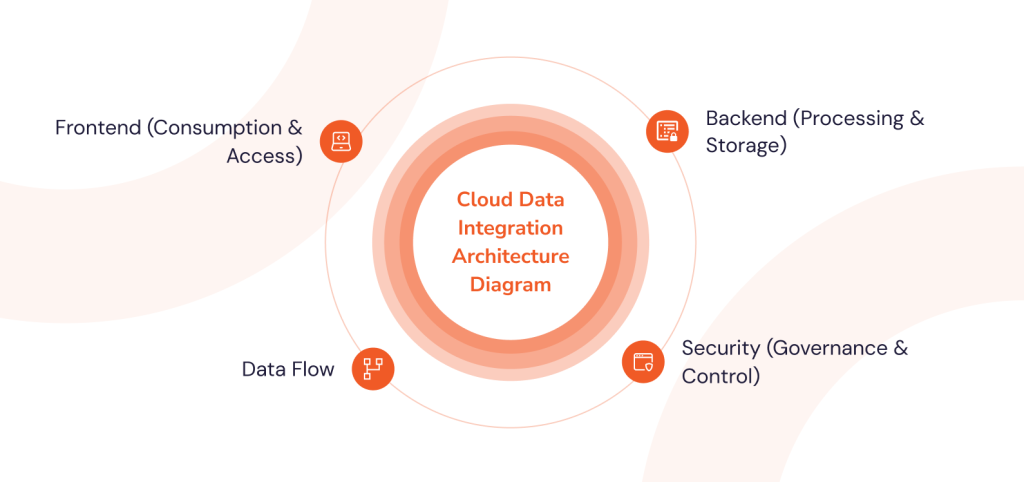
A cloud data integration diagram below showcases how data flows across cloud systems in a structured and a layered way. Instead of only connections, modern architecture focuses on flexibility, scalability, and clear separation of responsibilities.
1. Frontend (Consumption & Access)
The frontend is where the integrated data becomes useful. This includes dashboards, analytics tools, reporting platforms, business applications and ML interfaces. Users don’t require to know from where the data comes or how it was processed, they simply access consistent, trusted information through familiar tools.
2. Backend (Processing & Storage)
The backend handles the heavy lifting of whole cloud integration architecture. This is where data is processed, transformers, and stored using cloud native services such as data lakes and data warehouses. Business rules, data models, and transformations live here, ensuring data remains accurate and reusable across multiple platforms and use cases.
3. Data Flow
This defines how information travels between systems. This also includes batch processing, real time streaming, API based integrations, and pipelines that can also be event driven. Whereas orchestration tools manage schedules, alerts, notifications, dependencies, retirements, and failures so that pipelines run smoothly with no human involvement.
4. Security (Governance & Control)
Security spans the entire architecture. It includes encryption, identity and access management audit logging and compliance controls. Governance policies make sure the right people access the right data while protecting the sensitive information.
Types of Cloud Data Integration
Cloud data integration is not a single method. Businesses use different approaches depending on how fast they need data, where it comes from, and how it will be used. Below are the most common types of cloud data integration used in modern data platforms.
1. Batch Data Integration
This is the most traditional type of integration.
Data is collected over a period of time and then moved or processed together in batches. For example, sales data from the entire day may be transferred to a cloud data warehouse every night.
Best for:
- Reporting and dashboards
- Historical data analysis
- Scheduled data pipelines
Common technologies: ETL tools, data warehouses, scheduled jobs
Key benefit: Efficient for large volumes of data that don’t need real-time updates.
2. Real-Time Data Integration
In this type, data moves instantly or with very little delay. As soon as data is created, it is transferred, processed, and made available for analytics.
For example, fraud detection systems or live customer dashboards need real-time data.
Best for:
- Real-time analytics
- Monitoring systems
- Financial transactions
- IoT and streaming data
Common technologies: streaming data pipelines, event-driven architecture, change data capture (CDC)
Key benefit: Immediate insights and faster decision-making.
3. ETL Integration (Extract, Transform, Load)
This is a structured data integration process.
Data is:
- Extracted from source systems
- Transformed into the required format
- Loaded into a cloud data warehouse or storage system
Transformations happen before loading.
Best for:
- Structured data environments
- Data quality control
- Complex transformations
Key benefit: Clean and standardized data before storage.
4. ELT Integration (Extract, Load, Transform)
This is a modern cloud-native approach.
Data is:
- Extracted
- Loaded into cloud storage first
- Transformed later inside the cloud platform
Because cloud computing is highly scalable, transformation can happen faster after loading.
Best for:
- Large-scale data processing
- Data lakes and lakehouses
- Modern analytics environments
Key benefit: Faster ingestion and flexible transformations.
5. Data Replication and Synchronization
This type copies data from one system to another and keeps them synchronized.
It ensures multiple systems always have the same updated data.
Best for:
- Multi-cloud environments
- Disaster recovery
- Backup systems
- Operational reporting
Common methods: change data capture, continuous replication
Key benefit: Data consistency across platforms.
6. Data Virtualization
Instead of physically moving data, this method creates a virtual layer that allows users to access data from multiple sources in real time.
Data stays in its original location but appears unified.
Best for:
- Fast access to distributed data
- Reducing data movement
- Unified data views
Key benefit: No need to copy or store duplicate data.
7. Application and SaaS Integration
This connects cloud applications like CRM, ERP, marketing platforms, and analytics tools so they can share data automatically.
For example, syncing customer data between a CRM and billing system.
Best for:
- SaaS to SaaS integration
- Business workflow automation
- Customer data platforms
Common technologies: APIs, integration platforms, middleware
Key benefit: Seamless data flow between applications.
8. Hybrid Cloud Data Integration
Many organizations still use both on-premise and cloud systems. Hybrid integration connects these environments.
Data moves between local databases and cloud platforms securely.
Best for:
- Gradual cloud migration
- Legacy system integration
- Multi-environment operations
Key benefit: Flexibility during digital transformation.
9. Streaming Data Integration
This is an advanced form of real-time integration where continuous data streams are processed instantly.
Examples include sensor data, clickstream tracking, and financial trading systems.
Best for:
- IoT data
- Live analytics
- High-velocity data environments
Key benefit: Continuous data processing without delay.
10. Integration Platform as a Service (iPaaS)
This is a cloud-based platform that manages data integration, application integration, and workflow automation from one place.
It provides tools to build, monitor, and manage data pipelines without heavy infrastructure setup.
Best for:
- Enterprise integration
- Automated data workflows
- Scalable cloud environments
Key benefit: Centralized control of integration processes.
Cloud Data Integration Solutions
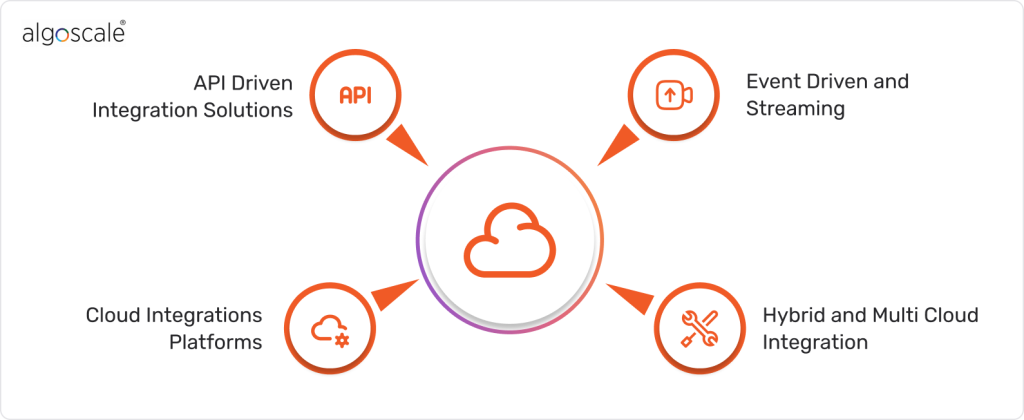
Cloud data integration solutions are designed to simplify how data moves across these cloud environments without forcing teams to stitch everything together manually. Actually this is not just about data flowing in and out. These cloud solutions provide structured ways to connect applications, manage data flows, and keep the integrations stable.
- API Driven Integration Solutions – These solutions rely on APIs to exchange data between cloud applications and services. They work well especially in SaaS environments, where systems are API first. API led integration keeps your data access controlled, secure, and easier to update as new applications are added.
- Cloud Integrations Platforms- These platforms act as a centralized layer that manages data ingestion, transformation, and routing across systems. Instead of creating separate point to point connections teams can define reusable integration logics that can support multiple use cases at once.
- Event Driven and Streaming – For some use cases where data needs to move continuously, event driven integration solutions will process data as it is generated. These are commonly used for operational reporting, real time sync between the applications and systems that require up to date information.
- Hybrid and Multi Cloud Integration – Many businesses still operate across multiple cloud providers or depend on on-prem systems. Hybrid solutions help bridge these environments, allowing customer data integration to work consistently across multiple platforms without locking teams into a single ecosystem.
Choosing the right cloud-based data integration solution depends on data volume, latency requirements, system complexity, and long term scalability goals.
How Cloud Data Integration Works (Step-by-Step Flow)
Cloud data integration connects different data sources, processes the data, and makes it ready for analytics or business use — all inside a cloud environment. Below is the simple step-by-step flow of how the process works.
Step 1: Data is collected from multiple sources (Data ingestion)
The process begins by gathering data from different systems.
These sources can include:
- Databases (on-premise or cloud)
- SaaS applications (CRM, ERP, marketing tools)
- APIs and web services
- Files (CSV, JSON, logs)
- IoT devices and streaming platforms
This stage is called data ingestion or data extraction, where raw data enters the cloud-based data integration platform.
Step 2: Data is moved to the cloud (Data movement & transfer)
Once collected, the data is transferred securely to cloud storage or processing environments such as:
- Data lakes
- Cloud data warehouses
- Lakehouses
This step ensures all data is centralized or accessible in one environment.
Data transfer can happen:
- In batches (scheduled transfers)
- In real time (continuous data streaming)
Step 3: Data is cleaned and transformed (Data transformation)
Raw data from different systems often has different formats, structures, and quality levels. So it must be standardized before use.
This step includes:
- Cleaning incorrect or duplicate data
- Converting formats
- Merging datasets
- Applying business rules
Transformation can happen before loading (ETL) or after loading (ELT).
Step 4: Data is organized and stored (Data storage layer)
After transformation, data is stored in structured and optimized storage systems designed for analytics.
Common storage environments:
- Cloud data warehouses
- Data lakes
- Lakehouse architecture
Here, data becomes analysis-ready and easily accessible.
Step 5: Data is managed and governed (Data governance & quality control)
To ensure reliability and security, organizations apply governance rules.
This includes:
- Data quality checks
- Access control and permissions
- Compliance and security policies
- Data lineage tracking
- Metadata management
This step ensures trusted and secure data usage.
Step 6: Data is orchestrated and monitored (Workflow management)
Modern cloud data integration platforms automatically manage data workflows.
They:
- Schedule data pipelines
- Monitor performance
- Detect errors
- Automate data processing
This is called data orchestration.
Step 7: Data becomes available for use (Analytics & consumption layer)
Finally, the integrated data is delivered to business users and applications for analysis.
It can be used in:
- Business intelligence dashboards
- Reporting tools
- Machine learning models
- Real-time analytics systems
This is where organizations generate insights and make decisions.
Cloud Data Integration Services
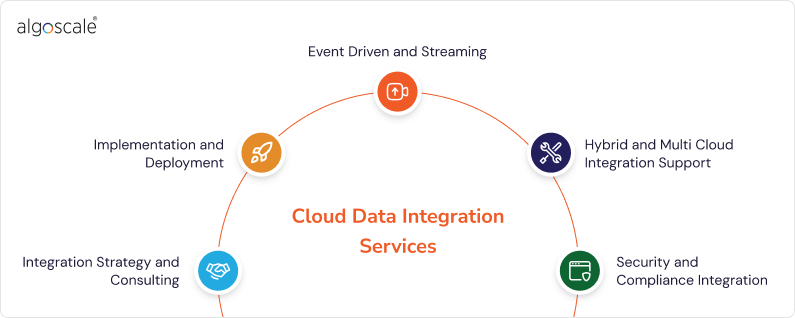
Cloud data integration services help your businesses grow beyond data connections and build reliable, scalable, and automated data flows across the cloud environments. These services can take care of the planning, implementation, and management of integration pipelines, so that your teams can focus on important things like insights and business outcomes rather than plumbing. These services also make sure that cloud & data integration works consistently across applications, platforms, and workflows.
1. Integration Strategy and Consulting
Before writing a single pipeline, integration specialists help you define the right strategy for connecting these systems, choosing suitable tools, and designing data flows that align with your business goals. This also includes assessing your current systems, planning migration paths, and ensuring security and compliance are built into the cloud data integration approach.
2. Implementation and Deployment
These services focus on building, testing and deploying integration solutions. It can be API integration, event streams, scheduled ETL/ELT workflows, or real time pipelines, this service ensures integration logic is correctly implemented and meets performance expectations.
3. Managed Data Integration Services
Some organizations prefer ongoing support rather than working with internal management. Managed services can take care of monitoring, maintenance, troubleshooting, and scaling of cloud data integration pipelines. This actually reduces operational overhead costs and helps the integrations updated over time.
4. Hybrid and Multi Cloud Integration Support
Many businesses operate across multiple cloud providers or mix existing systems with current cloud platforms. These services help combine those environments, manage integration across AWS, Azure, Google Cloud, and legacy systems with one governance and orchestration.
5. Security and Compliance Integration
Security must be integrated into every step, and keeping your data secure should always be business first priority. These services make sure that data access controls, encryption, and compliance frameworks are implemented securely and audited as part of the cloud integration architecture.
Key Technologies of Cloud Data Integration
Cloud data integration works because of several important technologies that help collect, move, process, and manage data across different systems. These technologies work together to make sure data flows smoothly, stays accurate, and is ready for analysis.
1. Data Pipelines
A data pipeline is the path that data follows from source to destination.
It automatically:
- Collects data
- Moves it
- Processes it
- Delivers it for use
Pipelines can run on schedules (batch processing) or continuously (real-time processing).
Why it matters:
It automates data movement so businesses don’t have to handle data manually.
2. ETL and ELT Processing
These are methods used to prepare data for analysis.
- ETL (Extract, Transform, Load)
Data is cleaned and transformed first, then stored. - ELT (Extract, Load, Transform)
Data is stored first, then transformed inside the cloud system. - Why it matters:
They make data consistent, structured, and ready for reporting or analytics.
3. Integration Platforms (iPaaS)
Integration Platform as a Service (iPaaS) is a cloud tool that connects different applications and data systems from one central place.
It helps:
- Build data workflows
- Connect SaaS apps
- Manage integrations
- Monitor pipelines
Why it matters:
It simplifies complex integrations without needing heavy infrastructure.
4. Data Storage Systems
Cloud-based data integration needs scalable storage to hold large amounts of data.
Common storage environments include:
- Data lakes (store raw data)
- Data warehouses (store structured data)
- Lakehouses (combine both)
Why it matters:
Centralized storage makes data easy to access and analyze.
5. Data Replication and Synchronization
This technology copies data from one system to another and keeps them updated.
Some systems update continuously using change data capture (CDC), which detects and transfers only the changes.
Why it matters:
It keeps data consistent across multiple platforms.
6. Real-Time Data Streaming
Streaming technology processes data the moment it is created.
Instead of waiting for scheduled updates, data flows continuously.
Common uses:
- Live dashboards
- IoT monitoring
- Fraud detection
Why it matters:
It enables instant insights and faster decision-making.
7. Data Orchestration Tools
Orchestration tools manage and control data workflows.
They:
- Schedule tasks
- Coordinate pipeline steps
- Monitor performance
- Handle failures automatically
Why it matters:
They ensure data processes run smoothly and efficiently.
8. Data Transformation and Processing Engines
These tools modify raw data into usable formats.
They perform:
- Data cleaning
- Filtering
- Aggregation
- Format conversion
Why it matters:
They make data meaningful and analysis-ready.
9. Data Governance and Security Technologies
These technologies protect data and ensure it is reliable.
They help manage:
- Access permissions
- Data quality
- Compliance rules
- Data lineage (where data comes from)
- Metadata management
Why it matters:
They ensure data is secure, trustworthy, and compliant with regulations.
10. APIs and Connectivity Tools
APIs allow different systems and applications to communicate and share data.
They connect:
- Cloud applications
- Databases
- External services
Why it matters:
They make seamless data exchange possible across platforms.
Key Components of Cloud Data Integration
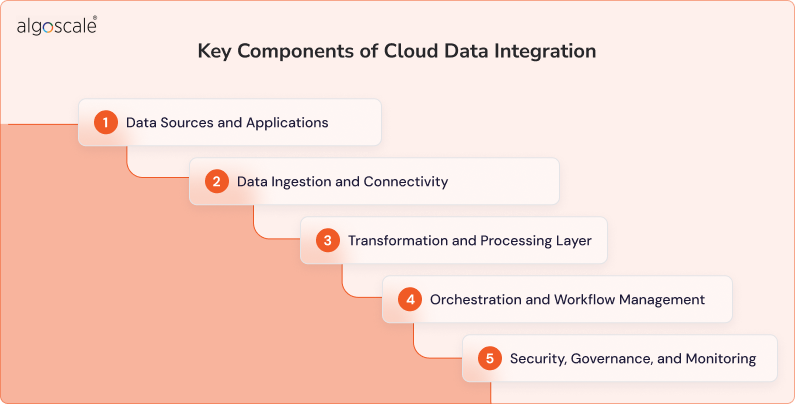
Cloud data integration isn’t one single tool or process, it contains components that include data connectors, transformation engines and cloud storage designed to merge disparate data sources into a unified, actionable view. When these components are designed well, your data stays accurate, timely, and ready for use across the business.
1. Data Sources and Applications
Everything starts at the source. This includes cloud applications, databases, SaaS platforms, API, and sometimes on-prem systems. A strong integration set up is flexible enough to connect structured and unstructured data with no major changes forcing it to the existing systems.
2. Data Ingestion and Connectivity
This is how data enters the integration pipeline. Connectors, APIs, and event streams pull data in either real time or on a scheduled basis. The goal here is reliability because data should be able to move consistently without breaking the pipelines when data volumes grow or systems change.
3. Transformation and Processing Layer
Raw data is rarely usable as-is. This component handles cleaning, standardizing, enriching, and transforming data so it fits business rules. In cloud environments, this often happens at scale and on demand, keeping the processing fast without overloading systems.
4. Orchestration and Workflow Management
As integrations grow, so do dependencies. Orchestration tools manage when the pipelines run, how steps connect, and what happens when something goes wrong or actually fails. This keeps data flows predictable and easier to maintain over time.
5. Security, Governance, and Monitoring
Cloud data integration only works if data is protected and trusted. Access controls, encryption, data lineage, and monitoring tools ensure compliance while giving teams visibility into performance, errors, and data quality.
Together, these components create a strong cloud integration foundation that is secure and is built for real world business needs.
How Cloud Data Integration Is Different from Traditional Data Integration
Cloud data integration and traditional integration solves the same problem, but they do so using very different architectural principles. The difference becomes cleared when you look at how data pipelines are built, deployed, and operated.
| Aspect | Traditional Data Integration | Cloud Data Integration |
| Infrastructure Layer | On-prem servers, tightly coupled to hardware | Cloud native infrastructure (IaaS/PaaS) with elastic compute |
| Architectural Style | Monolithic or tightly coupled pipelines | Modular, decoupled, and service oriented pipelines |
| Scalability Model | Vertical scaling (add more hardware) | Horizontal scaling using distributed compute |
| Data Processing | Primarily batch based ETL jobs | Batch, micro batch, and real time streaming |
| Pipeline Execution | Fixed schedules (cron-based jobs) | Event driven and on-demand execution |
| Data Movement | Point to point integrations | Hub based or API driven integration models |
| Transformation Approach | Heavy transformations before loading | ELT and push down processing using cloud engines |
| Latency | High latency for data availability | Low latency with near real time updates |
| Fault Tolerance | Manual recovery and restart mechanisms | Built in retires, checkpoints, and auto healing |
| Security & Access | Network level security and static roles | IAM based access, encryption, and policy driven controls |
| Operational Overhead | High maintenance, patching, and upgrades | Managed services reduces the operational complexity |
| Analytics ReadIness | Limited support for modern analytics | Optimized for BI, AI/ML, and cloud analytics tools. |
Many industries use cloud data integration to support specialized use cases. For example, an ecommerce data cloud integration platform helps businesses connect storefronts, payment systems, marketing tools, and inventory data to maintain real time visibility across operations, and healthcare data integration helps to merge, clean and consolidate data from all the sources to a unified repository to improve clinical decision making.
How to Choose Right Cloud Data Integration Tools & Platforms
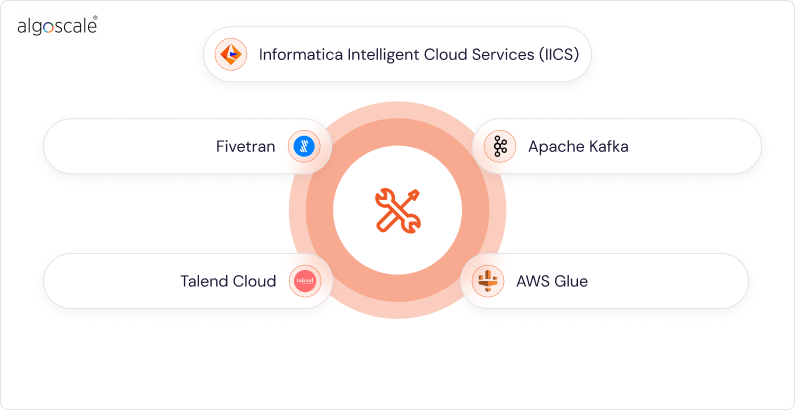
Choosing the right tool can define how scalable and maintainable your cloud-based data integration setup becomes. The best cloud data integration tools today are built to handle distributed systems, changing schemas, and growing data volumes with constant rework. Below are widely adopted tools, each serving a slightly different integration need.
- Informatica Intelligent Cloud Services (IICS)– This is a long standing enterprise choice for cloud-based data integration. It handles all the complex transformations, hybrid environments, and governance heavy use cases as well. Many businesses actually rely on it to integrate SaaS and cloud systems while still maintaining strong metadata and lineage controls.
- Fivetran – Fivetran focuses on simplicity and reliability. It automates data ingestion from SaaS apps, databases, and cloud platforms with very minimal configuration. This makes it popular with analytics teams wanting fast, low maintenance pipelines into cloud warehouses.
- Talend Cloud- Talend offers a flexible platform that supports both ETL and ELT patterns, It is often used where data quality, transformation logic, and governance need to live close together. Talend works very well for teams that need control without working or building any integration from scratch again and again.
- Apache Kafka– Kafka plays a crucial role in real time cloud data integration. It allows streaming data between systems with high throughput and low latency. Kafka is chosen by businesses to connect their applications, event streams, and analytics platforms where data freshness is needed.
- AWS Glue- It is a well known cloud native integration service that is designed for teams already working with the AWS ecosystem. It simplifies data discovery, transformation, and pipeline orchestration while scaling automatically with the data volume.
Best Practices for Cloud Data Integration
To implement a perfect cloud data integration, you need to follow a few best practices that can lead to better performance of your business. Understanding your data is the only way to scale up your business and managing it all well speaks to success. Here are some best practices that you can follow before setting up your data integration in the cloud.
- Design for change, not perfection– Assume sources, schemas, and business rules will evolve. Build pipelines that can adapt without full rewrites.
- Separate ingestion from transformation– Land raw data first, then transform it downstream. This keeps the pipelines easier to debug and reuse.
- Use event driven patterns where latency matters– For operations use cases, streaming or near real time integration delivers faster availability than batch only designs.
- Standardize data contracts early– Define naming conventions, data types, and expectations between producers and consumers to reduce downstream breakage.
- Automate monitoring and alerts – Track pipeline failures, data freshness, and volume anomalies so issues get caught before users notice them.
- Secure data at every layer- Apply encryption, role based access, and audit logging across ingestion, storage, and consumption layers of the architecture.
- Optimize for cost visibility– Monitor compute usage separately from storage and scale processing only when required.
- Document pipelines and ownership– Clear documentation and ownership prevent pipelines from becoming invisible dependencies over time.
Conclusion
Cloud data integration has moved from being a technical upgrade to a foundation capability for modern businesses. As data spreads across cloud platforms, SaaS tools, and real time systems, the ability to quickly teams can respond , adapt and grow improves. A well designed cloud integration approach will reduce complexity, improve data availability, and keep the architectures flexible as requirements keep evolving.
At Algoscale, cloud data integration is approached with a very strong focus on architecture reliability and long term scalability. We work closely with organizations to design integration frameworks that align with your real business workflows, not only tools or platforms. Through our data integration consulting services, our team of cloud developers help your businesses to build cloud native pipelines that are easier to maintain, scale and ready for future data demands.
Thinking about how to start with cloud data integration?
The first step is understanding how your data flows today and where it needs to go tomorrow. With the right architecture and clear integration strategy, cloud data integration becomes very easier to scale and simpler to manage. You can talk to Algoscale’s data integration experts to design a cloud integration approach that fits your systems, teams, and growth plans.
Contact Us Today !
FAQs
What is cloud data integration
Cloud data integration is the process of connecting, moving, and transforming data across cloud based data integration, applications, and platforms so it can be accessed and used consistently.
How does cloud data integration work
It works by ingesting data from multiple sources into the cloud, processing it and making the data available for analytics, applications, or reporting.
What’s the difference between cloud data integration vs ETL
ETL is a technique for moving and transforming data. Cloud data integration is a wider approach that includes ETL, ELT streaming, and real time data movement in the cloud environments.
What are the benefits of cloud data integration
It improves scalability, reduces infrastructure complexity, it supports real time data access, and makes it easier to integrate new systems as businesses grow.
Who should use cloud data integration
Any businesses that use cloud applications, SaaS platforms, or distributed systems can benefit, especially those handling growing data volumes or needing faster access to data.










