


If your business is not ready to lose $3.7 trillion annually to poor customer service, you should consider customer data integration.
This is the reality. Frustrated customers cost you the hard-earned loyalty and irreversible revenue losses as they churn towards better alternatives. Where does this all start?
With disconnected data. Imagine your customer contacting your support team for a delayed order expecting an immediate response on why it was delayed and when you will deliver it at the soonest. But your agent struggles between different systems where these details are scattered and fails to give an immediate answer to the already frustrated customer.
Data integration services solve this problem by consolidating customer data from multiple sources into a unified view. This blog helps you understand more about CDI, its benefits, and how it helps you retain every customer as a long-term advocate of your brand.
What Is Customer Data Integration?
Customer Data Integration (CDI) is the process of collecting, combining, and unifying customer data from multiple sources, like CRM systems, websites, mobile apps, ERP, marketing tools, and support platforms, into a single, consistent view of each customer.
Once this data is collected from different sources, it is organized in a manner that facilitates sharing it with all your team members easily. Imagine how disparate this customer data can be, originating from a wide range of interactions- social media, marketing, search behavior, emails, website views, and differing in appeal, quality, or type. Therefore, this data in its disparate form, cannot be resourceful for decision making. It needs to be organized, transformed, cleaned, and analyzed, so that your teams rely on a unified and clear picture rather than a fragmented one.
This is what CDI enables by helping businesses access a single source of truth for all systems that generate customer interactions. This ensures that your teams have the necessary clarity to cater to customers with all the information that matters in a unified format. Imagine your sales rep is preparing for a decisive call aimed at conversion- and they have the customer’s support history, responses, marketing interactions, and transaction patterns in one place! They are equipped to make quick and on-spot decisions better with every information that matters.
As such, CDI pulls data from different teams to make it available to teams as a unified source of decision making, enabling meaningful, faster, and effective customer interactions.
Why Is It Important To Integrate Customer Data?
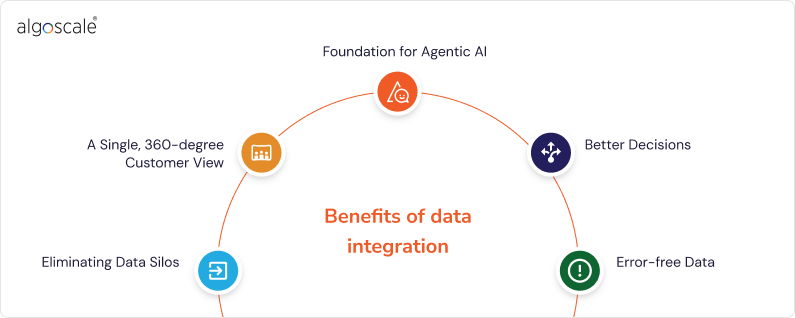
When your customer data is scattered across different tools, interaction mediums, and departments, it is easy to miss insights that are crucial for making decisions. These decisions directly translate to revenue, customer satisfaction, and retention. However, when your sales, marketing, customer support, and operations teams function in isolation with regards to customer needs, each of their versions of customer truth are not enough to grow your business.
It is here that data integration for customers gives you complete visibility into customer needs, aligns all your teams by consolidating data into a unified system, enhances decision making, and delivers more meaningful experiences to boost customer loyalty. Its core benefits are discussed below:
1. Eliminating Data Silos
Data silos, or disconnected data prevents your teams from getting a unified view of all customers. Fragmented data leads to costly gaps in understanding customers, resulting in lost opportunities to maximize conversions, boost loyalty, or retention. Imagine your most loyal customer facing a persistent issue, leading your upselling efforts to go in vain, as does any effort to build customer trust.
Real-time customer data integration ensures that every department has access to the same up-to-date information. So when it comes to making critical decisions, everyone is on the same page to deliver relevance, consistency, and seamless experiences to new and loyal customers.
2. A Single, 360-degree Customer View
The journey of your customer coming across your product to them buying it and then repeat purchases is laden with valuable insights on customer preferences, behaviours, and overall context in which they made the purchase decision. CDI gives you a complete picture of your customers’ journey.
This unified 360-degree view maximizes your team’s productivity while dealing with customers as they no longer have to juggle through fragmented records. A unified customer data view helps them personalize marketing campaigns, maximize conversions, and establish meaningful relationships with customers.
3. Foundation for Agentic AI
Your AI models are as good as the data that supports them. A unified foundation of high-quality and well integrated data ensures that your AI models act and make decisions on the most relevant and up-to-date information. When you integrate customer data, the elimination of data silos helps you create a single and reliable view of your customers and serves as the foundation for your AI performance accuracy.
When AI agents act on integrated and up-to-date data, their decisions reflect evolving market dynamics and help your customers at every stage of associating with your brand. Be it for advanced analytics, workflow automation, or AI-powered applications, this data integration is key. Without this data integration and pipeline, even the most advanced AI models will fall short of performance and not serve as instruments for business and revenue growth.
4. Better Decisions
Your customer data is the most valuable asset you have for making decisions to enhance your service quality, improve engagement and retention, and compete in a dynamic market. Just having customer data does not guarantee deeper insights for critical, day-to-day decisions.
Integrating customer data helps you identify trends, analyze them, predict outcomes accurately, and act faster to serve customers better and faster than competitors. Whether your service team is trying to find patterns using predictive capabilities to make sense of issues of customer churn, or your e-commerce team is preparing for a new product launch, unified customer data helps them proactively resolve issues before they become major roadblocks, and apply analytics to sales or customer service to adjust prices and maximize conversions.
5. Error-free Data
CDI harmonizes data across all platforms to prevent data gaps, duplication, and inconsistent records. Why CDI matters is because customer data can present several inconsistencies like different spellings of a customer’s name, information gaps from various datasets, data in different formats from multiple sources.
CDI harmonizes this data by aligning and standardizing it, enabling accurate and consistent data, resulting in fewer errors and better decisions. This guarantees seamless, personalized, and fuss-free experiences for customers as you resolve their issues faster without them having to wait for clarity multiple times.
Make Every Customer Interaction Count
Learn how integrated data drives better personalization, automation & revenue.
Talk to Our Data Integration Consultant
Types Of Customer Data Integration
There is no one-size-fits-all approach to CDI. Based on unique customer and business needs, there are three types or methods of CDI, each of which serve a different purpose. These have been discussed below:
1. Data Consolidation
Data consolidation is the process of combining data sets from multiple sources into a centralized database. This centralized repository holds all your customer data together (just like a big library) for your teams to access, share, and use this information. It helps businesses obtain a solid and comprehensive understanding of their customers, for example, retailers can unify data from online transactions and shopping behaviour, in-store purchases, and customer service interactions to enhance their campaigns and maximize conversion.
The process of loading all your customer data into a central repository involves ETL processes, or Extract, Transform, and Load pipelines, to pull data from different sources, clean and structure it so it becomes available consistently. APIs, connectors, SDKs, and other integration technologies streamline batch data transfers or real-time transfers between systems.
This helps you create a single source of truth, which in turn, improves analytics, collaboration, decision-making, and ability to deliver more personalised interactions. It creates a unified and structured environment for reliable and deeper insights, and facilitates better historical analysis through snapshots of data captured at specific times.
2. Data Propagation
The main role of data propagation is to ensure all your tools remain in sync instantly. It involves copy/pasting data across different datasets, automatically updating and sharing data across systems as soon as there is a change to ensure all parts of your business have consistent information from up-to-date data.
Your customer can update their contact number on one platform, and data propagation will ensure that the change instantly reflects and is updated on your marketing tools, analytics dashboard, and CRM tools. This is very important for present-day dynamic environments that survive and thrive on timely information. Data propagation helps you create a unified customer profile to eliminate data discrepancies that arise from manual data updates and improve customer interactions with synchronised data.
3. Data Federation
Data federation helps you create a virtual view of combined data without physically merging it. Think of it as a universal key that unlocks data from multiple places without actually moving it. This differs from data consolidation by connecting to data where it already resides and gives your teams access to the same without creating extra versions.
This approach helps you access and analyze data from different systems in real time. It enables a more comprehensive customer analysis, for example, by letting you view customer interactions from both the website and physical stores. Data federation helps you avoid extra storage costs from duplicate datasets, have on-demand access to any data source, and simplify compliance by maintaining data in its original source.
Customer Data Integration vs Customer Data Platform
In simple terms:
- CDI focuses on collecting, connecting, and unifying customer data from multiple sources.
- CDP focuses on using unified customer data to create profiles and drive marketing or engagement actions.
| Feature | Customer Data Integration (CDI) | Customer Data Platform (CDP) |
|---|---|---|
| Primary Purpose | Integrates and consolidates customer data from multiple systems | Builds persistent customer profiles for marketing and engagement |
| Core Function | Data unification and synchronization | Customer profiling and activation |
| Focus Area | Data infrastructure and architecture | Marketing intelligence and customer experience |
| Data Handling | Collects, cleans, matches, and merges data from different sources | Organizes unified data into actionable customer segments |
| User Base | Data engineers, IT teams, data architects | Marketing, sales, customer experience teams |
| Output | Single source of truth for customer data | 360° customer profiles ready for campaigns |
| Real-time Capabilities | Depends on integration setup | Often built for real-time personalization |
| Implementation Layer | Backend data management layer | Application and engagement layer |
| Use Case Example | Combining CRM, website, and transaction data into one system | Running personalized email or ad campaigns based on behavior |
| Relationship to Each Other | Foundation for unified data | Often built on top of integrated data |
Essential Requirements For Customer Data Integration
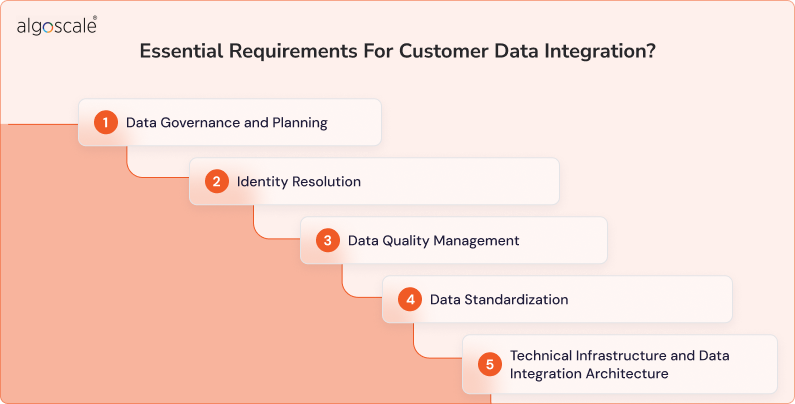
For successful CDI, a strategic approach combining technology, quality management, and data governance is necessary to offer a unified, 360-degree customer view. Some essential requirements for the same have been listed below:
1. Data Governance and Planning
For customer data integration to be secure and accurate, data governance and planning are necessary. Defining data ownership, standards, and rules before systems are connected prevents errors and inconsistencies across platforms. With robust data governance, clear business goals defined, identifying all data sources, and assigning data ownership to manage schema changes, you go a long way toward ensuring that integration leads to reliable insights, clarity, and seamless customer experiences, and simplifies compliance for your business.
2. Identity Resolution
Identity resolution ensures that your records from different systems refer to the same customer and there is no duplication with regards to their details. It matches and merges identifiers to eliminate any conflicts across disparate systems and create a single golden record for reliable insights, accurate reporting, and meaningful customer experiences with targeted personalization.
3. Data Quality Management
CDI amplifies whatever data it connects. Data cleansing, validation, and enrichment ensure that your customer records are accurate and consistent. Strong data quality controls prevent integrated systems from spreading errors, creating conflicting customer views, and undermining trust from inaccurate or incomplete insights.
4. Data Standardization
Your customer information is usually captured in different formats across various systems. Data standardization for fields like names, identifiers, dates, and addresses allows data to be accurately compared and merged. Without the necessary data standardization processes, your CDI can create mismatches and lead to unreliable analysis with incomplete records.
5. Technical Infrastructure and Data Integration Architecture
You need scalable ETL processes, APIs, and data warehouses to ensure that customer data flowing from different systems at varying speeds and volumes is reliably collected, transformed, and delivered in real-time, as well as in batches for consistent and reliable insights.
Your data integration architecture defines how data moves, transforms, and stays consistent across systems, ensuring your APIs, ETL pipelines, real-time streams, storage layers, and governance work together to prevent integrations from breaking as data grows with evolving business requirements.
Key Challenges & Solutions in Customer Data Integration
1. Data Silos Across Multiple Systems
- Challenge:
Customer data is often stored in separate systems like CRM platforms, marketing tools, and support software. These disconnected environments prevent teams from accessing a unified customer view. - Solution:
Implement centralized data architecture and integration pipelines that connect all systems. Use APIs, data pipelines, or integration platforms to continuously bring data into one unified repository.
2. Poor Data Quality and Inconsistent Formats
- Challenge:
Customer records may contain duplicates, missing values, outdated information, or inconsistent formats (e.g., different address styles or naming conventions). - Solution:
Establish data standardization rules and automated data cleansing processes. Use validation, normalization, and deduplication tools to maintain consistent and accurate data across all sources.
3. Difficulty in Identity Resolution
- Challenge:
Customers may appear differently in various systems — for example, using different email addresses or name variations — making it hard to match records accurately. - Solution:
Use identity resolution techniques such as deterministic matching (exact matches) and probabilistic matching (pattern-based similarity). Assign unique customer identifiers to link records reliably.
4. Integration Complexity and Technical Limitations
- Challenge:
Different systems use different data structures, technologies, and communication methods, making integration technically complex and time-consuming. - Solution:
Use scalable integration frameworks such as ETL/ELT pipelines, middleware, or data virtualization. Standardize data models and integration protocols to simplify connectivity.
5. Real-Time Data Synchronization Challenges
- Challenge:
Keeping customer data updated across systems in real time can be difficult, especially when dealing with large volumes of data or legacy systems. - Solution:
Implement real-time data streaming or scheduled synchronization processes. Use change data capture (CDC) techniques to update only modified data efficiently.
6. Data Privacy and Compliance Risks
- Challenge:
Handling customer data involves strict privacy regulations and compliance requirements. Improper data handling can lead to legal and reputational risks. - Solution:
Implement strong data governance policies, access controls, encryption, and compliance monitoring. Ensure adherence to relevant data protection regulations and maintain audit trails.
7. Lack of Clear Data Ownership and Governance
- Challenge:
Without defined responsibilities, data management becomes inconsistent, leading to errors, duplication, and poor accountability. - Solution:
Establish a formal data governance framework. Define roles such as data owners, data stewards, and access permissions to ensure accountability and data integrity.
8. Scalability and Performance Issues
- Challenge:
As customer data grows, integration systems may struggle to process large volumes efficiently, leading to delays and performance bottlenecks. - Solution:
Design scalable infrastructure using cloud-based storage, distributed processing, and performance monitoring tools. Plan for growth from the beginning.
How Customer Data Integration Works
Here’s how the process typically works in practice.
1. Connect to Multiple Data Sources
CDI starts by connecting to all systems that store customer information, such as CRM platforms, websites, mobile apps, support tools, and transaction systems.
These sources often contain:
- Different data formats
- Duplicate records
- Partial customer information
The goal is to extract all relevant data into one integration workflow.
2. Extract and Transform the Data
Once data is collected, it is processed to ensure consistency.
This includes:
- Converting formats (dates, phone numbers, addresses)
- Standardizing field names
- Removing errors or invalid entries
- Structuring data for compatibility
This transformation step makes data usable across systems.
3. Match and Identify Customers
Customers often appear differently in multiple databases. CDI applies identity resolution techniques to determine which records belong to the same individual.
This may involve matching:
- Email addresses
- Phone numbers
- Device identifiers
- Behavioral patterns
The system links these records under one unique customer identity.
4. Merge Records into a Unified Profile
After matching, CDI merges all related data into a single consolidated profile.
Each unified record typically includes:
- Personal details
- Interaction history
- Transaction data
- Behavioral insights
This creates a complete and accurate view of the customer.
5. Store Data in a Central Repository
Unified customer profiles are stored in a central system such as a data warehouse, data lake, or master customer database.
This repository becomes the organization’s single source of truth for customer information.
6. Synchronize Data Continuously
Customer data changes frequently. CDI systems keep profiles updated by continuously syncing with source systems through real-time or scheduled updates.
This ensures data remains accurate and consistent everywhere it is used.
7. Deliver Data for Business Use
Once unified and updated, the data is made available to different teams and tools for:
- Analytics and reporting
- Customer segmentation
- Personalization
- Customer support
- Marketing campaigns
This is where CDI creates measurable business value.
How To Implement CDI Solution

While implementing CDI for each organization will vary on the basis of their goals and data types, the standard implementation steps that apply for every business have been discussed below. With clear steps and a practical roadmap for implementing CDI, you can eliminate its complexities and benefit from unified customer data:
Step 1: Define goals and KPIs
The first step is identifying what you are solving for, and not starting with tools. Whether your goal is AI readiness, enhanced personalisation, or faster service response time, these need to be broken down into simple and measurable targets such as, reducing duplicate records or shorter time to insights.
Step 2: Identify data sources
This involves identifying every source of customer data within your organization — from transaction systems, CRMs, website analytics, IoT streams, marketing automation platforms, and even external vendors such as customer support outsourcing providers. Each of them need to be audited to identify which sources can contribute to a comprehensive customer view. Additionally, you need to note who owns each system, where sensitive details are stored, and how often data updates.
Step 3: Choose your integration approach
This is the stage where you choose between data consolidation, propagation, or federation. This is when you define your source of truth, such as a data lake, its supporting components like APIs and event buses, and ETL tools.
Step 4: Data mapping and schema design
After understanding the structure and format of your customer data from different sources, developing a data mapping strategy to align and transform data into a unified format is important. The key here is designing a data model that can hold different types of customer attributes, data, and relationships.
Step 5: Data extraction and transformation
Based on your data mapping strategy, relevant customer data from each system is extracted. This data needs to be transformed for accuracy and compatibility with the target CDI system. This involves data cleansing, deduplication, standardization, and normalization.
Step 6: Data loading and integration
The transformed data is loaded into the target CDI database or system with the help of APIs, data integration tools, or custom data integration workflows. This ensures that the data is transferred and merged into a unified repository.
Step 7: Data validation and quality assurance
The integrated customer data should maintain integrity and accuracy. These can be determined by performing data validation checks against predefined business rules, checking data for incompleteness, and resolving any inconsistencies in data. Quality assurance tests on an ongoing basis help you verify if the integrated customer data meets desired standards.
Step 8: Real-time data access and maintenance
Relevant stakeholders within your organization should have access to the integrated customer data. The key at this step is to implement mechanisms for ensuring that customer data remains accurate and updated over time. You can maintain the integrity of this customer data with processes like data synchronization, enrichment, and governance.
Step 9: Continuous improvement
CDI is not a one-time task. Your CDI system performance needs to be monitored continuously to identify possible areas of improvement. Regular reviews, performance checks, and feedback from users are necessary to align with evolving business needs, maintain strong data quality, and establish robust governance.
Also explore our data integration guide to get started!
Make Every Customer Interaction Count
Learn how integrated data drives better personalization, automation & revenue.
Talk to Our Data Integration Consultant
Algoscale’s Customer Data Integration Success Story
A US-based healthcare data integration service offering a wide range of products and services wanted to accelerate their sales, automate real-time synchronization, and implement a sales forecasting engine.
Our team implemented custom data integration for customers tailored to their problems and helped the achieve:
- 11% increase in sales by improving customer engagement with accurate forecasts and timely purchase reminders.
- 997K leads consolidated by creating a consistent view of the sales funnel and eliminating data duplication.
- 127K orders synced with automated syncing processes that unified all historical and live orders across both NetSuite and Close.io CRM systems.
Challenges of Customer Data Integration
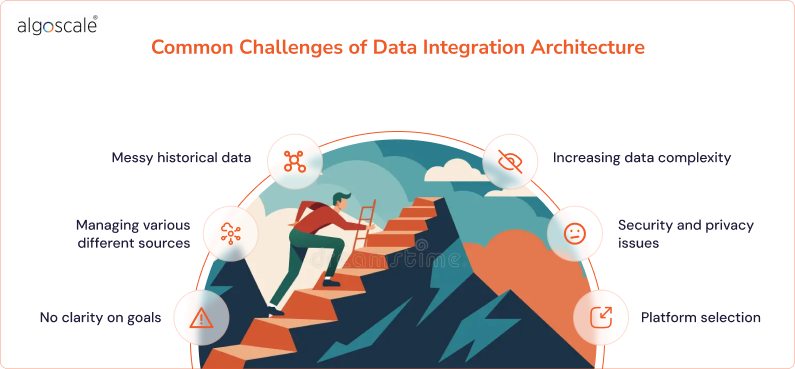
CDI is beneficial, but implementing it can be challenging for some businesses because of the following reasons:
1. No clarity on goals
CDI helps you get a complete picture of your customers without any difficulty, but how do you get to a place where all your customer data magically falls in place and helps you make good decisions?
That is the part most businesses find tricky because they have not defined their goals clearly or established an integration plan. Think of it like a situation where you want to reach a destination but have not decided how you will travel or what you will do after reaching there. In such circumstances, it is better to start with specific objectives, such as syncing sales or marketing data, and building your integration plan around these.
2. Managing various different sources
Your customer data lives in different places- CRMs, older systems, spreadsheets, or data lakehouses (combining traditional databases and big data systems flexibility). Now each source may have different formats or structures, making it difficult to implement integration. Think of it like a difficult jigsaw puzzle with pieces of different shapes or sizes.
3. Messy historical data
Old historical data can be very messy to manage. You may have duplicated customer records, your customer profiles might be incomplete, or information can be stored in different formats. Now to integrate this data, or build a single source of truth for the same, you need to clean, audit, and standardize it with the help of a data steward team, so there is no difficulty in integrating this data into modern formats.
4. Increasing data complexity
Every time your business adopts a new technology, a new data type is generated. New data formats from, let’s say, IoT devices, social media, or even call transcripts can cause compatibility issues. Moreover, your customer data can live in many cloud and on-premise systems that grow constantly, increasing your infrastructure costs. Cloud data integration in this scenario can streamline costs and simplify integration by providing a centralized layer to connect these sources and process data in real time.
5. Security and privacy issues
Your customer data includes their personal details and financial information. This sensitive information can create the risk of possible data breaches and compliance issues while integrating customer data. If your business is not prioritizing security as part of its data strategy, it may be difficult to build customer trust.
6. Platform selection
There are many CDI tools available in the market, but choosing the right tool for your business can be difficult. Your platform selection should be based on scalability, compatibility and integration with your present technology stack, and should grow with your business. It should address your business needs, rather than create more difficulty.
Best Tools For Customer Data Integration
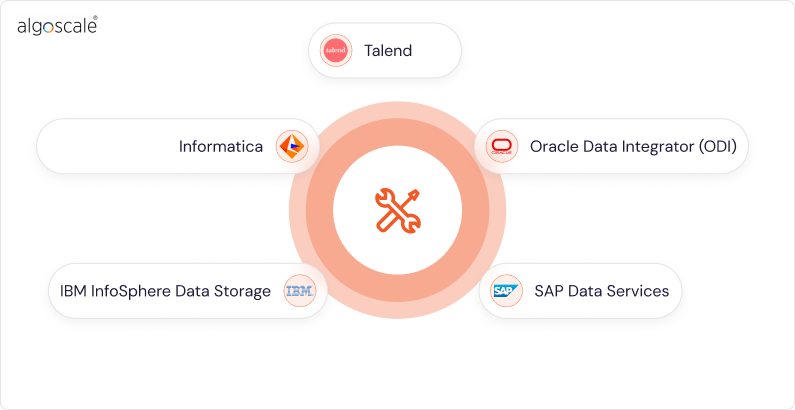
A CDI tool helps you unify customer data from multiple sources into a single, accurate, and reliable point of view. There are a number of CDI tools available in the market that address this need, but choosing the tool that makes best sense for your business is necessary. We have discussed the top 5 data integration tools you can consider and decide which best fits your requirements:
1. Talend
Customer data platform integration becomes easier with Talend, which offers you a low-code solution to connect and deploy data sources. It has powerful ETL capabilities and its OpenStudio helps you create data pipelines quickly. You can consider it if you are looking for a platform that covers the entire data lifecycle. One of its core benefits is that it offers built-in data quality tools that ensure that all information flowing through your data pipeline is accurate and reliable. Its core features include:
- Real-time and batch processing capabilities.
- AI and Gen AI integration with LLM extensibility.
- Impact analysis and end-to-end column-level lineage tracking.
Best for:
- Advanced data scheduling, governance, and modeling.
- ETL transformations that are complex and have multi-step workflow orchestration.
- Centralized BI projects and enterprise data warehousing.
2. Informatica
Informatica Power Center is an enterprise data integration tool widely preferred for managing large data volumes. If you are working in a complex enterprise data environment, this tool can help you manage its reliability, scalability, and robust data governance needs efficiently. Its features include:
- Visual development interface and extensive connectivity.
- Data extraction from multiple sources and application of complex business logic.
- Profiling, cleansing, and validation capabilities in advanced data quality tools.
Best for:
- Building and maintaining enterprise data warehouses.
- Large enterprises that are managing petabyte-scale data integration projects.
- ETL operations that manage advanced transformation capabilities.
3. IBM InfoSphere Data Storage
If you are looking for a solution that offers high-performance data integration at scale, you can consider IBM InfoSphere Data Storage. It is a cloud data integration tool that guarantees exceptional performance in big data environments, but offers enterprise-grade capabilities with some complexity. Its core features include:
- ELT and ETL patterns supported for data integration.
- Parallel processing architecture for maximum performance.
- Real-time batch processing and load balancing.
Best for:
- Enterprises that have dedicated data engineering resources.
- Environments that need parallel processing optimization.
- Enterprises that manage large data volumes and complex transformations.
4. Oracle Data Integrator (ODI)
ODI uses ELT architecture to move and transform big data. It improves performance and reduces resource overhead by using the target database’s processing power to perform transformations. Its core features include:
- Native integration with Oracle cloud services and databases.
- Real-time synchronization and advanced data replication capabilities.
- Comprehensive data lineage.
Best for:
- Businesses that mostly use Oracle databases.
- Businesses that are managing large scale data warehousing projects within Oracle systems.
- Enterprises that need advanced data replication and synchronization capabilities.
5. SAP Data Services
This tool is part of the SAP BusinessObjects Suite and offers unified data integration, governance, and quality management capabilities. It helps organizations transform raw data into reliable information by pulling information from multiple sources- including SAP systems, third-party apps, databases, and web services. Its core features include:
- Native integration with the entire SAP application ecosystem.
- Built-in support for SAP HANA in-memory processing.
- Pre-built SAP business content and transformation templates.
Best for:
- Enterprises that extensively rely on SAP applications.
- Businesses that need unified data governance and quality frameworks.
- Complex SAP system consolidation projects.
Best Practices For Customer Data Integration
Discussed below are best practices for CDI that help you unlock its complete benefits without any difficulty:
1. Identify all data sources: Know what you’re working with
What sources of customer data do you have for your business that you want to unify? Start by identifying each of them- from CRMs, spreadsheets, e-commerce systems, legacy databases, and more to track what each source contains, how it is used, and who manages it.
This inventory ensures that your CDI does not miss any critical information source that could help you cater to customers better.
2. Centralize data management: Establish a single source of truth
You don’t necessarily need all customer data in one physical location, but even virtualization and federation techniques can help you maintain data consistency and reliability. When necessary team members have all data within their reach, they can serve customers better and CDI can offer a more comprehensive picture.
3. Regular audits and integration optimization: Keep up with the times
Customer needs evolve every day just as your data sources. How do you ensure that your CDI framework reflects these evolving needs and keeps up with them?
Regular audits help you improve your workflows to adapt to these needs, find out inefficiencies and eliminate them, and also identify which new data sources need to be added to your CDI to keep it relevant.
Conclusion
Customer service is no longer the reactive system of the past, where you could wait for tickets, take months to solve them, and keep that loop running. Today, it is a data-driven proactive engine that meets the customer across every interaction touch point and enhances how they engage with your business. Immediacy and relevance is responses are a by-product of this data-driven dynamic, ceasing to be nice-to-have features of the past.
In this context, CDI is the means to keep your customer data unified, accurate, and relevant, so it helps your teams deliver the clarity customers expect in their fast-paced lives to feel valued, and trust your brand to solve their problems. When you have all their data in a ready-to-use format for quick decision making, you are in a better position to serve them and stay ahead of competition, rather than drowning in data volumes that give you too much information to nothing. Get in touch with Algoscale to transform your customer data into revenue and build meaningful relationships with all your customers.
FAQs
What is customer data integration
Customer data integration is the process by which you unify and connect all your customer data from multiple systems into a unified view. It helps you align, clean, and merge data from marketing, sales, support, in-store, and other sources, so that your teams can get a complete picture of customer needs and support them better with relevant solutions to their problems.
How to choose the right tools for customer data integration
You should choose a customer data integration tool after considering your business needs, tech stack, scalability, security, and usability requirements. Before selecting the tool, consider-
- Can the tool grow with your business and support evolving needs?
- Does the tool offer enterprise-grade security and comply with GDPR, HIPAA, and other industry regulations?
- Does the tool make sense to technical and non-technical users in your team alike so they can access the data they need?
What systems are typically involved in customer data integration?
Typical systems involved in CDI include:
- Customer support and ticketing platforms
- CRM systems for customer profiles
- Marketing automation platforms for campaign and engagement data
- ERP and billing systems for transactions and invoices
- Web, mobile, and analytical tools for behavioural data.
Is customer data integration secure?
If your CDI prioritizes security from the outset, establishes robust data governance, encryption, access controls, and compliance standards, your customer data remains secure and helps
Build customer trust with transparency and regular audits.
How does customer data integration differ from a CDP
CDI is the process of cleaning and consolidating data from multiple sources into a unified view. A CDP, or customer data platform is the tool that uses integrated first-party datasets to deliver 360-degree customer profiles for better decisions. While the main focus of CDI is unifying data and maintaining its accuracy, a CDP creates actionable data for personalised campaigns.










