Microsoft Integration Services: Connecting Azure, Power BI, Dynamics 365, and Fabric into One System
Most enterprises running on Microsoft don’t have a shortage of tools. They have Azure, Power BI, Dynamics 365, Microsoft Fabric, and Microsoft 365 often all five, sometimes with a Power Platform layer on top. The problem is rarely the tools themselves. It’s that none of them were connected with a plan, so each one holds a partial, disconnected view of the business.
That gap is exactly what Microsoft integration services are built to close. Instead of finance running reports in Dynamics 365, sales working from a separate Power BI export, and engineering pulling raw data straight from Azure, Microsoft integration ties these systems together so every team works from the same governed data in real time, not through weekly CSV hand-offs.
What Microsoft Integration Services Actually Cover
A proper Microsoft integration services engagement is broader than a single connector between two apps. It spans the full Microsoft ecosystem an enterprise is already paying for: Azure integration services for data movement and orchestration, Power BI integration for live reporting, Dynamics 365 integration for operational data, Microsoft Fabric integration for unified analytics and AI, and Microsoft 365 integration for the productivity layer teams work in every day.
• Azure Integration — Synapse, Data Factory, Logic Apps, and Azure Data Lake Storage connected into governed, automated pipelines.
• Power BI Integration — dashboards fed directly from live data instead of static exports, so numbers don’t drift out of sync.
• Dynamics 365 Integration — schema mapping and real-time sync between CRM/ERP data and the rest of the data estate.
• Microsoft Fabric Integration — OneLake-based unification of engineering, BI, and AI workloads under one architecture.
• Microsoft 365 & Power Platform Integration — Power Automate, SharePoint, and Teams connected to core business data, not siloed from it.
• Identity & Governance — Azure Active Directory and Microsoft Purview providing secure, compliant, auditable access across every connected system.

Why Siloed Microsoft Tools Cost More Than They Save
Buying every piece of the Microsoft stack doesn’t automatically make it work as one system. Without deliberate Microsoft systems integration, each tool becomes its own silo: Dynamics 365 holds the customer record, Power BI holds a snapshot of it from last week’s refresh, and Azure holds the raw version nobody has reconciled against either. The result is the same complaint enterprises raise across every industry: two departments, two numbers, one meeting spent arguing about which one is correct.
An integrated Microsoft ecosystem removes that argument by design. Data moves automatically between systems, dashboards refresh from a governed source, and new integrations take days with reusable connectors instead of weeks of custom scripting.
Siloed Tools vs. an Integrated Microsoft Ecosystem
| Capability | Siloed Microsoft Tools | Algoscale Integration |
| Data flow between apps | Manual exports, CSV hand-offs | Automated, real-time sync |
| Reporting accuracy | Multiple versions of the truth | One governed source of truth |
| Dynamics 365 + Power BI | Disconnected dashboards | Live, unified reporting |
| Fabric + Azure + M365 | Point-to-point workarounds | Native, governed pipelines |
| Time to new integration | Weeks of custom scripting | Days with reusable connectors |

How Algoscale Delivers Microsoft Integration Services
Algoscale is a long-standing Microsoft Partner with 150+ Microsoft-certified experts working across the ecosystem rather than one product in isolation. Engagements typically begin with Microsoft Azure development services to build the integration and orchestration layer connecting Synapse, Data Factory, and Azure Active Directory into a secure, governed foundation.
From there, Microsoft Fabric consulting brings engineering, analytics, and AI onto OneLake so every team works from one copy of the data instead of separate exports, and Power BI consulting services turn that unified data into dashboards leadership can actually trust refreshed live, not reconciled manually every Monday morning.
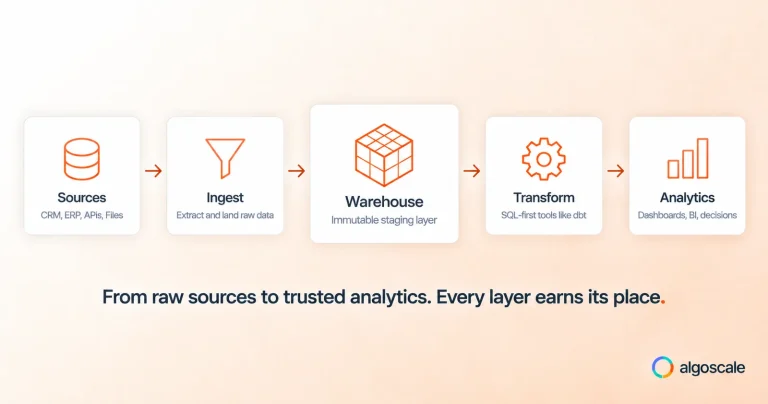
For enterprises whose data still lives partly outside the Microsoft stack, data integration consulting and data engineering services close the remaining gaps bringing CRM, ERP, and legacy systems into the same governed environment as Azure, Fabric, and Power BI, so nothing is left as a manual hand-off.

Signs Your Microsoft Stack Needs Integration Work
• Power BI dashboards and Dynamics 365 reports show different numbers for the same metric.
• New integrations between Microsoft apps take weeks of custom scripting instead of days.
• Teams still export data to Excel to reconcile what Azure, Fabric, and Dynamics 365 don’t agree on.
• Microsoft 365 and Power Platform workflows run disconnected from the core data estate.
• No single team can explain how data moves end to end across your Microsoft ecosystem.
If more than one of these is true, the fix usually isn’t another Microsoft license it’s an integration layer connecting the licenses you already have.
Bringing Your Microsoft Ecosystem Together
Microsoft integration services aren’t a one-time project; they’re the connective layer that determines whether Azure, Power BI, Dynamics 365, Fabric, and Microsoft 365 function as one enterprise system or five disconnected ones. Algoscale’s Microsoft integration and data consulting team works across the full Microsoft ecosystem architecture through governance so every product you’ve already invested in works together instead of in isolation. Talk to a Microsoft integration consultant about your current stack.