



Key insights
- Explosive Market Growth: The cloud data warehouse market is projected to grow from USD 14.94 billion in 2026 to USD 49.12 billion by 2031, a 26.86% CAGR, fuelled by exploding enterprise data volumes.
- Your Pricing Model Matters as Much as Your Platform: Pay-per-scan suits bursty, unpredictable queries; reserved capacity suits steady 24/7 reporting. Picking the wrong model for your workload is the most common reason cloud bills surprise finance teams.
- Storage and Compute Are Now Separate: Modern warehouses store data cheaply in columnar format and spin compute up or down on demand, so you stop paying for idle hardware sized for month-end peaks.
- Lakehouse over Two-System Setups: Enterprises are retiring the old pattern of a separate data lake plus a separate warehouse in favour of a single storage tier built on open table formats such as Apache Iceberg and Delta Lake.
- Migrations Fail on Validation, Not on Data Movement: Copying tables is the easy part. Running legacy and cloud systems in parallel across at least two month-end closes is what protects the numbers.
- India Has a Compliance Clock Running: The DPDP Rules were notified on 13 November 2025, and most obligations, including cross-border transfer rules, apply from 13 May 2027. Region choice now matters for Indian data.
SEO title (57 characters): Cloud Data Warehouse Guide: Architecture, Cost & Migration
Corporate data volumes are expanding faster than on-premise servers can process them. Businesses generate vast amounts of information every single hour, yet extracting commercial value from that raw data remains difficult without the right infrastructure. In 2026, the global cloud data warehouse market is projected to reach USD 14.94 billion, and analysts expect it to grow to USD 49.12 billion by 2031 at a compound annual growth rate of 26.86%. Moving analytics to the cloud is no longer an experimental IT project. It is a mandatory step for any business wanting to remain competitive.
Replacing physical servers with cloud infrastructure fundamentally changes how organisations handle reporting, machine learning, and business intelligence. A modern cloud warehouse scales elastically, separating computing power from data storage so you only pay for what you use. However, navigating the vendor landscape, designing the underlying schemas, controlling costs, and planning a migration require strict engineering discipline. This guide covers all four.
What Is a Cloud Data Warehouse?
A cloud data warehouse is a centralised analytics database hosted on public cloud infrastructure such as AWS, Azure, or Google Cloud. It consolidates structured and semi-structured data from many business systems and provides on-demand compute to run reporting, BI dashboards, and machine learning workloads.
Four design choices separate it from a traditional warehouse:
- Decoupled storage and compute: Data sits in cheap cloud object storage, and query engines attach to it only when needed. You can scale one without paying for the other.
- Columnar storage: Tables are stored column by column and heavily compressed, so a query that needs three columns out of two hundred only reads those three.
- Massively parallel processing (MPP): Big queries are split across many nodes and run simultaneously.
- Managed infrastructure: The provider handles patching, backups, and hardware failures.
Cloud vs On-Premises Data Warehouse
If you are still weighing whether to move at all, this is how the two models compare on the factors that usually decide the business case.
| Factor | Cloud Data Warehouse | On-Premises Data Warehouse |
|---|---|---|
| Upfront cost | None. Pay for storage and compute as you use them. | Large capital outlay for servers, storage, licences, and data centre space. |
| Time to deploy | Hours to days. | Months of procurement, installation, and configuration. |
| Scaling | Compute and storage scale independently, often automatically. | Fixed capacity. Scaling means buying more hardware, sized for peak load. |
| Maintenance | Provider handles patching, upgrades, and hardware failures. | In-house team patches, upgrades, and replaces hardware. |
| Disaster recovery | Cross-region replication and point-in-time recovery built in. | Requires a second site and manual backup processes. |
| Control and residency | Choose a region; the provider runs the hardware. | Full physical control over where data lives. |
The Commercial Benefits of Cloud Warehousing
Holding onto legacy on-premise servers drains capital. Physical hardware requires heavy upfront investment, constant maintenance, and expensive cooling systems. Cloud platforms remove most of that capital expenditure, replacing it with an operational cost model that tracks actual usage.
- Public Cloud Dominance: Public cloud deployments controlled 63.92% of 2025 revenue, reflecting heavy investment from hyperscalers and top-tier security certifications.
- Elastic Scalability: Traditional databases slow to a crawl during peak reporting periods because their compute resources are fixed. Cloud platforms add compute when the queue builds and release it when the work is done.
- Cost Efficiency via Serverless Compute: The market is shifting rapidly toward pay-per-query models. Serverless compute is expanding at a 29.94% CAGR as businesses tie their exact data spend to business value, reducing the overhead of idle capacity. Meanwhile, fully managed Data Warehouse-as-a-Service (DWaaS) offerings held 42.30% of revenue in 2025, appealing to executives wanting turnkey operations.
- Native Artificial Intelligence Readiness: Modern cloud warehouses integrate directly with machine learning frameworks. Vendors are now bundling AI features directly into the consumption layer, allowing firms to run inference and natural language queries without standing up dedicated clusters.
Understanding Cloud Data Warehouse Architecture
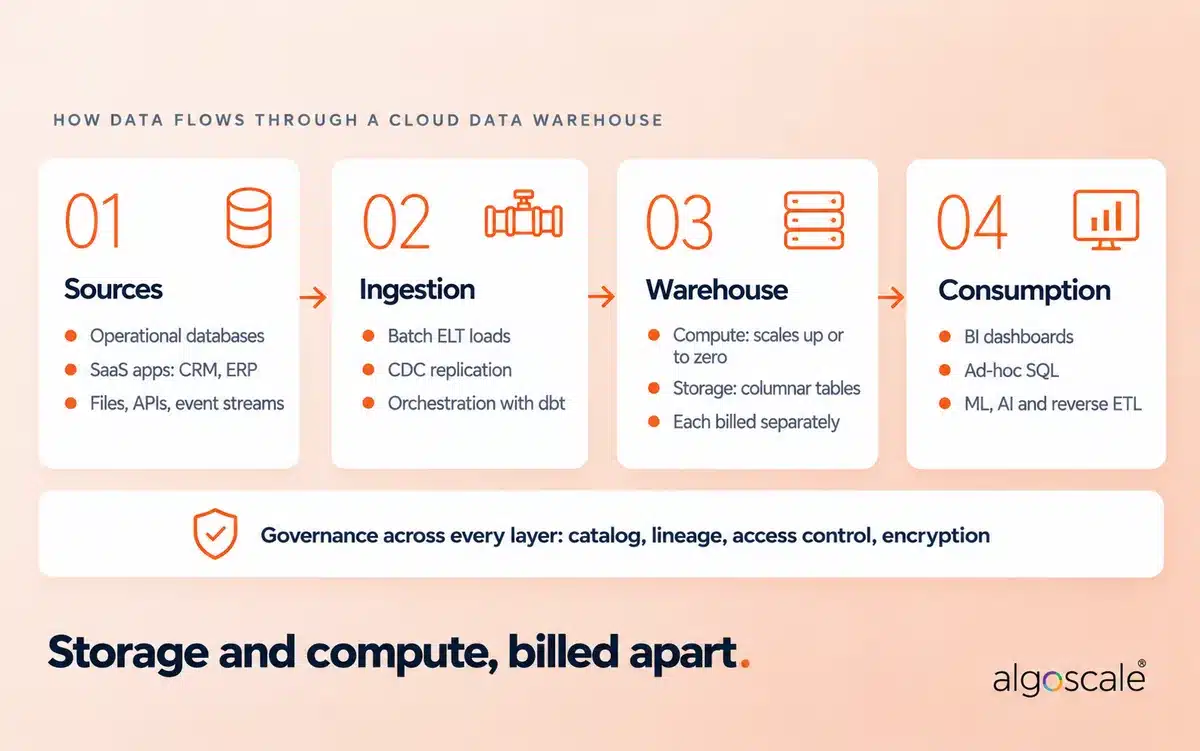
A reliable analytical system relies on a highly structured hierarchy. While different vendors use their own proprietary terminology, every cloud data warehouse moves data through the same four stages: sources, ingestion, the warehouse itself (storage plus compute), and consumption, with a governance layer wrapped around all of it.
The Three-Tier Framework
Textbooks still describe data warehouse architecture in three tiers, and the model remains a useful way to think about responsibilities. If you look at any standard data warehouse architecture diagram, you will see data flowing upward from raw storage to final presentation.
- Bottom Tier (Data Sources and Storage): This foundational layer is responsible for collecting, integrating, and storing data from multiple heterogeneous sources: operational OLTP databases, SaaS applications, flat files, spreadsheets, web logs, and APIs. Pipelines retrieve this raw data, apply business rules to clean inconsistencies, and load the processed records into the warehouse. In the cloud, this tier is cheap object storage holding compressed, columnar tables.
- Middle Tier (Query Engine): This is the analytical engine processing the complex SQL queries. Older systems used OLAP cube servers (ROLAP or MOLAP) here. In a cloud warehouse, this tier is the elastic compute layer: Snowflake virtual warehouses, BigQuery slots, or Redshift clusters, which can run many workloads side by side without competing for the same hardware.
- Top Tier (Front-End Tools): This layer handles user interaction. Business users do not write SQL or interact with the raw database directly. They use Business Intelligence (BI) tools to generate dashboards, charts, and reports for immediate decision-making. Increasingly, this tier also feeds ML models and pushes data back into operational apps through reverse ETL.
ETL vs ELT, and Where CDC Fits
On-premise warehouses ran ETL: extract data, transform it on a separate integration server, then load the finished result. Compute inside the warehouse was too expensive to waste on transformations.
Cloud warehouses flipped that order. With ELT, you extract and load raw data first, then transform it inside the warehouse using its own elastic compute, typically with SQL models managed in a framework like dbt. You keep the raw history and can rebuild any model when business rules change.
Change Data Capture (CDC) sits at the ingestion stage. Instead of re-copying an entire source table every night, CDC reads the source database’s change log and streams only the inserted, updated, and deleted rows. It keeps the warehouse minutes behind production rather than a day behind, without hammering the source system.
Architectural Challenges and Solutions
| Tier | Common Challenges | Engineering Solutions |
|---|---|---|
| Bottom Tier | Inconsistent data quality and integration complexity from heterogeneous sources. | Deploy continuous data quality checks, standardise ingestion with ELT tooling, and use CDC for high-change sources. |
| Middle Tier | High data latency and slow query performance on large volumes. | Use partitioning and clustering, isolate heavy workloads on separate compute, and write set-based SQL. |
| Top Tier | Poor user adoption due to complex tools and difficult integration with underlying tiers. | Select BI tools that integrate natively with the specific warehouse, add a governed semantic layer, and provide user training. |
Designing an Enterprise Data Warehouse Architecture
Small businesses can often survive with a simple, single-database setup. However, global corporations require a robust enterprise data warehouse architecture that spans multiple departments, geographic regions, and strict regulatory zones. (We cover EDW design in depth in our enterprise data warehouse guide.)
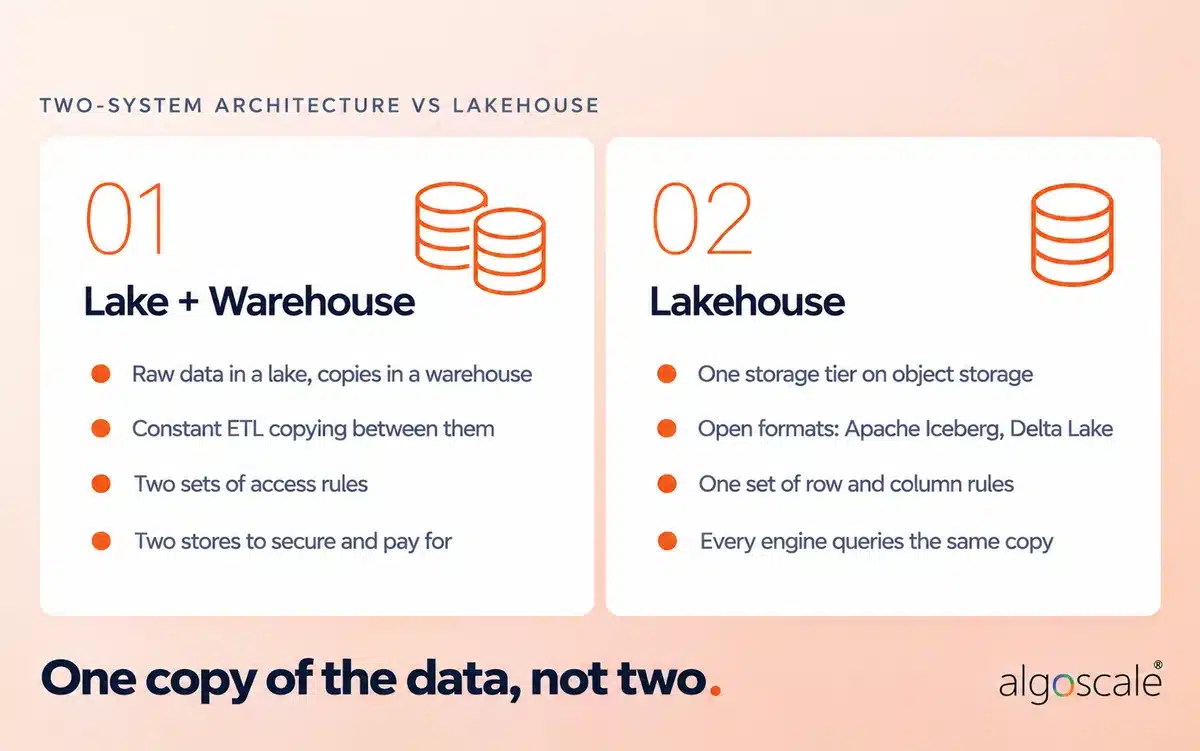
Before the modern era, enterprises frequently relied on a two-system architecture to handle varying data types. They used an on-premises data lake (often HDFS) or a cloud data lake (like Amazon S3) for immutable storage and a “schema on read” approach. This allowed them to ingest all data formats raw, without schema restrictions. They would then copy structured subsets of that data into a separate data warehouse for BI analytics.
However, this combined architecture introduced severe limitations:
- Data Duplication: Persisting massive volumes of data across two separate storage systems requires constant syncing and copying.
- Metadata Mismatches: Data types in data lakes often differ from those in data warehouses, requiring heavy engineering effort to convert and sync metadata between the two systems.
- Difficult Access Control: Data warehouses allow fine-grained column and row-level security, while data lakes typically govern access at the broader file or object level.
The Lakehouse Evolution
To resolve these architectural bottlenecks, the architecture of data warehouse systems evolved into the Lakehouse. A Lakehouse consolidates operations into a single storage tier. It stores vast amounts of data in cheap, open table formats (like Apache Iceberg or Delta Lake) but allows analysts to query that data with the speed and row-level security of a traditional warehouse. If you are still deciding between the two older models, our data lake vs data warehouse breakdown covers the trade-offs.
| Feature | Two-System Architecture (Lake + Warehouse) | Modern Lakehouse Architecture |
|---|---|---|
| Storage Infrastructure | Two distinct systems requiring separate maintenance. | Single, unified cloud object storage layer. |
| Data Movement | Requires constant, heavy ETL copying between systems. | Eliminates redundant data movement. |
| Security Governance | Fragmented access controls across files and tables. | Centralised, row-level and column-level governance. |
Leading Cloud Data Warehouse Tools (2026)
The vendor landscape is dominated by a few major players. Amazon Web Services, Microsoft, Google Cloud, and Snowflake collectively represented 68% of vendor revenue in 2024. Each platform takes a slightly different approach to pricing, compute management, and artificial intelligence integration. For a wider list that includes specialist and open-source options, see our roundup of the top data warehouse tools.
| Platform | Best For | Primary Architecture | Pricing Model | Key AI / Technical Differentiator |
|---|---|---|---|---|
| Snowflake | Multi-cloud teams and high-concurrency BI | Cloud Data Warehouse | Per-second credit consumption | Snowflake Cortex AI for native LLM access. |
| Google BigQuery | Bursty, ad-hoc analytics with no infrastructure to manage | Serverless Warehouse | Per TiB scanned / Slot-hour | Vertex AI integration for in-database ML. |
| Amazon Redshift | Teams already standardised on AWS | Cloud Data Warehouse | Hourly nodes / Serverless RPU | Redshift ML using SageMaker models. |
| Microsoft Fabric | Power BI-heavy Microsoft shops | SaaS Lakehouse | Capacity Unit (CU) hourly | OneLake and native Power BI integration. |
| Databricks | Data engineering and ML on the same platform | Lakehouse | Databricks Unit (DBU) | Unity Catalog and specialised ML runtime. |
How to Choose the Right Platform
Feature lists rarely decide this. These six questions usually do:
- Which cloud are you already on? Egress fees and existing contracts make your current cloud’s warehouse the default.
- Is your query pattern bursty or steady? Unpredictable, ad-hoc analysis favours pay-per-scan. Constant dashboard refreshes favour reserved capacity.
- How many people query at once? High concurrency favours platforms that can spin up isolated compute clusters per team.
- Is your team SQL-first or Spark-first? SQL analysts get productive faster on Snowflake or BigQuery; engineering-heavy teams often prefer Databricks.
- Do you need open table formats? If avoiding lock-in or sharing data across engines matters, check each platform’s Iceberg or Delta support.
- Where must your data live? Regulated or Indian personal data may need a specific in-country region. Check availability before you shortlist.
Cloud Data Warehouse Pricing and Cost Drivers
Pay-as-you-go is the headline benefit of the cloud, and also the fastest way to receive an invoice nobody can explain. The platforms bill in very different ways, and the same set of queries can cost several times more on the wrong model.
How Each Pricing Model Works
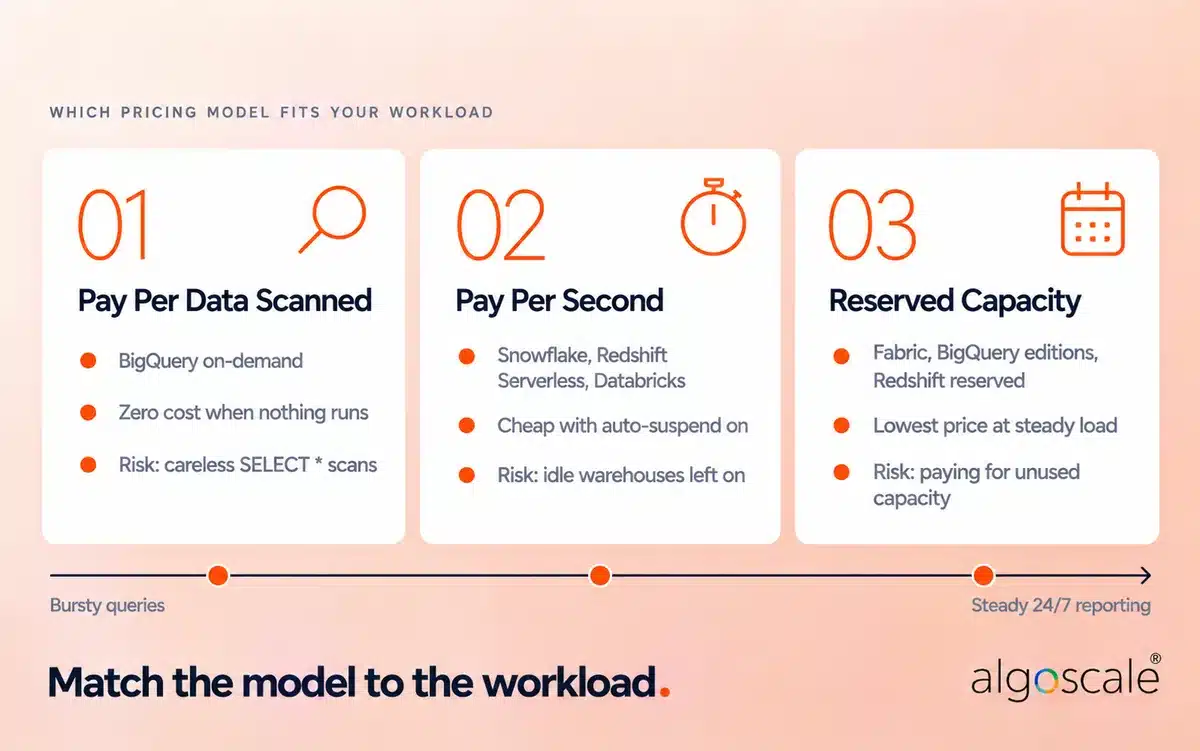
- Pay per data scanned: BigQuery’s on-demand model charges for every TiB a query reads. Nothing runs, nothing bills. But one analyst running SELECT * against an unpartitioned events table can burn a week’s budget before lunch.
- Pay per second of compute: Snowflake bills credits for every second a virtual warehouse is running, Redshift Serverless bills RPU-hours, and Databricks bills DBUs. Costs are predictable per query, but a warehouse left running over the weekend keeps billing.
- Reserved capacity: Microsoft Fabric capacities, BigQuery editions with commitments, and Redshift reserved nodes trade flexibility for a lower unit price. They win when the warehouse is busy most of the day, and lose money when it sits idle. (Our Microsoft Fabric pricing guide works through the capacity maths.)
- Storage: Billed separately, per TB per month, and usually the smaller line item.
What Actually Drives Your Bill
- Bytes scanned per query: Unpartitioned tables and wide SELECT * queries force the engine to read far more data than the answer needs.
- Idle compute: Warehouses or clusters with no auto-suspend, or with a long suspend timeout, bill for time when no one is querying.
- Dashboard refresh frequency: A BI tool refreshing fifty tiles every five minutes is a steady, hidden workload.
How to Keep Costs Under Control
- Set aggressive auto-suspend timeouts on every compute cluster, measured in minutes, not hours.
- Partition and cluster large tables on the columns analysts filter by, usually date first.
- Put query-level cost limits and spend alerts in place before you onboard business users, not after the first surprise invoice.
- Review the top 20 most expensive queries every month. They usually account for a large share of spend and are often easy to fix.
Security, Governance and Data Residency
All of the major platforms encrypt data at rest and in transit, support role-based access control, and offer row-level and column-level security. The differences that matter sit in compliance coverage and where your data physically lives.
Compliance for US Organisations
For US teams, the usual questions are SOC 2 reports, HIPAA eligibility for health data, PCI DSS for card data, and FedRAMP for public sector work. Coverage varies by provider, region, and edition (some platforms only support HIPAA workloads on higher tiers), so check each vendor’s compliance page for the exact service and region.
Data Residency in India: The DPDP Act
India’s Digital Personal Data Protection (DPDP) Rules were notified on 13 November 2025 and come into force in phases. The bulk of the obligations, including notice and consent, security safeguards, breach notification, and the rules on transferring personal data outside India, apply from 13 May 2027.
Cross-border transfers are permitted by default, subject to conditions the government may set. The bigger exposure is for organisations designated as Significant Data Fiduciaries, which may be required to keep specified categories of personal data inside India. If that could be you, build in an Indian region from day one rather than migrating again later.
The good news is that the main options are available locally. AWS, Google Cloud, and Microsoft Azure all run cloud regions in India, and Snowflake is available in AWS Asia Pacific (Mumbai) and Azure Central India (Pune). Check that the specific features you need (for example, certain AI services) are offered in the Indian region you pick, as new features often reach US regions first. For an example of DPDPA-aligned data design, see our MDM and data governance engagement for an Indian telecom group.
The Cloud Data Warehouse Migration Process
Ripping out an on-premise system like Teradata, Netezza, or Oracle Exadata is not an afternoon task. The fastest way to blow your budget is to treat a cloud migration like a simple cut-and-paste job. Decades of nested stored procedures, custom cursor loops, and proprietary SQL scripts just will not run natively inside Snowflake, BigQuery, or Redshift without serious refactoring.
Pick Your Approach: Lift-and-Shift, Modernise, or Greenfield
- Lift-and-shift: Move schemas and logic across with minimal changes. It is the quickest way off ageing hardware, but you carry every inefficient query and design flaw with you, and you pay cloud prices to run them.
- Modernise: Redesign schemas and pipelines for the cloud as you move. It takes longer upfront, but it is the only way to get the cost and performance benefits you are migrating for.
- Greenfield: Build from scratch and retire the old system. Worth it when the legacy warehouse is so tangled that untangling it costs more than rebuilding.
In practice, most large migrations blend the first two: get off the legacy hardware with minimal changes, then modernise the highest-value workloads in waves. The four steps below apply either way.
- Audit what actually gets used. Before running a single export script, crawl your query logs. You will almost certainly find a big chunk of the tables in your legacy warehouse have not been queried in years. Moving dead data only burns engineering sprints and racks up unnecessary storage bills. Talk to business leads, trace dashboard dependencies, and prune the junk early.
- Rethink your schemas for columnar engines. Relational appliances loved deep third-normal-form designs to save disk space. Modern cloud databases do the opposite: they chew through wide, denormalised tables with ease. Resist the temptation to mirror your old schemas row for row. Flatten your dimensional models, get rid of procedural cursor loops, and rewrite transformation steps using declarative, set-based SQL.
- Rebuild the ingestion plumbing. Fragile, hard-coded cron jobs and monster batch scripts belong in the past. Rebuild your transformation layer using modern frameworks like dbt, and rethink your ingestion cadence. Instead of stalling the database with an eight-hour batch job every midnight, configure continuous micro-batches or CDC so business teams have fresh numbers throughout the workday.
- Run parallel runs across month-end closes. Do not decommission the old hardware the weekend after your initial data load. Keep the legacy appliance running alongside the new cloud warehouse for at least two complete month-end financial reconciliations. Build automated checks comparing balance sheets, margin metrics, and regional revenue row by row across both engines. Only unplug the on-premise servers once the finance team verifies the numbers match down to the penny.
Moving to the cloud forces businesses to rethink how they handle data fundamentally. It requires heavy upfront engineering effort, but the long-term payoff in reporting speed, AI readiness, and operational agility is hard to match. For a deeper build plan, see our guide to data warehouse implementation, or see how we delivered an Azure data warehouse for a field services and fleet operator.
Real Talk: What Reddit Says About Data Warehouse Migrations
Vendor marketing materials make migrating to a new cloud data warehouse sound seamless. However, data engineers on the front lines tell a slightly different story. We analysed discussions across communities like r/dataengineering and r/snowflake to see what practitioners actually experience during large migrations.
The “Lift and Shift” vs. “Refactor” Debate
When migrating off legacy on-premise hardware (like Teradata or SQL Server) to a modern cloud platform, teams often argue over whether to rebuild their messy schemas immediately or just move the data as-is.
One engineer migrating to Snowflake advised, “Lift and shift first to get off the legacy hardware, then optimize once you have a functional baseline in snowflake”. Attempting to redesign thousands of tables simultaneously often causes projects to stall entirely, with one user noting they “couldn’t complete not even 10% in 1year” when trying to remodel everything at once.
- Read the discussion: Snowflake Migration (r/snowflake)
The Hidden ROI in Cloud-to-Cloud Moves
Migrations are not just for escaping on-premise servers. Many companies are moving between cloud providers, such as shifting from Amazon Redshift to Google BigQuery or Snowflake.
When discussing a Redshift to BigQuery move, one data engineer highlighted that the biggest financial win was not raw compute pricing, but human capital: “We saved on developer cost since Bigquery doesn’t require as much monitoring/maintenance effort as Redshift”. Another user who managed a Redshift to Snowflake transition called it “one of the easiest migrations out there,” noting that if you export the data to S3, you can largely use the same SQL to pull it into Snowflake.
- Read the discussion: How we migrated our data warehouse from Redshift to BigQuery (r/dataengineering)
- Read the discussion: Redshift to Snowflake Migration (r/dataengineering)
Performance Optimisation Tips
A cloud warehouse will happily run a badly written query; it will just charge you for it. These habits keep queries fast and bills sane:
- Select only the columns you need. Columnar engines read per column, so SELECT * is the single most expensive habit to break.
- Partition and cluster large tables on the columns used in filters and joins, so the engine can skip whole blocks of data.
- Isolate workloads. Give ELT jobs, BI dashboards, and data science their own compute so a heavy backfill never slows the CFO’s dashboard.
- Watch the query history. Every platform logs runtime and bytes scanned per query. Review the slowest and most expensive queries every month.
Frequently Asked Questions
What is a cloud data warehouse?
It is a centralised data repository hosted on public cloud infrastructure (like AWS, Azure, or Google Cloud). It stores structured and semi-structured data from multiple business systems and provides on-demand computing power to run complex analytics and business intelligence dashboards.
Is AWS a data warehouse?
AWS is a cloud provider, not a data warehouse. Its data warehouse service is Amazon Redshift, which comes in provisioned and serverless versions. You can also run Snowflake or Databricks on AWS infrastructure.
What are the top cloud data warehouses?
The most widely used are Snowflake, Google BigQuery, Amazon Redshift, Microsoft Fabric, and Databricks SQL. The right one depends on your existing cloud, your query patterns, and your team’s skills rather than on any single ranking.
What is ETL in a data warehouse?
ETL (Extract, Transform, Load) is the process of pulling data from source systems, cleaning and reshaping it, and loading it into the warehouse. Cloud warehouses mostly use ELT instead: data is loaded raw first and transformed inside the warehouse using its own compute.
What is the difference between a data warehouse and a data lake?
A data warehouse stores structured, cleaned, and processed data that is ready for immediate business reporting. A data lake (like HDFS or Amazon S3) uses immutable storage and a schema-on-read approach to hold raw, unfiltered data across all formats. A lakehouse combines the two on a single storage tier.
How long does a data warehouse migration typically take?
Migrating a small departmental database might take four to eight weeks. A full enterprise migration from a legacy on-premise appliance to a modern cloud environment typically requires between six and eighteen months, depending on the complexity of the existing SQL code and how many month-end parallel runs finance requires.
Which cloud data warehouse is the most cost-effective?
Cost efficiency depends entirely on your workload. Google BigQuery on-demand is highly cost-effective for teams with bursty, unpredictable queries because you only pay for the data scanned. Reserved capacity on Snowflake, Redshift, BigQuery editions, or Fabric often proves more economical for teams running predictable, continuous 24/7 reporting operations.
Can I keep Indian customer data in India on a cloud data warehouse?
Yes. AWS, Google Cloud, and Azure all operate Indian regions, and Snowflake runs in AWS Mumbai and Azure Central India. Pick the region at setup, and confirm the features you need are available there.










