


Key insights
- Builders always pay. Anyone who creates or publishes reports needs a Pro or PPU seat. Capacity never waives that requirement.
- Check your Microsoft 365 stack first. E5 plans bundle Pro at no extra cost; E3 and Business plans do not.
- PPU workspaces are walled gardens. A Pro user cannot open dashboards published there.
- Free viewing starts at F64, not before. An F2 to F32 runs Fabric and Copilot, but every viewer still needs a paid seat.
- F64 beats Pro at about 357 viewers on a one-year reservation, or about 600 on pay-as-you-go.
- P SKUs are off the shelf. New customers buy Fabric F SKUs through Azure, and Enterprise Agreement holders move over at renewal.
Meta Title: Power BI License Types & Costs (2026): Pro, PPU, Fabric F64
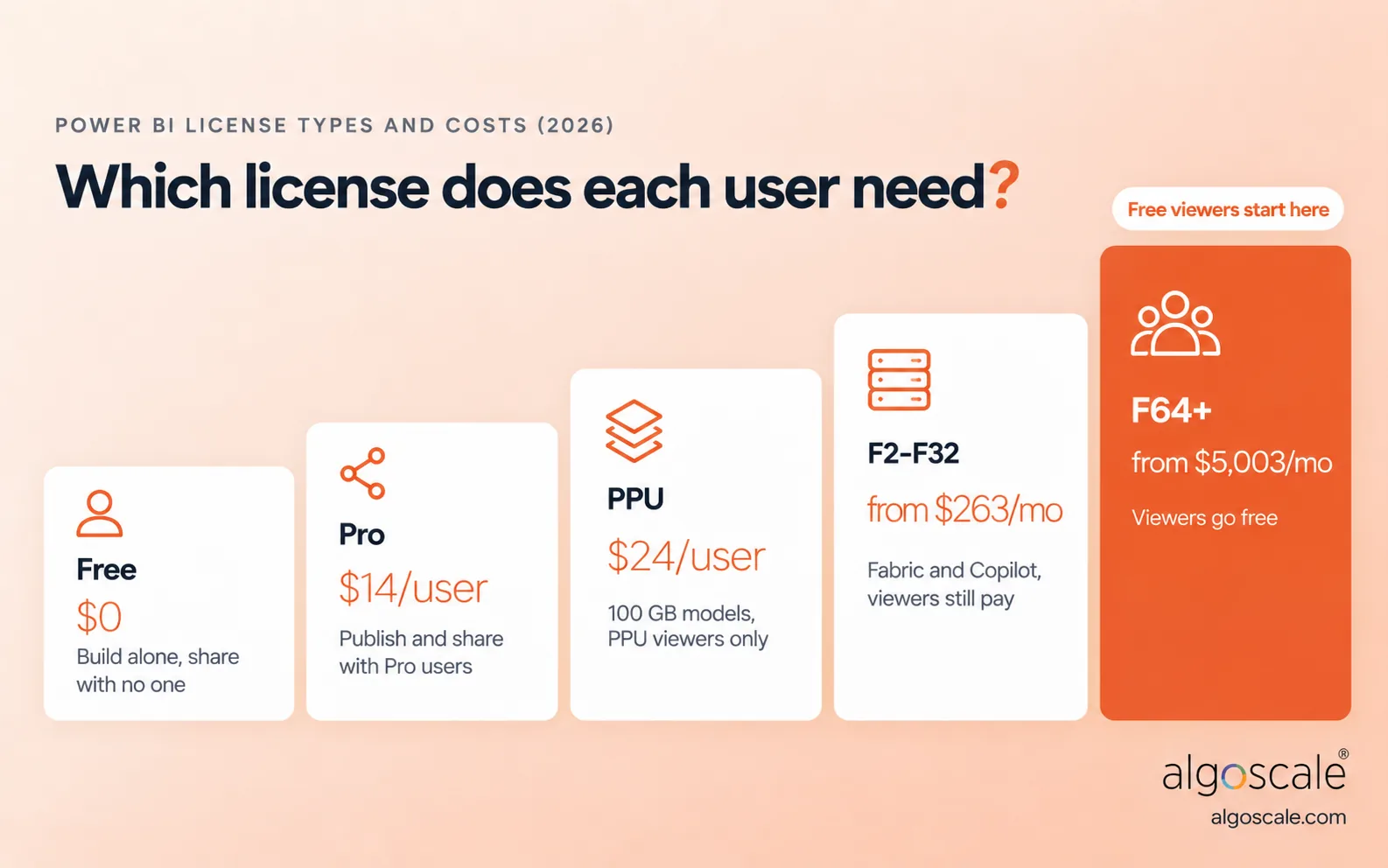
Two distinct billing models govern Power BI: individual user seats or pooled organizational capacity. Free costs nothing, Pro costs $14 and Premium Per User costs $24 per user per month. Fabric capacity starts at F2 (about $263 a month) and switches on Copilot, yet read-only viewers still need a paid seat until your business runs an F64 or larger.
Power BI License Types At A Glance

Buying software from Microsoft frequently feels like an exercise in decoding legal jargon. You either buy individual tickets for named colleagues, or you rent an entire processing engine for the wider company.
If you manage eight staff in a single department, paying per head keeps spending sensible. Once you hit five hundred staff who log on every alternate Friday to glance at regional sales figures, individual seats bleed cash quickly. Working out Power BI license types and cost means finding that pivot point before you talk to enterprise sales reps or a Power BI consulting partner.
| License | Billing Model | US List Price | Who it is for | Can share with |
|---|---|---|---|---|
| Fabric (Free) | Per-user | $0 | Personal report drafting; report viewing on F64+ | No one (unless hosted on F64+) |
| Power BI Pro | Per-user | $14 / month | Analysts building reports; viewers in small teams | Pro, PPU |
| Premium Per User (PPU) | Per-user | $24 / month | Power users building heavy models on a budget | PPU accounts only |
| Fabric F2 to F32 | Capacity | From ~$263 / month | Teams running Fabric workloads or Copilot, with every viewer on Pro | Pro, PPU |
| Fabric F64+ | Capacity | From ~$8,410 / month (~$5,003 reserved) | Enterprises distributing reports to broad audiences | Anyone (Free, Pro, PPU) |
| Embedded (A and EM SKUs) | Capacity | A SKUs billed hourly | Developers embedding reports in customer apps or Microsoft 365 | App users without licenses |
US list prices, verified October 2026. Per-user prices assume an annual commitment; month-to-month terms are priced higher.
Per-User Licenses
Per-seat plans remain the default playground for small outfits, pilots, or teams taking their first steps into visualized reporting. You buy and assign them in the Microsoft 365 admin center, and they renew alongside your Office applications.
Fabric (Free)
People who used the service years ago remember this as Power BI Free. When Redmond launched Fabric, it rebranded this personal tier. Anyone can install Power BI Desktop, pull records from a database, transform rows in Power Query, and assemble dashboards on their machine at no cost.
Here is the wall: you cannot distribute your work. Published files land only in your private “My workspace.” You cannot forward a working link to your team lead or collaborate in shared workspaces.
The single scenario where a Free user views colleagues’ reports, on the web or in mobile BI apps, is when that content lives on an F64 or larger, or on a legacy P capacity.
Power BI Pro
Pro remains the foundational workhorse for analytics across most mid-sized companies. At $14 per user every month, it gives authors the right to publish semantic models, share interactive reports and dashboards, build apps, and collaborate in team workspaces.
Before purchasing, dig through your company licenses. Several Microsoft 365 plans already include Pro, and those seats often sit unassigned:
| Microsoft plan | Includes Power BI Pro? |
|---|---|
| Microsoft 365 E5 / Office 365 E5 | Yes |
| Microsoft 365 A5 (education) / G5 (government) | Yes |
| Microsoft 365 E3 / Office 365 E3 | No |
| Microsoft 365 Business Basic, Standard, Premium | No |
Pro imposes real limits. Each semantic model cannot exceed 1 GB compressed in memory, and you are capped at 8 scheduled refreshes per day. That works for overnight syncs but breaks down if your operations director expects fresh numbers hourly, which is where real-time Power BI dashboards need a different setup. Each seat gets 10 GB of cloud storage.
Choose it when:
- You want a simple, predictable setup for a small or medium-sized team.
- Every colleague who needs to open your reports also holds an active Pro seat.
Skip it when:
- Your compressed semantic models grow beyond 1 GB.
- You need more than eight refreshes throughout the working day.
Premium Per User (PPU)
PPU bridges an awkward gap in Microsoft’s lineup. Teams often hit the limits of Pro, yet spending thousands on dedicated capacity would get them laughed out of the finance office. PPU costs $24 per user each month, or a $14 add-on if someone already holds Pro or a Microsoft 365 E5 plan.
The engineering jump is massive: 100 GB model limits instead of 1 GB, 48 scheduled refreshes daily, deployment pipelines, and read/write XMLA endpoints so data architects can manage models with external tools. Storage moves to a 100 TB pool shared across your PPU users.
The catch catches companies out constantly: PPU workspaces are walled gardens. Standard $14 Pro users cannot open reports published there, so every viewer needs their own $24 PPU seat.
PPU also does not buy you Fabric. Lakehouses, warehouses, notebooks and Copilot need an F SKU. Our breakdown of Microsoft Fabric vs Power BI explains where that line sits.
Choose it when:
- Your analysts build models that choke on the 1 GB Pro ceiling.
- You need deployment pipelines on a tight departmental budget.
Skip it when:
- You are sharing dashboards with hundreds of casual viewers across departments.
- Your models run comfortably under Pro thresholds.
Capacity Licenses
Capacity licensing abandons the per-seat model. Instead, you pay for a dedicated compute engine in Azure, built for broad enterprise distribution, multi-workload data platforms, or embedded customer tools. This is where per-seat purchasing stops making financial sense.
Microsoft Fabric Capacity (F SKUs)
Microsoft Fabric sells compute in Capacity Units (CUs). An F2 delivers 2 CUs, an F64 delivers 64, and that shared pool runs everything: Power BI semantic models, OneLake transformations, data engineering and pipelines.
You can pay as you go, billed by the second through Azure, or commit to a one-year reservation that knocks roughly 40.5% off list rates.
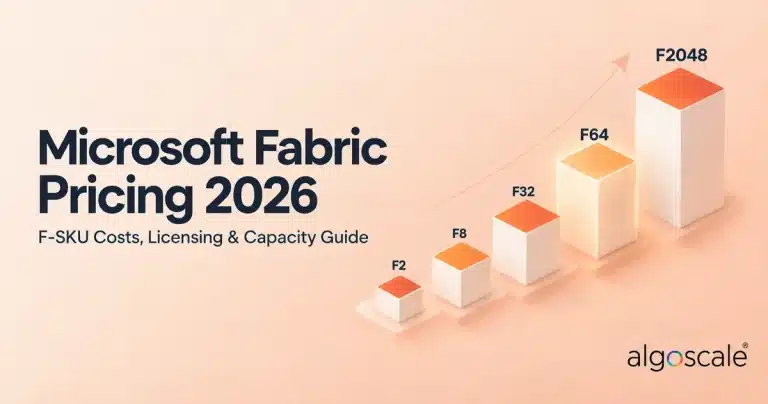
| F SKU | Capacity Units | Pay-as-you-go / month | 1-year reserved / month | Free viewers? |
|---|---|---|---|---|
| F2 | 2 | $262.80 | $156.33 | No |
| F4 | 4 | $525.60 | $312.67 | No |
| F8 | 8 | $1,051.20 | $625.33 | No |
| F16 | 16 | $2,102.40 | $1,250.67 | No |
| F32 | 32 | $4,204.80 | $2,501.33 | No |
| F64 | 64 | $8,409.60 | $5,002.67 | Yes |
| F128 | 128 | $16,819.20 | $10,005.33 | Yes |
| F256 | 256 | $33,638.40 | $20,010.67 | Yes |
| F512 | 512 | $67,276.80 | $40,021.33 | Yes |
| F1024 | 1,024 | $134,553.60 | $80,042.67 | Yes |
| F2048 | 2,048 | $269,107.20 | $160,085.33 | Yes |
Based on Microsoft’s US list rate of $0.18 per CU hour (730 hours a month) and its published F2 and F64 reserved prices, verified October 2026. Prices vary by Azure region. For a deeper breakdown, see our Microsoft Fabric pricing guide.
F64 is the critical milestone. It is the smallest size that lets colleagues view reports on a free license. On F2 to F32, the capacity handles backend work, but every employee opening a report still needs Pro.
F64 also caps each semantic model at 25 GB of memory, and larger SKUs raise that ceiling. One more budget line: capacity pricing covers compute only, and OneLake storage is billed separately per GB.
Copilot and AI Licensing
Copilot does not wait for F64. Since April 30, 2025, Microsoft enables it on every paid Fabric capacity from F2 upward, as well as on P capacities.
Two exceptions trip people up: trial capacities do not include Copilot, and a Pro or PPU license on its own does not unlock it. The workspace has to sit on a paid capacity.
Power BI Premium Per Capacity (P SKUs), Retired
The old P tiers are off the shelf. Microsoft stopped selling new P capacity on July 1, 2024, and customers without an Enterprise Agreement lost renewal rights in early 2025 (Microsoft’s own pages give both January 1 and February 1). Enterprise Agreement customers can keep renewing until the agreement ends, then must move to F SKUs.
Miss the cut-over and you get 30 days of free capacity, then about 20-second delays on interactive requests, and a possible freeze after 90 days.
| Legacy P SKU | Equivalent Fabric F SKU |
|---|---|
| P1 | F64 |
| P2 | F128 |
| P3 | F256 |
| P4 | F512 |
| P5 | F1024 |
Power BI Embedded (A SKUs) and EM SKUs
If your software team builds commercial portals and wants to show dashboards to external clients without making them register Microsoft accounts, you use the app-owns-data pattern. App users need no Power BI license; your developers still need Pro to publish.
A SKUs sit in Azure and charge by the hour, so you can pause them when customers are offline. The entry-level A1 gives you 1 virtual core and 3 GB of memory. EM SKUs cover embedding inside Microsoft 365 apps such as Teams and SharePoint, and EM1 and EM2 are sold only through volume licensing.
| Option | How it is billed | Built for | Runs Fabric workloads |
|---|---|---|---|
| A SKUs (Power BI Embedded) | Hourly through Azure; pause anytime | Reports inside apps for external customers | No |
| EM SKUs | Capacity; EM1 and EM2 through volume licensing only | Embedding in Teams, SharePoint, PowerPoint and custom apps | No |
| F SKUs (Fabric) | Per second through Azure, or 1-year reserved | One budget for internal reporting, data engineering and app embedding | Yes |
Because every F SKU also supports app-owns-data embedding, many teams skip A SKUs and run internal reporting and client dashboards from one compute budget. If you embed reports for your own staff on free licenses, only F64 or larger allows it.
For the build side, see our guide to integrating Power BI with web applications, and plan row-level security early so each customer only sees their own data.
Power BI License Comparison Table
| Feature | Free | Pro | PPU | Fabric F2 to F32 | Fabric F64+ |
|---|---|---|---|---|---|
| Price | $0 | $14 / user / month | $24 / user / month | ~$263 to ~$4,205 / month | From ~$8,410 / month (~$5,003 reserved) |
| Publish and share | No (My workspace only) | Yes | Yes | Yes, with a Pro or PPU seat | Yes, with a Pro or PPU seat |
| Who can view | Author only | Pro, PPU | PPU only | Pro, PPU | Anyone, including Free |
| Max model size | 1 GB | 1 GB | 100 GB | Varies by SKU | 25 GB on F64, higher on larger SKUs |
| Scheduled refreshes / day | 8 | 8 | 48 | 48 | 48 |
| Deployment pipelines | No | No | Yes | Yes | Yes |
| XMLA read/write | No | No | Yes | Yes | Yes |
| Fabric workloads | No | No | No | Yes | Yes |
| Copilot | No | No | No | Yes | Yes |
| Free viewers allowed | N/A | No | No | No | Yes |
| How you get it | Sign up, or admin assigns | Microsoft 365 admin center | Microsoft 365 admin center | Azure portal | Azure portal |
Refresh limits apply to refreshes scheduled in the Power BI service; API-triggered refreshes on capacity are not capped at 48.
Which Power BI License Does Each User Need?
Licensing depends on two things: what the person is trying to do, and where the content lives.
| User | Shared workspace | PPU workspace | Fabric F64+ workspace | Your app (app owns data) |
|---|---|---|---|---|
| Report creator | Pro | PPU | Pro or PPU | Pro (to publish) |
| Power user with models over 1 GB | Not possible; move to PPU or capacity | PPU | Pro or PPU | Pro (to publish) |
| Internal viewer | Pro or PPU | PPU | Fabric (Free) | No license |
| External guest (Entra B2B) | Pro (theirs or yours) | PPU | Fabric (Free) | No license |
| Customer using your product | Not applicable | Not applicable | Not applicable | No license |

Free viewing on F64 comes with a condition people miss: the report and its semantic model must both sit on that capacity.
Guests have three routes in: you assign them a seat, they bring a Pro or PPU license from their own organization, or the content sits on F64 or larger.
Before sending purchase requisitions to your accounts team, walk through these five steps:
- Count your authors. Anyone building models, writing DAX, or publishing dashboards needs Pro at minimum ($14).
- Review model memory. Authors whose models exceed 1 GB need PPU ($24) or capacity.
- Count your audience. Note how many people only open reports and never build anything.
- Subtract the seats you already own. E5 users already have Pro. Multiply the rest by $14 for your baseline monthly spend.
- Check the F64 tipping point. If viewer seats approach $5,000 a month, price an annual F64 reservation instead.
Power BI License Costs At Your Team Size
The real-world difference shows up when you run numbers across common company sizes. For budgeting beyond licenses, see our guide to Power BI cost, and if you are still choosing a BI tool, compare Tableau vs Power BI first.
| Scenario | Users | Setup | Monthly | Annually |
|---|---|---|---|---|
| Small startup | 2 authors, 8 viewers | 10 Pro seats | $140 | $1,680 |
| Mid-sized department | 5 authors, 45 viewers | 50 Pro seats | $700 | $8,400 |
| Advanced analytics unit | 5 authors (15 GB models), 20 viewers | 25 PPU seats | $600 | $7,200 |
| Large enterprise on Pro | 20 authors, 400 viewers | 420 Pro seats | $5,880 | $70,560 |
| Large enterprise on Fabric | 20 authors, 400 viewers | F64 reserved + 20 Pro seats | $5,282.67 | $63,392 |
| SaaS app embedding | 3 developers, unlimited app users | F8 pay-as-you-go + 3 Pro seats | $1,093.20 | $13,118 |
Moving the large enterprise to F64 saves about $7,168 a year and unlocks Fabric workloads and Copilot; budget separately for OneLake storage.
The SaaS setup drops to $667.33 a month on a one-year F8 reservation, but load-test first, because heavy customer traffic may need a larger SKU.
When Does Fabric F64 Become Cheaper Than Pro?
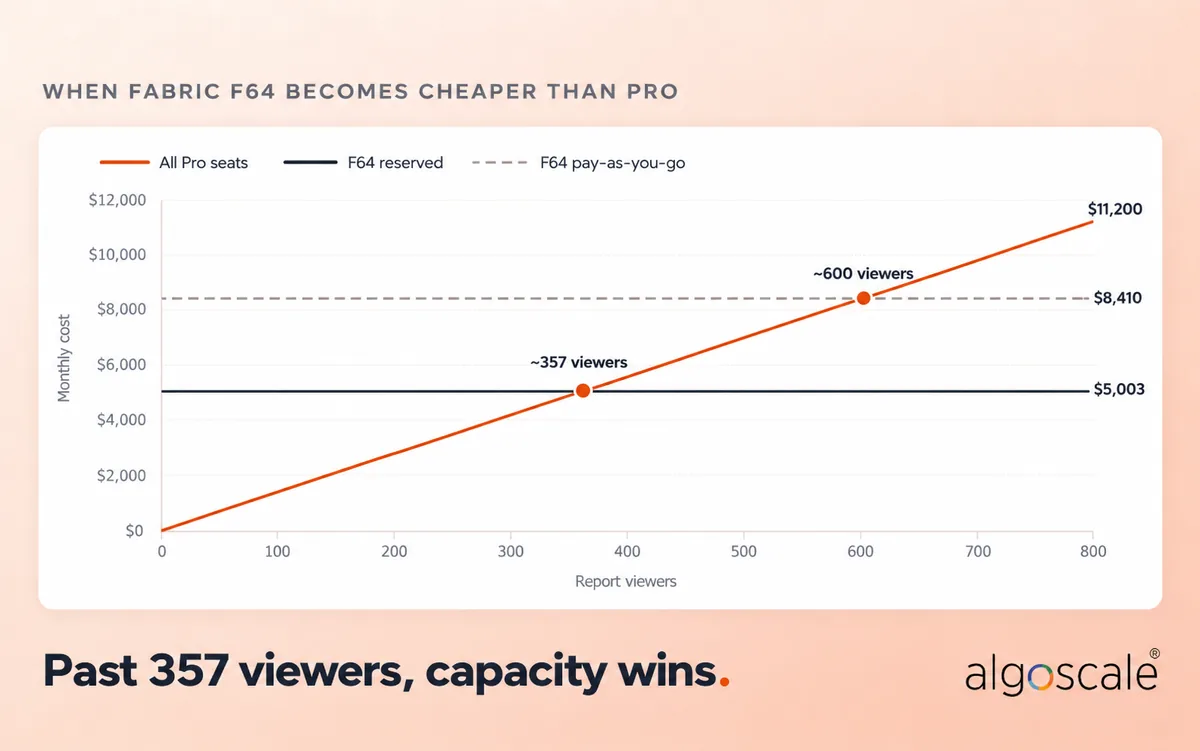
| Fabric F64 Billing Option | Effective Monthly Cost | Viewer Break-Even Volume |
|---|---|---|
| Pay-as-you-go | ~$8,410 | ~600 viewers |
| 1-Year Reserved | ~$5,003 | ~357 viewers |
Break-even = F64 monthly price ÷ $14 Pro price. Authors need Pro in both setups, so they cancel out. If many viewers already hold E5, the break-even moves higher.
9 Licensing Gotchas That Cause Surprise Bills
- PPU Workspace Lockouts: Move a workspace to PPU and every Pro user loses access. Every viewer then needs a $24 seat.
- The F32 Trap: Companies buy an F32 thinking it removes viewer seats. Free viewing only starts at F64, so you still pay $14 per viewer.
- The Semantic Model Left Behind: Reports move to F64 but the model stays in a shared workspace, and free viewers can’t open them.
- Guest User Licenses: Entra B2B guests need their own Pro, one of your seats, or content on F64 or larger.
- Capacity Throttling: Overload an F SKU for more than 10 minutes and reports start slowing; past an hour, interactive requests get rejected. Heavy afternoon batch jobs can lock out dashboard users.
- Paused Reservations Still Cost Money: Pausing a reserved capacity doesn’t stop the bill. Pausing only saves money on pay-as-you-go.
- M365 E5 Does Not Cover PPU: E5 gives you Pro. Analysts who need PPU require the separate $14 add-on.
- Downscaling Reserved Capacity: Scaling an F64 reservation down to F32 earns no credit. Your options are an Azure exchange or a refund, capped at $50,000 a year.
- Self-Service Purchases: Staff can buy their own Pro seats by credit card, outside your Enterprise Agreement pricing. Admins can switch self-service purchase off.
Upgrading, Migrating and Checking Your License
Upgrading seat licenses takes minutes: your Microsoft 365 admin buys the Pro or PPU seats and assigns them. Moving to F64 means provisioning the capacity in Azure, naming capacity admins, and moving your workspaces (reports and semantic models) onto it.
Migrating away from a retired P1 demands steady execution. Provision the replacement F64 first, copy across your governance settings, reassign workspaces during a maintenance window, and test that dashboard links still work. Only cancel the P1 once the F64 has run cleanly for a week.
If the move is part of a bigger platform shift, our guide to data warehouse migration to Microsoft Fabric covers the wider plan, and our Microsoft Fabric consulting team runs these migrations.
Want to try before you buy? A Fabric trial gives you 60 days on an F4 or F64 trial capacity (without Copilot), and admins can start a 30-day Pro trial for up to 25 users.
Need on-premises reporting? Power BI Report Server rights come with P SKUs and reserved F64 or larger, or through SQL Server core licenses.
To check your current license, open your account settings in the Power BI service; your license type appears with your subscription details.
Pricing for Government, Education, Nonprofits and India
US list prices are not the whole story. Enterprise Agreement customers keep their contracted prices until renewal, and Microsoft offers academic, government and nonprofit pricing without publishing the rates, so ask your Microsoft partner for a quote.
In India, Microsoft lists Power BI Pro at ₹1,165 and Premium Per User at ₹1,995 per user per month on an annual commitment, with GST added on top. Pro and E5 users can add PPU for ₹1,165 a month. Fabric capacity is billed through Azure and varies by region, and the F64 rule for free viewers is the same.
How Algoscale Helps
Balancing seat licenses against Fabric capacity takes technical and financial planning, and getting the user ratio wrong can inflate software spend by thousands of dollars a quarter.
Algoscale runs licensing reviews that look at your actual usage, model sizes and user traffic, then removes duplicate seats, sizes your compute, and moves legacy P SKUs to Fabric without downtime.
That work sits inside our wider business intelligence consulting practice. In a recent AWS data warehouse modernization for a US security and fire systems integrator with 14+ subsidiaries, Algoscale delivered 20+ Power BI KPI dashboards across Finance, Operations, HR and Sales and cut reporting preparation time by 70%.
Speak with our team to arrange a licensing review and see how our Power BI consulting services protect your IT budget while improving performance.
Frequently Asked Questions
What are the main Power BI license types?
Microsoft offers per-user licenses (Fabric Free, Pro and Premium Per User) and capacity licenses (Fabric F SKUs, plus Embedded A and EM SKUs). Pro covers day-to-day sharing, PPU handles oversized models, and F SKUs provide dedicated compute for the wider company.
How much does Power BI Pro cost in 2026?
Power BI Pro costs $14 per user per month on an annual commitment. It lets you build and share reports in standard workspaces, as long as the workspace isn’t locked to PPU.
Power BI Pro vs Premium Per User: which should you buy?
Stay on Pro while models stay under 1 GB and eight daily refreshes are enough. Move to PPU ($24) when models exceed 1 GB or you need XMLA endpoints and deployment pipelines. Every viewer of PPU content also needs PPU.
When does Fabric F64 become cheaper than Pro seats?
On a one-year reservation (about $5,003 a month), F64 becomes cheaper once you have about 357 users who only view reports, since they can use free accounts. On pay-as-you-go, the line is near 600 viewers.
Does Copilot in Power BI require F64?
No. Since April 30, 2025, Copilot is enabled on every paid Fabric capacity from F2 upward and on P capacities. It isn’t available on trial capacities, and a Pro or PPU license alone doesn’t unlock it.
Is Power BI Pro included in Microsoft 365 E3?
No. Pro is included in Microsoft 365 E5, Office 365 E5, Microsoft 365 A5 and G5. E3 and the Business plans don’t include it, so those users need a separate $14 Pro license to share reports.
Do external clients need a license to see our reports?
Guests invited through Entra B2B need a Pro license from their employer, one of your seats, or content on F64. Customers viewing reports embedded in your own app through app-owns-data need no license.
How do I know what type of Power BI license I have?
Open your account settings in the Power BI service and check your subscription details, where your license type is listed. Your Microsoft 365 admin can also see every assigned license in the admin center.
Is there a free trial of Power BI Pro or Fabric?
Yes. A Fabric trial runs for 60 days on an F4 or F64 trial capacity, without Copilot. Admins can also start a 30-day Pro trial for up to 25 users from the Microsoft 365 admin center.
How much does Power BI Pro cost in India?
Microsoft lists Power BI Pro at ₹1,165 per user per month and Premium Per User at ₹1,995, both on an annual commitment, with GST added on top.