


Quick Summary
- Helps businesses choose the right plan to optimize costs and maximize ROI.
- Explains Power BI pricing in 2026 and the factors that influence total BI costs.
- Covers key plans and pricing:
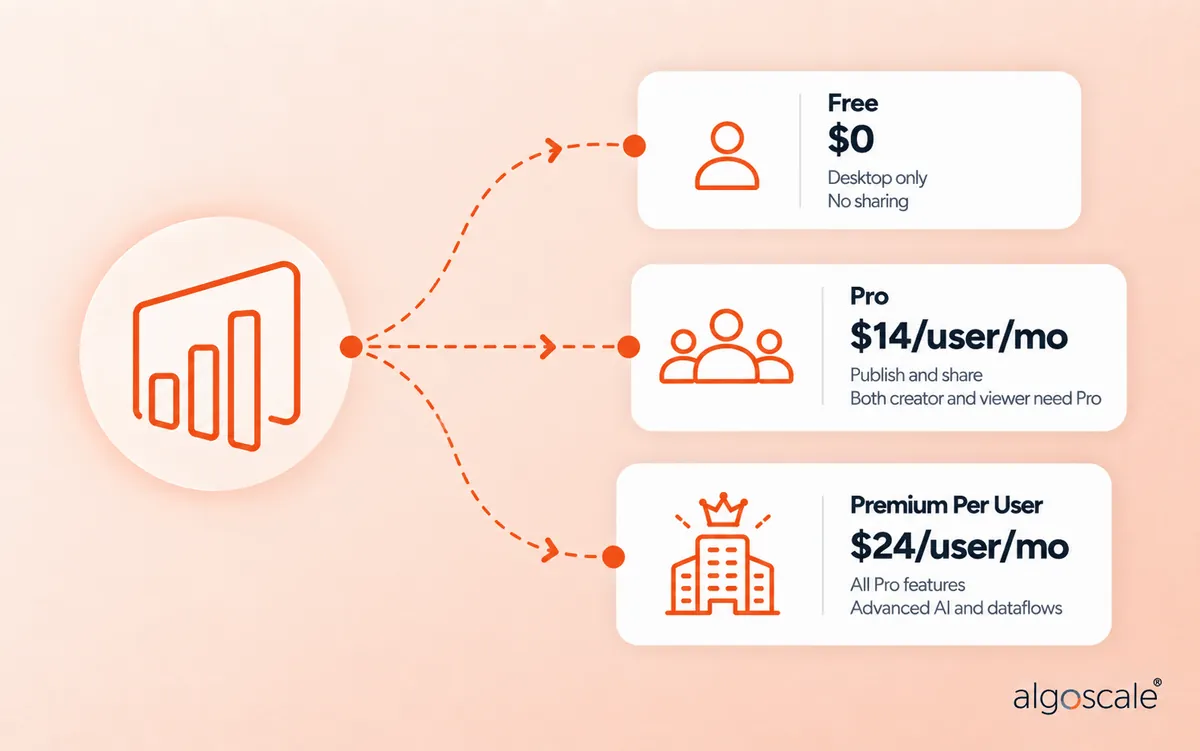
- Power BI Free: $0/user/month
- Power BI Pro: ~$14/user/month
- Premium Per User: ~$24/user/month
- Premium Capacity: Starts at $4,995/month
- Embedded & Microsoft Fabric: Capacity-based and pay-as-you-go pricing
- Shows how team size, data usage, and collaboration needs impact overall costs.
Welcome! If you have thought about “how much does Power BI cost?” and googled it, you should know that understanding the full picture contributing to Power BI costs is essential. This does not just include the license price you see on Microsoft’s website. It also includes user tiers, capacity options, and a few hidden tradeoffs that can increase your costs months later. Need to find the correct answer considering all scenarios? Then you are in the right place. You can be a small business owner, a team lead or simply a bit interested in data tools, this blog unfolds the cost of Power BI, all related licences in detail.
Why should you care? Because analytics tools like Power BI are not only for insights, they also come with everyday costs that can impact your business budget and strategy. From free plans to Power BI Pro cost and Power BI Premium every plan fits different needs. Not sure which one to choose? We can break down that for you.
In this guide we will cover and explain what affects Power BI pricing, and help you to pick up the right plan for your team. Plus you’ll learn how partnering with Power BI Consulting experts like Algoscale can help reduce costs while getting the best value for your Power BI setting up.
Key Insights on Power BI Cost in 2026

Before we decide on a Power BI plan for your business, let us understand a few key things about this and what can affect it. Here what you should know in 2026:
Microsoft Power BI cost has changed: From April 2026, Microsoft has updated its pricing for Power BI licenses. This price increase reflects new features and integration with Microsoft Fabric, making the cost of Microsoft Power BI more about value and capability than just the license fee.
License structure is evolving: Some older pricing models are now being replaced with new ones connected to Microsoft Fabric. For example, older capacity based licenses (P-SKUs) are now changing to Fabric based (F-SKUs). So, when you review your Power BI license types and cost, consider your total spending license, setup, data management and maintenance costs for better understanding.
The Desktop App is 100% Free: You can model data locally without spending a dime. The actual Power BI license cost (or Power BI licence cost) only kicks in when you want to collaborate and share those dashboards in the cloud.
The Breakeven Math: Do not buy individual licences blindly. Once your viewing audience crosses the 357-user mark, transition to a $4,995 Power BI Premium cost (Capacity) to save money on your total Microsoft Power BI cost.
Check Your E5 Subscriptions: We frequently see companies double-paying for analytics. If you already use Microsoft 365 E5, your Pro licences are fully covered.
Architecture Dictates the Bill: Messy data and complex DAX formulas drain processing power, forcing you into expensive Premium tiers. Solid data engineering keeps your platform running smoothly and reduces the overall cost of Power BI.
What is Microsoft Power BI?
Microsoft Power BI is a tool that helps businesses turn their data into easy to understand charts, dashboards, and reports. You might have sales numbers, customer information, or inventory data all not sorted properly, Power BI makes it simple, you can see the trends, find out information from the data to make smarter decisions.
When you think about Power BI cost, it is important for you to know that is not just a software that you are purchasing, it is the platform that connects to many data sources and give your team clear insights, The cost of Power BI Pro depends on the license type you choose and how many people are using it in total.
Power BI Pricing Plans: Which One Fits Your Business?
Understanding the Power BI cost is crucial for choosing the right plan for your business. Microsoft offers several current pricing plans in 2026, designed for different business needs. It covers all from individual users to large organizations. Here is a detailed breakdown of all major Power BI license types, along with their key features and pricing in USD.
Power BI Free
Cost: $0 per user/ month
The Power BI Free plan is perfect for individuals who want to explore the capabilities of Power BI without any cost. Users can create personal dashboards and reports, connecting to more than 100 data sources. However, sharing and collaboration features are limited, so this plan is mainly for your personal use or testing.
Key Features:
- Create and view personal reports and dashboards
- Connect to 100+ data sources
- Limited sharing capabilities
- Ideal for personal use or trail purpose.
Power BI Pro
Cost: $14 per user/month
Power BI Pro is designed for small to medium sized teams that might need collaboration and sharing capabilities. It allows users to publish dashboards to the Power BI service, share insights with colleagues, and integrate with Microsoft 365 apps. As such, the Power BI cost per month for this plan can be calculated based on the number of users there are in a team, ideal for team-based and can be used for business intelligence projects.
Key Features
- All free plan features will be included,
- Share and collaborate on reports and dashboards
- Access to app workspaces and also content creation.
- Publish content to the Power BI service.
- Peer-to-peer report sharing.
- 10 GB storage per user.
- Live data refresh and scheduled updates.
- Mobile access and Excel/ Teams integration
Power BI Premium Per User (PPU)
Cost: $24 per user/month
Premium Per User is suitable for data professionals who might need advanced analytics, larger data models, and enhanced performance. This includes all Power BI pro features and adds access to some top premium tier capabilities.
Key Features:
- All Power BI Pro features will be included.
- Larger dataset sizes up to 100 GB
- Advanced AI-powered visualizations
- AutoML and cognitive services
- Enterprise connectivity with XMLA endpoint.
- Deployment pipelines for ALM.
- Up to 48 data refreshes per day.
Also, For businesses looking to maximize value, then working with an experienced AI powered Data Visualization Consulting services provider like Algoscale will ensure you not only reduce costs but also get insights faster.
Power BI Premium (Capacity Basis)
Cost: The Power BI Premium Capacity pricing starts at $4,995/month for P1 SKUs. Higher SKUs: P2 ($9,995), P3 ($19,995), P4 ($39,995), p5 ($79,995)
Premium Per Capacity is designed for large organizations requiring dedicated cloud resources. This plan provides your businesses wide dedicated capacity and allows multiple users, which includes free users also to view content. This plan actually supports largest datasets and maximum throughput. Sometimes the Power BI Server cost depends on the licensing model you choose. The rights to use this are included with this plan itself and you will be provided with dedicated resources.
Key Features:
- All PPU features will be included.
- Dedicated cloud resources.
- Unlimited content distribution to free users.
- Multi-geo deployments.
- Incremental refresh for large datasets.
- On-premises Power BI report server support.
- Advanced AI and Dataflow/ Datamart compute isolation.
Power BI Pro vs Premium: Which Is The Best Plan For You?
Discussed below are business sizes and each of their unique needs to help you choose the best among Power BI and Premium plans:
- Individual or Small Teams of 1-2 people: For initial development or a freelancer doing analysis for themselves, Power BI Free is sufficient, but if your business needs even two people to collaborate closely and regularly, Pro is your best plan.
- Small to Medium Businesses with up to 50-100 users: Power BI Pro enables affordable collaboration for all with low administrative overhead. Clearly, not all your 50-100 users will have advanced needs, so for the select ones who do, you can buy PPU licenses. PPU licenses however, do not allow direct sharing of content with Pro users.
- Mid-Sized Business with 100-500 users: Typically, your team might already be using Pro licenses mostly, but some of them may surely need more refreshes or model limits exceeding 1 GB. This is the stage where you can test the Pilot Premium Per User and on reaching its upper limits, a cost analysis for Premium capacity will be helpful.
- Large Enterprises with 500+ users: Your best option is Power BI Premium Capacity with its enterprise-scale BI, advanced features like AI, big data, on-premise server report integration, and so on.
Power BI Embedded (A SKUs)
Cost: The Power BI Embedded pricing is variable, and offers pay as you go by Azure node. Even higher SKUs scale accordingly.
Power BI embedded is for developers embedding the dashboards and reports into applications. This allows external users to interact with reports without needing Power BI licenses.
Key Features
- Embedding Power BI reports and dashboards into custom applications
- Full APIs for embedding and automation.
- Custom branding of business reports.
- Telemetry and monitoring.
- Fixed compute/RAM per node ensures predictable performance.
- Viewers do not require Pro or PPU licenses.
Microsoft Fabric (F SKUs)
Cost: Pay as you go mode this is reserved 1-year pricing which is ~40% lower.
Microsoft Fabric F SKUs cover the entire Fabric analytics platform, including Power BI, data pipelines, and Synapse, under one capacity.
Key Features:
- Unified analytics platform (Power BI, Synapse, Data Factory)
- Auto scalable compute with pause/ resume capabilities.
- Shared CU pool for storage and compute
- Fabric storage extra ($0.023/GB/Month)
- Smaller F SKUs (<F64) still require pro licenses for sharing.
- F64+ offers unlimited viewing similar to Premium P1.
Are you considering Fabric? Check how our Microsoft Azure Development Services can optimize your investment.
Do I Need Power BI Pro? Power BI Free vs Pro Explained
If you are wondering how much does Power BI cost, understanding the nuances of Power BI pricing is crucial. Teams often get stuck figuring out the real difference between Power BI Free vs Pro. Think of it this way: if you work alone, pull data from Excel, and just want to build a dashboard on your laptop to export as a PDF, you do not need to pay a penny — is Power BI free for personal use? Yes. However, is Power BI free for business collaboration? No.
The moment you decide to publish that report to the cloud and share an interactive link with your manager, you cross into paid territory. According to our experience with client rollouts, many people miss one vital rule: in a standard setup, both the person building the dashboard and the person viewing it must have their own active Pro licence, meaning the Power BI Pro cost (currently around $14 a month) applies to both. So, if you are asking “do I need Power BI Pro just to view?”, the answer is yes, unless you have Premium Capacity.
Microsoft 365 Integration and Power BI Certification Cost
We regularly hear clients ask, “Is Power BI included in Microsoft 365?” The short answer? It depends entirely on your subscription tier.
Is Power BI Pro included in E5? Yes. If your company pays for the top-tier Microsoft 365 E5 or Office 365 E5, you are in luck — the Power BI Pro license cost is baked in at no extra charge. However, if your business runs on E1, E3, or Business Premium, you have to buy the analytics platform separately, adding to your overall Power BI subscription cost.
Beyond the software itself, you should also budget for team training. If you want your staff officially certified, sitting the PL-300 Data Analyst exam means the Power BI certification cost is typically $165 USD, depending on where your team is located.
How Many Users Before Premium Is Cheaper Than Pro?
When companies start scaling their analytics, they usually hit a financial crossroads. They want to know exactly how many users before Premium is cheaper than Pro.
Let’s break down the actual numbers. A Premium P1 Capacity (or a Fabric F64 node) sets you back about $4,995 every month. Since Premium lets an unlimited number of free users view your dashboards, the breakeven point happens around 357 users.
If you have 360 employees who just need to look at reports, buying the $4,995 Premium Capacity is instantly cheaper than paying $5,040 a month for individual $14 licences. So, what is the cheapest way to share Power BI reports across a large enterprise? Buy the Premium node for the viewers, and only pay the Power BI Premium per user cost or standard Pro fee for the handful of engineers actually building the models.
Price Comparison Overview (Power BI vs Competitors: Price Comparison)
When evaluating Tableau vs Power BI cost, Microsoft’s deep integration with Azure and Office 365 generally results in a significantly lower total cost of Microsoft Power BI.
| Tool | Starting Range | 10 Users | 100 Users | Enterprise |
|---|---|---|---|---|
| Power BI Pro | $14 per month | $1,680 per year | $16,800 per year | Premium Required |
| Tableau | $75 per month | $9,000 per year | $90,000 per year | $145,000+ per year |
| Looker | Custom | $36,000+ per year | $180,000+ per year | $500,000+ per year |
| Qlik Sense | Custom | $30,000+ per year | $150,000+ per year | Custom |
Power BI Pricing Comparison by Country
Power BI Cost Calculator: A Feature and Capability Comparison Across Power BI Plans
| Capability | Power BI Free | Power BI Pro | Power BI Premium Per User (PPU) | Power BI Premium Capacity |
|---|---|---|---|---|
| View own content in Power BI Service | Yes | Yes | Yes | Yes |
| Create and save dashboards/reports | Yes (desktop and personal workspace) | Yes | Yes | Yes (Pro user can publish to premium workspace) |
| Collaborate in workspaces | No | Yes | Yes | Yes (Premium workspace enables all viewer roles) |
| Total cloud storage | 10 GB per user | 10 GB per user | 100 TB total 3 | 100 TB total (per capacity)3 |
| Content sharing with others | No | Yes (with other Pro users) | Yes (with other PPU users) | Yes (with any user, including those in Free and Pro plans) |
| Maximum dataset (model) size | 1GB2 | 1 GB | 100 GB | Upto 400 GB |
| External sharing outside organization | No (only publish to the web) | Yes (if external users have Pro licenses) | PPU licenses required for external users | Yes (Capacity supports content embedding for external users via Power BI Embedded) |
| Scheduled data refreshes | 8 per day | 8 per day | 48 per day | 48 per day (per dataset) |
| AI and Advanced Analytics Features | Limited | Standard AI Visuals | Advanced AI and Auto ML. | Advanced AI and more. |
| Paginated Reports (Pixel perfect RDL) | No | No | Yes | Yes |
| License cost | Free | $14 per user per month | $24 per user per month | $4995 per capacity per month |
If you are exploring Best Power BI Alternatives, tools like Tableau, Qlik Sense, and Looker also offer similar features and capabilities, but Power BI’s integration with Microsoft 365 and Azure can make it a cost effective choice for most of the businesses.
Optimize Your Power BI Investment Today
Don’t overspend on Power BI licenses. Partner with Algoscale to choose the right plan, streamline dashboards, and maximize ROI for your business.
Talk to a Power BI Consultant
How Team Size and Use Cases Impact Power BI Costs
When thinking about Power BI costs, one of the most important factors is your team size. Because the bigger your team, the higher the total cost. Wait, sometimes it is not just about the number of people, it is also about each person using Power BI, because that also affects your spending.
Small Teams (1-10 Users)
If you have a small team, you might only need Power BI pro licenses. Small teams usually use Power BI for creating and sharing dashboards within a small team. They do the simple reporting and basic analytics.
Here is the tip, with 5-10 users, you can keep the Power BI Pro license cost low by giving Pro licenses only to users who build reports. Other team members can view content shared from Pro or Premium capacity. This helps manage the Power BI Pro cost without limiting access to insights.
Medium Teams (10-50 Users)
Medium size team members often need more collaboration. You might mix Pro licenses for report creators with Premium Per User (PPU) licenses for those who need advanced features like large datasets, AI-powered data visualizations, and paginated reports.
Let’s say in a 25 person team, 10 report creators could have Pro licenses ($14/user/month) and 5 data specialists with PPU ($24/user/month). The remaining 10 members in the team can view reports if you use premium capacity. This combination can optimize the Power BI license costs.
Large Teams (50+ Users)
For large teams or enterprise-level use, Premium capacity is usually the most cost efficient. Instead of giving every employee a Pro or PPU license you can purchase dedicated premium nodes. Anyone in the organization can view dashboards without any individual licenses. This can support large datasets, multiple refreshes per day and to the point reporting.
If a sales team consists of 200 members they might have 10 PPU users creating reports, and the rest accessing dashboards via Premium capacity. This setup keeps the cost of Microsoft power BI manageable while providing enterprise level analytics access to everyone in the team.
The way your team uses Power BI also matters, so before you buy a license, initially map out who creates reports, who can view the dashboards and which use cases might need advanced features. This planning before itself can save a significant amount of money and prevent overspending on unused features.
For guidance on optimizing Power BI user costs, Hire Power BI Developers from Algoscale to design a cost efficient solution tailored to your business and team sizes.
Must Read – Power BI Dashboards vs Reports
How Do You Choose the Right Power BI Pricing Plan for Your Business?
Now choosing the right Power BI pricing plan for your business might not be that complicated. It is all about understanding your team’s needs, amount of data you deal with, and how you plan to use Power BI. You can follow this simple steps, that help you decide which Power BI license to choose:
Step 1 : Identify Your Team Individual Roles
Think about who will be creating Power BI dashboards versus reports. Report creators usually need Power BI Pro or Premium Per User (PPU) licenses, while viewers might only need access through Premium capacity or Power BI Embedded. Knowing this before buying the plan helps avoid paying for unnecessary licenses, keeping your Power BI costs in check.
Step 2: Assess Your Data Needs
The next step is you need to look at the size and complexity of your data. If you are just working with small datasets and basic analytics then Power BI Pro might be just enough. But if your team deals with large datasets, advanced analytics or AI features you might need to consider PPU or Premium Per Capacity.
And if your goal is something different like embedding dashboards directly into apps, Power BI Embedded is the best choice. Picking a plan that matches your actual needs ensures you’re not overspending on features you won’t use.
Step 3: Consider Collaboration and Sharing
Collaboration is a key factor. Teams that frequently share dashboards and reports will benefit from Pro or Premium licenses. For enterprise wide access, Premium capacity is the most effective option, as it allows even free users to view dashboards. The right plan makes sharing smooth while controlling the overall cost of Power BI.
Step 4- Factor in Budget and Growth
Budget and future growth will guide your choice. Small teams can start with a few Pro licenses and expand to PPU or Premium capacity as analytics usage grows Using Power BI license costs to plan ahead ensures you get the features you need without overspending.
Step 5: Get Expert Advice
Finally, if you’re still not sure which plan fits your team best, then hiring Power BI consultants can help, because these experts can assess your team size, use cases, and data complexity to recommend the most cost-effective plan. By this step your Power BI investment can deliver maximum value while avoiding unnecessary costs.
For businesses seeking guidance on getting the most out of their Power BI cost per year (ranging anywhere between $100,000 to $500,000 per year for large enterprises), partnering with Algoscale, one of the best Power BI companies, can be a wise step. Our Power BI consultants can help you set up dashboards, choose the right license for your team and business needs to reduce unnecessary costs.
Also Read – Power BI Desktop vs Power BI Service
Power BI vs Competitors: Price Comparison
If you are exploring Best Power BI Alternatives, tools like Tableau, Qlik Sense, and Looker also offer similar features and capabilities, but Power BI’s integration with Microsoft 365 and Azure can make it a cost effective choice for most of the businesses.
The table below presents a comparison of Power BI costs as well as costs of its alternatives:
| Tool | Starting Range | 10 Users | 100 Users | Enterprise |
|---|---|---|---|---|
| Power BI Pro | $10 per month | $1200 per year | $12,000 per year | Premium Required |
| Tableau | $75 per month | $9000 per year | $90,000 per year | $145,000 per year |
| Looker | Custom | $36,000+ per year | $180,000+ per year | $500,000+ per year |
| Qlik Sense | Custom | $30,000+ per year | $150,000+ per year | Custom |
What Are Hidden Power BI Costs?
Most businesses see a gap in their Power BI usage and costs without proper planning or expertise in unlocking its complete potential while streamlining costs. Discussed below are some hidden Power BI costs:
- Data Preparation Time: An average enterprise is reported to spend approximately $4.8 million annually for data preparation, i.e, to get clean data into Power BI.
- License Sprawl: Most teams start with a few Pro licenses but team usage quickly expands, which escalates costs per user. The jump to Premium Capacity is often made suddenly with sharing and performance limits exhausted without proper optimization.
- Performance Issues: Even with lesser user counts, some teams end up spending on Premium capacity to resolve performance issues, such as complex DAX calculations, gateway failures, and data size limits.
How a Power BI Partner Helps Maximize Your Investments?
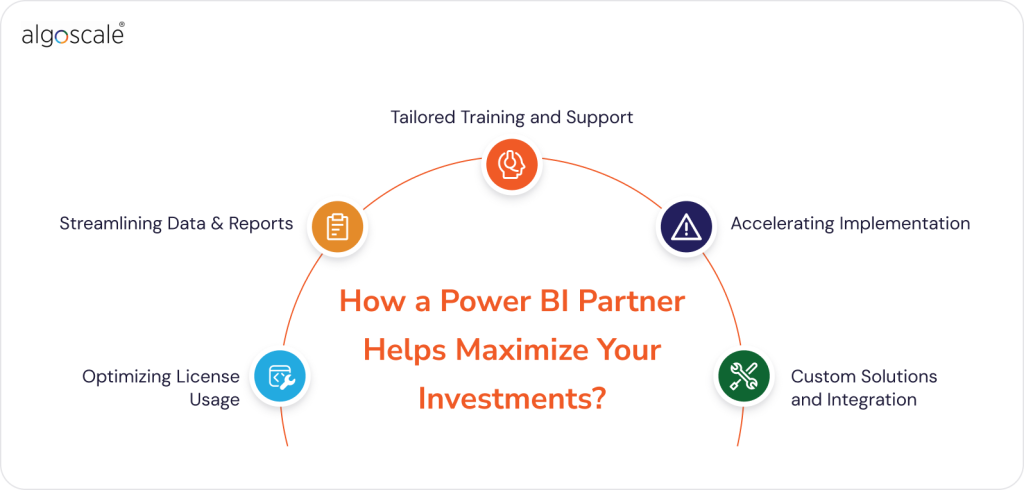
Investing in Microsoft Power BI is a lot more than just purchasing Power BI licenses. To get the best result and data oriented outcomes, working with a Power BI partner can make a huge difference. Partners bring expertise, experience, and practical solutions to help your team use Power BI efficiently while controlling your Power BI costs.
Optimizing License Usage
A Power BI partner can analyze better your team size, usage patterns, and reporting needs to recommend the most cost effective plan. Instead of giving every employee a pro license, a Power BI partner may suggest using Premium capacity for viewers only while keeping Pro licenses only for report creators. This approach ensures you get maximum value from your Power BI license reports.
Streamlining Data and Reports
Power BI partners help clean, organize, and structure your data for better performance. They can design dashboards and reports easily. They are highly efficient too. By avoiding unnecessary duplicate reports or heavy datasets, your team can reduce the pro costs and improve overall efficiency.
Tailored Training and Support
Even with the best licenses, teams may not use all features effectively. Partners provide training sessions, workshops, and ongoing support, helping your team understand advanced features like AI visuals, paginated reports or dataflows. This can maximize the ROI from your Power BI costs by ensuring the team uses the platform completely.
Accelerating Implementation
Implementing Power BI across a team or organization can take time. A partner can speed up the setup, connects the data sources, builds dashboards, and ensures everything runs smoothly. Faster implementation can mean that your team starts gaining insights sooner, which can add direct value to your Power BI investment, ensuring you start seeing better value from your Power BI pricing per month instantly.
Custom Solutions and Integration
Power BI Partners can also help your team to integrate Power BI with your existing data systems, such as Microsoft Azure, CRM platforms, or retail data analytics solutions. These custom connectors and dashboards can make your implementation process more efficient while cutting down the costs.
How Algoscale Can Help you Reduce Microsoft Power BI Costs?
Algoscale offers comprehensive Microsoft Power BI Consulting Services that are designed to reduce your organization’s BI investments. We evaluate your team’s sizes, roles and your data usage patterns,and recommend the most cost effective licensing strategy. We ensure that you only pay for the features and access your team truly needs. Our Power BI cost estimation approach helps your business to prevent unnecessary expenditures.
Not only the licensing part, Algoscale also specializes in designing and implementing efficient dashboards and reports tailored to your business needs with its Power BI consulting services. By streamlining data models and optimizing reports performance,we ensure that your team can access insights quickly and easily. This reduces the needs for higher cost licenses and reduces overall costs.
Algoscale provides expert guidance on integrating Power BI with other tools and platforms, such as Microsoft Fabric and Power BI embedded. This integration enables easier data flow and improves your team reporting capabilities. We help you to make informed decisions without any additional licensing fees.
Reduce Your Power BI Costs Without Losing Insights
Learn how to lower your Power BI expenses by assigning the right licenses and using advanced features efficiently. Algoscale’s experts provide cost-effective solutions tailored to your team.
Schedule a Free Consultation
Conclusion
Understanding Power BI costs is a bit confusing at first, but breaking it down by your use cases and needs could make it much easier. From Power BI free for individual users to Premium capacity for larger organizations, there is a plan for every business out there. By carefully matching your team’s roles and needs to the right plan, you can control Microsoft Power BI costs while still getting powerful analytics and insights.
Working with a trusted Power BI partner can make a big difference. Algoscale’s Power BI Consulting Services, helps businesses to optimize their licensing, build efficient dashboards, and implement AI powered advanced analytics. This can ensure that your business can get the maximum value from your Power BI investment without extra costs or spending.
The key to manage Power BI license costs is planning ahead, understanding your team and seeking expert guidance when needed. With the right strategy, Power BI will become not just a tool but a powerful resource to make data driven business decisions smartly.
Frequently Asked Questions
Does Power BI cost money?
The Power BI Desktop cost is strictly zero, but the moment you want to share those reports securely with your colleagues, Microsoft requires you to step up to a paid Pro or Premium plan, which dictates your overall Power BI cost.
How much does Power BI cost per user?
The standard Power BI cost per user sits at $14 per month for Pro. If you need heavier compute power, advanced AI, or larger data models, you will need the Premium Per User (PPU) tier, which makes the Power BI Premium license cost $24 a month.
What about Power BI embedded pricing?
Power BI embedded pricing uses pay-as-you-go Azure compute. It is vastly cheaper to use this method to show analytics to clients inside your own custom app rather than buying individual Microsoft licences for every external customer.
Are there rumours of a Power BI Pro price increase?
While some regions experience currency fluctuations that feel like a Power BI Pro price increase, the base US price has remained stable at $14. Always review the official Power BI license types and cost documentation for exact regional pricing.