

Key insights
- Replacing your BI platform is a major architectural change that requires careful planning.
- The true cost of migration usually eclipses the software licensing fees.
- Free and open-source tools provide excellent value for startups and engineering teams.
- Always define your primary use case before evaluating any tools similar to Power BI.
Microsoft Power BI dominates corporate data, but it is not a perfect fit for everyone. The best Power BI alternatives depend on your exact needs. Tableau excels at visual storytelling, Looker provides strict data governance, and Metabase offers a lightweight open-source starting point. Your final choice rests heavily on your budget, existing cloud architecture, and technical skill level.
Video: Why some teams are moving to lighter dashboard tools than Tableau or Power BI
Watch on YouTube: STOP Using Tableau or PowerBI, Do THIS Instead
Power BI alternatives at a glance
Evaluating Power BI competitors requires a clear view of the landscape. Every tool has distinct strengths and unique commercial models. Below is a high-level summary of the top options available today, comparing their target audience, entry prices, and overall value.
| Tool | Best for | Entry price (US, Oct 2026) | Pricing model | Free or open-source option | Our score |
|---|---|---|---|---|---|
| Microsoft Power BI (Reference) | Microsoft ecosystem reporting | $14 per user/month | Per-user or Fabric capacity | Free Desktop app and free account | 9.0/10 |
| Tableau | Deep visual storytelling | $15 per user/month (Viewer) | Per-user | Tableau Public (non-commercial) | 8.8/10 |
| Qlik Cloud Analytics | Associative data modelling | $300/month (10 users) | Capacity-based | Free trial | 8.2/10 |
| Looker | Strict central governance | Custom quote | Platform + user fees | None | 8.5/10 |
| ThoughtSpot | Search-driven natural language | $25 per user/month | Per-user or credits | Free trial | 8.4/10 |
| Sigma | Spreadsheet-style cloud queries | Custom quote | Custom contract | Free trial | 8.3/10 |
| Domo | Rapid deployment for executives | Custom quote | Credit-based, unlimited users | 30-day free trial | 7.9/10 |
| Sisense | Custom product embedding | Custom quote | Usage and user tiers | None | 8.1/10 |
| Amazon Quick Sight | AWS-native reporting | $3 per user/month (Reader) | Per-user or session capacity | Free to try | 7.8/10 |
| Metabase | Quick startup dashboards | Free (Open Source) | Free self-hosted or $100/month cloud | 100% open source | 8.7/10 |
| Apache Superset | Scalable engineering workloads | Free (Open Source) | Free or managed hosting via Preset | 100% open source | 8.6/10 |
| Data Studio (formerly Looker Studio) | Web and marketing data | Free | Free or $9 Pro per user/project | Generous free version | 8.0/10 |
| Zoho Analytics | Affordable all-in-one SMB suite | $30/month (2 users) | Flat monthly subscription | Free plan (2 users) | 7.7/10 |
Prices are list prices from each vendor’s pricing page, billed annually, checked October 2026. Links to every pricing page are at the end of this article.
Should you leave Power BI at all?
Before you rip out your entire reporting infrastructure, you need to ask a difficult question. Is the software actually the problem?
Many businesses start looking for an alternative to Power BI because their dashboards load slowly or their users complain about complex interfaces. However, changing the presentation layer rarely fixes bad data architecture. If your underlying database is chaotic, buying a new visualisation tool will just give you a more expensive way to view the same mess.
You should genuinely consider staying put if your company runs heavily on Microsoft infrastructure. Power BI integrates seamlessly with Excel, Azure, and Teams. Moving away means severing those native connections, which forces your data engineering team to build custom API bridges. Furthermore, if your complaints revolve around performance, you might just need to optimise your DAX queries or upgrade your Fabric capacity tier rather than buying completely new software. Power BI is not being phased out either: Microsoft now sells it as part of Microsoft Fabric, so staying is a safe long-term option.
On the flip side, you should absolutely leave if the licensing model no longer fits. If you need to embed dashboards into a commercial SaaS product, Microsoft’s pricing can become restrictive quickly. The same applies if your staff use Macs, as Power BI Desktop remains stubbornly Windows-only. In those specific scenarios, exploring alternatives to Power BI makes perfect commercial sense.
Why teams look for Power BI alternatives
Data teams usually start exploring PowerBI alternatives when they hit specific technical or financial walls. The most common trigger is the user experience. Power BI is a phenomenal engineering tool, but it feels overwhelming for casual business users. When marketing or sales teams struggle to build basic charts without asking IT for help, productivity grinds to a halt.
Another major driver is the operating system limitation. Finding a reliable Power BI alternative for Mac is a constant headache for design and creative agencies. Because Microsoft refuses to release a native macOS version of Power BI Desktop, Mac users are forced to run clunky virtual machines or rely entirely on the limited web service.
Licensing costs also push companies to explore the market. While the $14 entry price looks cheap, upgrading users to Premium Per User at $24 or buying dedicated Fabric capacity escalates costs rapidly. Teams often seek a free Power BI alternative when they realise they are paying thousands a month just to let executives view static weekly metrics. Finally, businesses building their own software products often want white-label tools, leading them to seek platforms that handle embedded analytics more elegantly than Microsoft does.
Our evaluation criteria
To rank the best Microsoft Power BI competitors, we looked past marketing brochures and focused on how these tools perform in real production environments.
We scored every platform against five strict pillars.
- Total Cost of Ownership: We looked at the true financial impact, including hidden compute costs and mandatory viewer licenses.
- Learning Curve: We evaluated how quickly a non-technical business user could build a functional dashboard without writing SQL or custom code.
- Data Modelling Capability: We tested how well the platform handles complex table joins, messy data structures, and advanced calculations.
- Ecosystem Integration: We checked how easily the tool connects to modern cloud data warehouses like Snowflake, BigQuery, and AWS Redshift.
- Deployment Flexibility: We assessed whether the tool supports on-premise installation, cloud hosting, and seamless product embedding.
User ratings come from Gartner Peer Insights, where Power BI itself holds 4.4/5 from 4,140 ratings.
Best Power BI alternatives by use case
No single tool wins every category. To help you find the right fit, we have grouped the leading platforms based on their ideal real-world applications.
Enterprise BI
Tableau

Our score: 8.8/10
Best for: Deep visual storytelling and pixel-perfect customisation.
- Entry price: $15 per user/month for Viewers, $42 for Explorers, and $75 for Creators.
- Pricing model: Per-user, billed annually.
- Free tier: Tableau Public (for non-commercial, public data).
- Verified: October 2026.
- Tableau pricing

Pros:
- Unmatched control over visual formatting and design.
- Massive, highly active global user community.
- Excellent native application for macOS users.
Cons:
- Licensing costs scale aggressively for large teams, with every dashboard viewer adding $15 monthly on Standard editions.
- Handling basic data transformations requires a separate tool called Tableau Prep.
- Steep learning curve for advanced level of detail calculations.
Tableau vs Power BI:
- Visuals: Tableau offers more flexibility; Power BI is more rigid.
- Cost: Power BI is significantly cheaper for broad deployment. A 50-person team pays $8,400 a year for Power BI Pro, compared to $15,840 for Tableau with 5 Creators, 10 Explorers and 35 Viewers.
- Data Prep: Power BI handles complex modelling better natively.
Skip it if: You operate on a tight budget and only need basic operational bar charts.
Rating: Gartner Peer Insights: 4.4/5 (3,984 ratings)
Our take: Tableau feels like painting on a blank canvas, whereas Microsoft feels like building with rigid Lego blocks. In one Algoscale project, we used Tableau Prep Builder to replace manual Salesforce reports with live Tableau dashboards.
Qlik Cloud Analytics (Qlik Sense)

Image: Qlik homepage, October 2026
Our score: 8.2/10
Best for: Associative data modelling and exploring complex datasets in any direction.
- Entry price: Qlik Cloud starts at $300 a month for 10 users on the Starter tier.
- Pricing model: Capacity-based. The Standard tier costs $825 monthly for 25 GB of data, with no cost for additional users.
- Free tier: Free trial only.
- Verified: October 2026.
- Qlik pricing
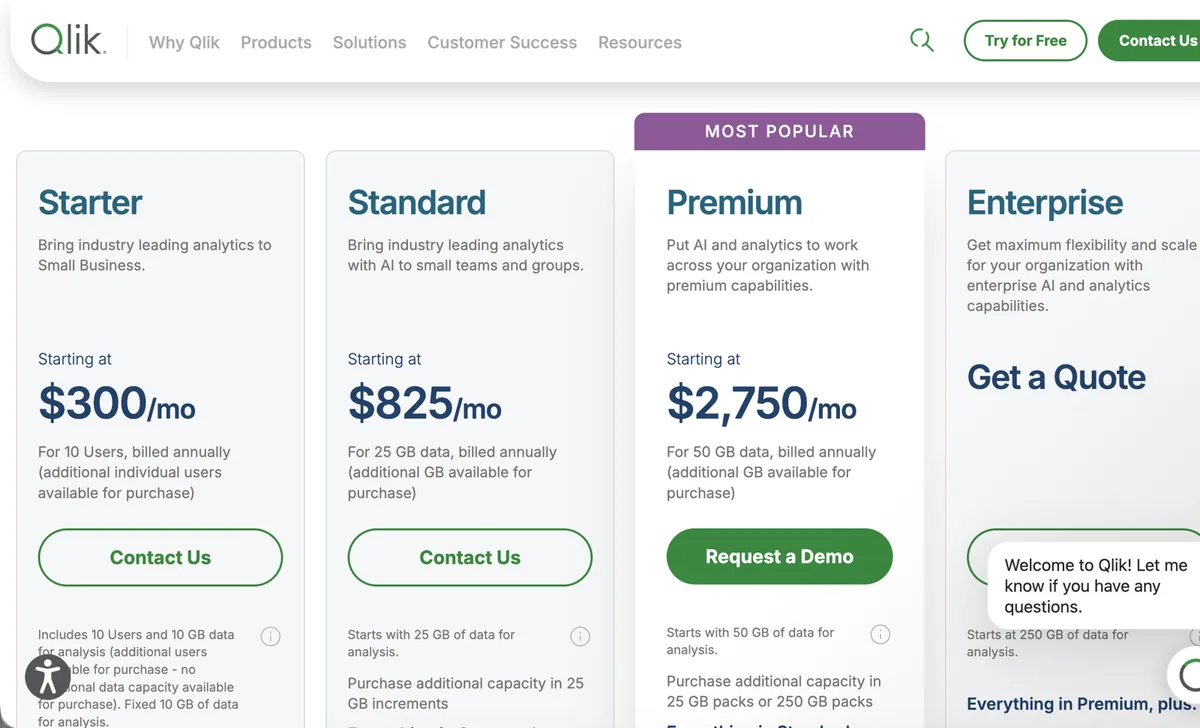
Image: Qlik pricing page, October 2026
Pros:
- Associative engine highlights data relationships you did not know existed.
- Exceptional performance when handling massive data volumes in memory.
- Strong support for hybrid cloud and on-premise deployments.
Cons:
- Proprietary scripting language takes time to master.
- The visual interface feels slightly dated compared to modern rivals.
- The administrative backend is notoriously complex to manage.
Qlik Sense vs Power BI:
- Data Engine: Qlik offers more flexible exploration; Power BI is strictly hierarchical.
- Ease of Use: Power BI is easier for beginners to pick up.
- Cost: Qlik Cloud offers predictable capacity pricing at scale, though it starts much higher than Power BI Pro.
Skip it if: You want a simple drag-and-drop tool and refuse to learn a custom scripting language.
Rating: Gartner Peer Insights: 4.6/5 (1,429 ratings)
Our take: The associative engine is brilliant for exploring data sideways, but the UI needs a modern overhaul.
Looker

Image: Google Cloud Looker page, October 2026
Our score: 8.5/10
Best for: Governed self-service analytics controlled by data engineering teams.
- Entry price: Custom quote only. Looker does not publish a list price at any tier.
- Pricing model: Platform fee plus individual user licenses.
- Free tier: No.
- Verified: October 2026.
- Looker pricing

Pros:
- LookML enforces strict, centralised governance over all metrics, acting as a single source of truth.
- 100% web-based experience with no local desktop installation required.
- Outstanding version control and Git integration.
Cons:
- LookML requires a strong data engineering background to set up.
- Historically very expensive for small deployments.
- Limited library of out-of-the-box visualisations.
Looker vs Power BI:
- Governance: Looker centralises business logic perfectly; Power BI risks metric fragmentation.
- Accessibility: Power BI is much easier for casual business users to author reports.
- Architecture: Looker queries databases directly; Power BI relies heavily on imported extracts.
Skip it if: You do not have a dedicated data engineering team to write and maintain LookML code.
Rating: Gartner Peer Insights: 4.6/5 (931 ratings)
Our take: LookML is fantastic for maintaining a single source of truth, but getting business users to adopt it is a constant uphill battle.
AI and search-first
ThoughtSpot

Image: ThoughtSpot homepage, October 2026
Our score: 8.4/10
Best for: Executives needing instant answers via natural language search.
- Entry price: The Essentials tier starts at $25 per user each month, billed annually, for 5 to 50 users.
- Pricing model: Per-user pricing for Essentials, or a consumption model on Pro starting at $0.10 per credit.
- Free tier: Free trial.
- Verified: October 2026.
- ThoughtSpot pricing

Image: ThoughtSpot pricing page, October 2026. This view shows the Pro tier; Essentials starts at $25 per user.
Pros:
- Brilliant natural language search, now driven by its Spotter AI agents, lets users type queries and receive instant visualisations without SQL.
- Automated anomaly detection surfaces hidden trends proactively.
- Removes the bottleneck of waiting for analysts to build dashboards.
Cons:
- Demands rigorous upfront data modelling by consultants or experts before search works correctly.
- Consumption-based billing can lead to unexpected spikes during heavy query months.
- Natural language search requires users to learn how to phrase questions effectively.
ThoughtSpot vs Power BI:
- Ad-hoc Queries: ThoughtSpot is vastly superior for natural language questions.
- Dashboards: Power BI is much better for structured, static corporate reporting.
- Setup: Power BI lets you start analysing messy data faster.
Skip it if: Your primary audience just wants to open a PDF report on Monday mornings.
Rating: Gartner Peer Insights: 4.5/5 (687 ratings)
Our take: The search capability feels like magic for executives, but the data team has to spend weeks modelling everything behind the scenes.
Cloud data warehouse-native
Sigma

Image: Sigma homepage, October 2026
Our score: 8.3/10
Best for: Spreadsheet power users who want to query cloud data warehouses directly.
- Entry price: Custom quote. Vendr’s purchase data puts the median buyer at about $57,000 a year.
- Pricing model: Custom enterprise pricing based on users and usage.
- Free tier: Free trial.
- Verified: October 2026.
- Sigma pricing
Pros:
- Familiar spreadsheet-like interface drastically reduces the learning curve for business analysts.
- Queries the cloud data warehouse directly, ensuring real-time accuracy without extracting data.
- Allows write-back capabilities directly into the database.
Cons:
- Completely reliant on having a robust cloud data warehouse like Snowflake.
- Every interaction generates a SQL query, creating hidden compute costs on your database bill.
- Pricing transparency is poor, requiring custom negotiation for all contracts.
Sigma vs Power BI:
- Interface: Sigma appeals directly to spreadsheet loyalists.
- Architecture: Sigma never moves your data; Power BI often relies on imported tabular models.
- Offline Access: Power BI works offline via Desktop; Sigma requires a constant connection.
Skip it if: You rely heavily on local Excel files or legacy on-premise SQL servers.
Our take: Sigma is a lifesaver if your finance team refuses to leave Excel but you want them querying Snowflake directly.
Customer-facing and embedded
Domo

Image: Domo homepage, October 2026
Our score: 7.9/10
Best for: Rapid deployment and executive oversight without heavy IT involvement.
- Entry price: Custom quote.
- Pricing model: Credit-based consumption pricing with unlimited users. Credits are spent on storing data, refreshing tables and running workflows.
- Free tier: 30-day free trial, no credit card required.
- Verified: October 2026.
- Domo pricing

Image: Domo pricing page, October 2026
Pros:
- Hundreds of native connectors allow incredibly fast data ingestion.
- Built-in ETL capabilities mean you do not necessarily need a separate data warehouse.
- Excellent mobile application for executives on the move.
Cons:
- Severe vendor lock-in makes extracting your data later very difficult.
- Pricing becomes aggressive as your data storage needs grow.
- Visualisations feel generic and lack granular formatting controls.
Domo vs Power BI:
- Speed to Value: Domo connects to cloud apps much faster out of the box.
- Data Ownership: Power BI integrates nicely with your own Azure warehouse; Domo wants to hold your data.
- Cost: Power BI offers a much lower barrier to entry for small teams.
Skip it if: You already have a mature data warehouse and want strict control over your architecture.
Our take: Domo connects to absolutely everything immediately, but getting your data back out later feels like a hostage negotiation. Note that Domo’s platform business is now owned by Progress Software, so check the product roadmap before signing a multi-year deal.
Sisense

Image: Sisense homepage, October 2026
Our score: 8.1/10
Best for: Product teams needing an API-first platform for embedded analytics.
- Entry price: Custom quote.
- Pricing model: Annual subscription based on usage scale and user count.
- Free tier: No.
- Verified: October 2026.
- Sisense pricing
Pros:
- Outstanding API capabilities for embedding charts seamlessly into SaaS products.
- ElastiCube technology handles complex data blends highly effectively.
- Highly customisable via code, allowing perfect white-labelling.
Cons:
- Very expensive if you only need internal corporate reporting.
- Steep learning curve for developers integrating the platform.
- The proprietary data engine can require specialised administrative knowledge.
Sisense vs Power BI:
- Embedding: Sisense offers a much smoother, fully white-labelled embedded experience.
- Internal Reporting: Power BI is far cheaper and easier for internal staff to use.
- Customisation: Sisense allows deeper code-level visual tweaks within applications.
Skip it if: You just need to build internal monthly performance reports for your HR department.
Rating: Gartner Peer Insights: 4.1/5 (922 ratings)
Our take: If you are building a SaaS product and need to embed a white-label dashboard, Sisense is incredible. For basic internal reporting, it is complete overkill.
AWS teams
Amazon Quick Sight (formerly QuickSight)
Our score: 7.8/10
Best for: Engineering teams already heavily invested in the AWS ecosystem.
- Entry price: $3 per user/month for Readers, $24 per user/month for Authors. Pro roles with generative AI cost $20 (Reader Pro) and $40 (Author Pro).
- Pricing model: Per-user or session-based capacity pricing. A $250 monthly account fee applies once you add Pro users or Q&A.
- Free tier: Free to try.
- Verified: October 2026.
- Amazon Quick Sight pricing
Pros:
- Deep, seamless integration with AWS services like Redshift and S3.
- Serverless architecture scales automatically without manual intervention.
- Extremely cost-effective for large audiences of casual dashboard readers.
Cons:
- The authoring interface feels clunky and less intuitive than modern rivals.
- Visual formatting options are rigid and limited.
- The SPICE in-memory engine caps each dataset at 1 billion rows.
Quick Sight vs Power BI:
- Ecosystem: Quick Sight dominates for AWS users; Power BI dominates for Azure.
- Reader Cost: Quick Sight’s session-based pricing is cheaper for massive audiences.
- Authoring: Power BI offers a vastly superior dashboard building experience.
Skip it if: Your company hosts its data primarily in Google Cloud or Microsoft Azure.
Rating: Gartner Peer Insights: 4.3/5 (968 ratings)
Our take: Quick Sight is incredibly cheap if you have thousands of casual readers, but building the actual dashboards is a frustratingly clunky experience.
Free and open source
Metabase

Image: Metabase homepage, October 2026
Our score: 8.7/10
Best for: Startups looking for a lightweight, free alternative to Power BI.
- Entry price: Free for the Open Source version.
- Pricing model: 100% free for self-hosting, or managed cloud hosting starting at $100/month for 5 users on the Starter plan.
- Free tier: Yes, the open-source edition is fully free.
- Verified: October 2026.
- Metabase pricing
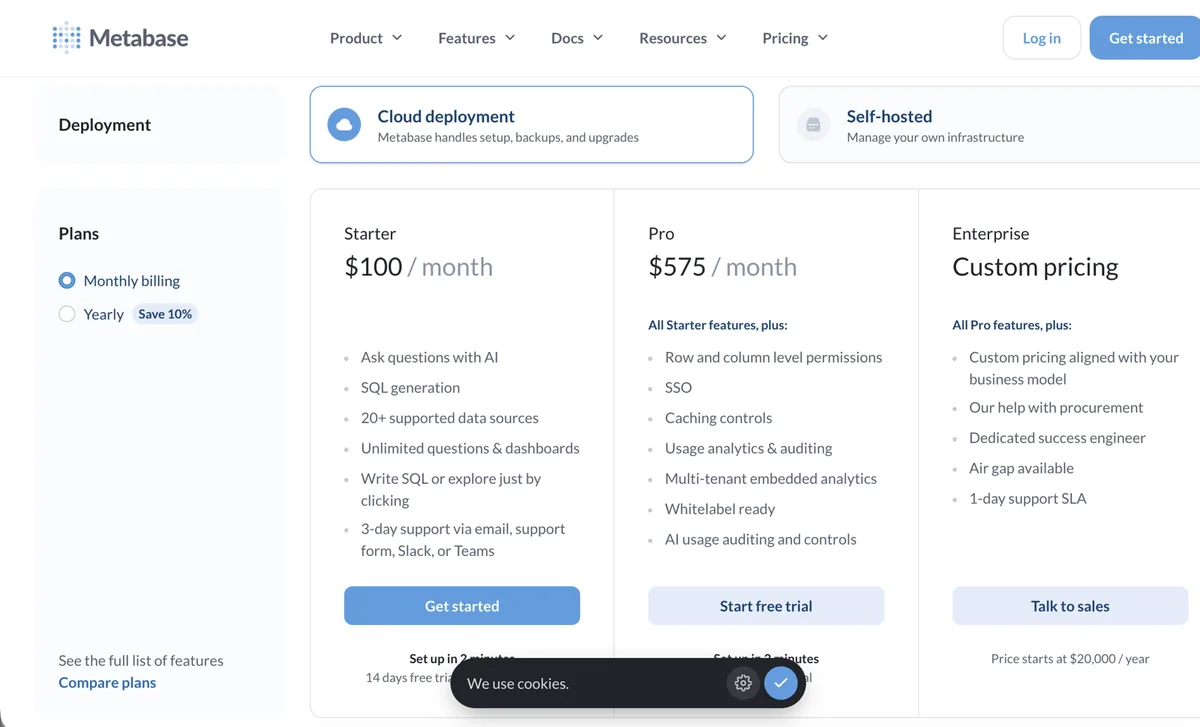
Image: Metabase pricing page, October 2026
Pros:
- An intuitive interface allows non-technical users to query data easily.
- The very fast setup process gets you to your first dashboard in minutes.
- The open-source edition provides immense value for zero licensing cost.
Cons:
- Struggles significantly when executing highly complex table joins.
- Dashboard formatting options are extremely basic.
- Lacks the robust data governance features required by large enterprises.
Metabase vs Power BI:
- Usability: Metabase is drastically simpler for beginners to grasp.
- Modelling: Power BI handles complex enterprise data modelling infinitely better.
- Cost: Metabase eliminates user licensing fees completely if self-hosted.
Skip it if: You need to build complex financial models requiring intricate DAX calculations.
Our take: Metabase is the perfect first BI tool for a startup. It gets you 80% of the way there with almost no training required.
Apache Superset

Image: Preset (managed Apache Superset) homepage, October 2026
Our score: 8.6/10
Best for: Engineering teams wanting open-source software that handles massive scale.
- Entry price: Free for Open Source.
- Pricing model: Free software, or pay for managed hosting. Preset is free for up to 5 users, then $20 per user/month billed annually.
- Free tier: 100% free open source.
- Verified: October 2026.
- Preset pricing (managed Superset)

Image: Preset pricing page, October 2026
Pros:
- Features a massive, diverse library of unique chart types.
- Connects seamlessly to almost any SQL-speaking database in existence.
- Engineered to handle huge data volumes without crashing.
Cons:
- Requires strong SQL knowledge to build meaningful datasets.
- Initial deployment and server maintenance can be highly complex.
- Lacks any built-in data preparation or ETL tools.
Apache Superset vs Power BI:
- Target Audience: Superset is built for data engineers; Power BI accommodates business analysts.
- Visual Variety: Superset offers more niche, open-source chart types.
- Data Prep: Power BI includes Power Query natively; Superset expects clean data upfront.
Skip it if: Your end users expect a drag-and-drop interface and do not know how to write SQL.
Our take: Superset is brilliant for data engineers working on massive datasets, but do not expect your marketing team to use it.
Data Studio (formerly Looker Studio)
Our score: 8.0/10
Best for: Digital marketing agencies heavily invested in the Google ecosystem.
Google renamed Looker Studio back to Data Studio in April 2026. Existing Looker Studio reports keep working under the new name.
- Entry price: Free on the Standard tier.
- Pricing model: Free core product, with a Pro tier at $9 per user per Google Cloud project each month.
- Free tier: Yes, the standard version is exceptionally generous.
- Verified: October 2026.
- Data Studio Pro pricing
Pros:
- Unbeatable native integration with Google Analytics, Google Ads, and BigQuery.
- The standard version serves as a completely free Power BI alternative for most marketing needs.
- Extremely easy to share reports via standard Google Drive permissions.
Cons:
- Performance grinds to a halt when handling large, unaggregated datasets.
- Very limited capacity for complex calculations or data transformations.
- Official support is virtually non-existent on the free tier.
Data Studio vs Power BI:
- Marketing Data: Data Studio connects to Google marketing platforms instantly.
- Enterprise Reporting: Power BI is vastly superior for complex corporate data modelling.
- Cost: Data Studio is free for an unlimited number of viewers.
Skip it if: You are dealing with millions of rows of granular transactional data from an ERP system.
Our take: Data Studio is fantastic for throwing together a quick SEO report, but it struggles hard if you throw real corporate data at it.
Budget SMB
Zoho Analytics

Image: Zoho Analytics homepage, October 2026
Our score: 7.7/10
Best for: Small to medium businesses looking for an affordable, all-in-one suite.
- Entry price: About $30 per month billed annually (Basic plan covering 2 users).
- Pricing model: Flat monthly subscription per account, based on user and row tiers.
- Free tier: 15-day trial, plus a free plan for 2 users and 10,000 rows.
- Verified: October 2026.
- Zoho Analytics pricing
Pros:
- Highly affordable entry point for small teams.
- Integrates perfectly with Zoho CRM and the broader Zoho ecosystem.
- Includes decent built-in data preparation and blending tools.
Cons:
- The user interface feels dated compared to slick modern competitors.
- Performance suffers noticeably when querying massive enterprise data volumes.
- Community support and third-party tutorials are limited.
Zoho Analytics vs Power BI:
- Cost: Zoho provides a much cheaper starting point for small businesses.
- Ecosystem: Zoho dominates its own CRM ecosystem; Microsoft dominates Office.
- Scalability: Power BI scales to enterprise levels much more effectively.
Skip it if: You are a large enterprise requiring rigorous governance and advanced DAX modelling.
Our take: Zoho Analytics is a hidden gem for small businesses, especially if you already use Zoho CRM, but you outgrow it quickly at enterprise scale.
Quick Picks Summary:
- Free and Open Source: Metabase, Apache Superset
- Best for Mac Users: Tableau, Looker (browser-based)
- Best for Linux Environments: Apache Superset
- Best for Google Ecosystem: Data Studio (formerly Looker Studio)
- Also worth a look: Strategy One (formerly MicroStrategy), which Gartner reviewers rate 4.6/5 for large governed deployments.
If Tableau is also on your list to replace, see our guide to the best Tableau alternatives.
How to choose a Power BI alternative

Selecting the right tool requires honesty about your team’s technical skills and your company’s data maturity. Start by mapping out your existing infrastructure. If you host your data in AWS, Amazon Quick Sight offers seamless native integration. If your data lives in Snowflake, evaluating cloud-native tools like Sigma makes strategic sense. If your data warehouse is still messy, fix that first, because every tool on this list inherits its problems.
Next, evaluate your end users. Are they data engineers who prefer writing SQL, or are they marketing managers who need a drag-and-drop interface? Pushing a complex tool onto a non-technical team guarantees low adoption rates, turning your expensive new software into shelfware.
Selection Checklist:
- Map your primary data sources (cloud warehouse, local Excel, APIs).
- Define the technical literacy of your average report builder.
- Count your total audience to accurately forecast licensing costs.
- Verify your operating system requirements (Mac vs Windows).
- Decide if you need embedded analytics for an external product.
What switching away from Power BI actually costs

Software vendors love to highlight their low monthly license fees while conveniently ignoring the massive hidden costs of migration. When you move to a Power BI alternative, you do not just transfer files. You have to rebuild your entire reporting logic from scratch.
The highest cost of migration is human labour. Your analysts must translate complex DAX formulas into entirely new calculation languages. Dashboards must be redesigned to fit the visual quirks of the new platform. Furthermore, you will face a temporary drop in productivity as business users climb the learning curve of the new interface.
Migration Cost Checklist:
- Analyst time required to rebuild existing reports.
- Data engineering time to rewire database connections and security policies.
- Training hours for end users to learn the new platform.
- Dual-licensing costs during the transition period (paying for both tools simultaneously).
Algoscale Project Callout: During a recent migration for a mid-market logistics firm, we found that simply auditing and pruning their thousands of unused Power BI workspaces before the move saved them over 40% in estimated rebuilding time.
How Algoscale helps
Replacing your reporting infrastructure carries significant operational risk. Choosing the wrong tool can trap your business in expensive, inflexible contracts while frustrating your data team. Algoscale provides independent, expert guidance to help you navigate this complex market.
We audit your current data architecture, analyse your exact commercial requirements, and recommend the platform that truly fits your business. We then manage the entire migration process, running both systems in parallel until the numbers match so reporting never goes dark. If the answer is to stay, our Power BI consulting team can fix the performance and licensing issues instead.
CTA banner: Not sure whether to switch or fix? Book a BI tool review
Frequently Asked Questions
What are the best alternatives to Power BI?
The best alternatives depend strictly on your use case. Tableau is the top choice for advanced visual design, Looker leads in governed self-service, and Metabase is widely considered the best open-source option for startups needing a quick setup.
Is Microsoft phasing out Power BI?
No. Power BI Pro and Premium Per User are still sold, and Power BI Desktop is still a free download. Microsoft now positions Power BI as the reporting layer of Microsoft Fabric, so the product is growing rather than being retired.
Is there a completely free alternative to Power BI?
Yes, several open-source tools offer incredible value. Metabase and Apache Superset are completely free if you host them on your own servers. Data Studio (formerly Looker Studio) also provides a highly capable free version that is excellent for web and marketing data.
What is the biggest drawback of Power BI?
For most teams it is the combination of a Windows-only Desktop app and DAX, a formula language that casual business users find hard to learn. Costs also climb once you need Premium Per User or Fabric capacity.
What is the best Power BI alternative for Mac users?
Because Microsoft does not make a native macOS desktop app, Mac users often prefer Tableau, which offers a dedicated Mac application. Alternatively, 100% web-based platforms like Looker or ThoughtSpot bypass operating system limits entirely.
Is Tableau better than Power BI?
Neither is objectively better; they serve different priorities. Tableau offers vastly superior visual formatting and design flexibility. However, Power BI integrates far more smoothly with the Microsoft Office ecosystem and is generally much cheaper to deploy at scale.
Does Google have a Power BI equivalent?
Yes. Google offers two primary tools. Data Studio (renamed from Looker Studio in April 2026) is a lightweight, often free tool excellent for marketing data. Looker (the enterprise platform) is a highly governed, heavy-duty analytics engine built for massive corporate deployments.
Is Power BI going to be replaced by AI?
Not replaced, but changed. Microsoft is adding Copilot and data agents to Power BI through Fabric capacity, while AI-first tools such as ThoughtSpot let users ask questions in plain English. Clean, governed data still decides whether any of these AI answers can be trusted.
How do ThoughtSpot vs Power BI compare?
ThoughtSpot focuses almost entirely on search-driven, natural language analytics, allowing executives to type questions and get instant charts. Power BI focuses heavily on building structured, predefined dashboard reports for regular operational tracking.
What is the main Alteryx vs Power BI difference?
They do completely different jobs. Alteryx is a powerful data preparation and advanced analytics tool used to clean and format messy data. Power BI is a visualisation tool used to display cleaned data to business users. They are frequently used together.