


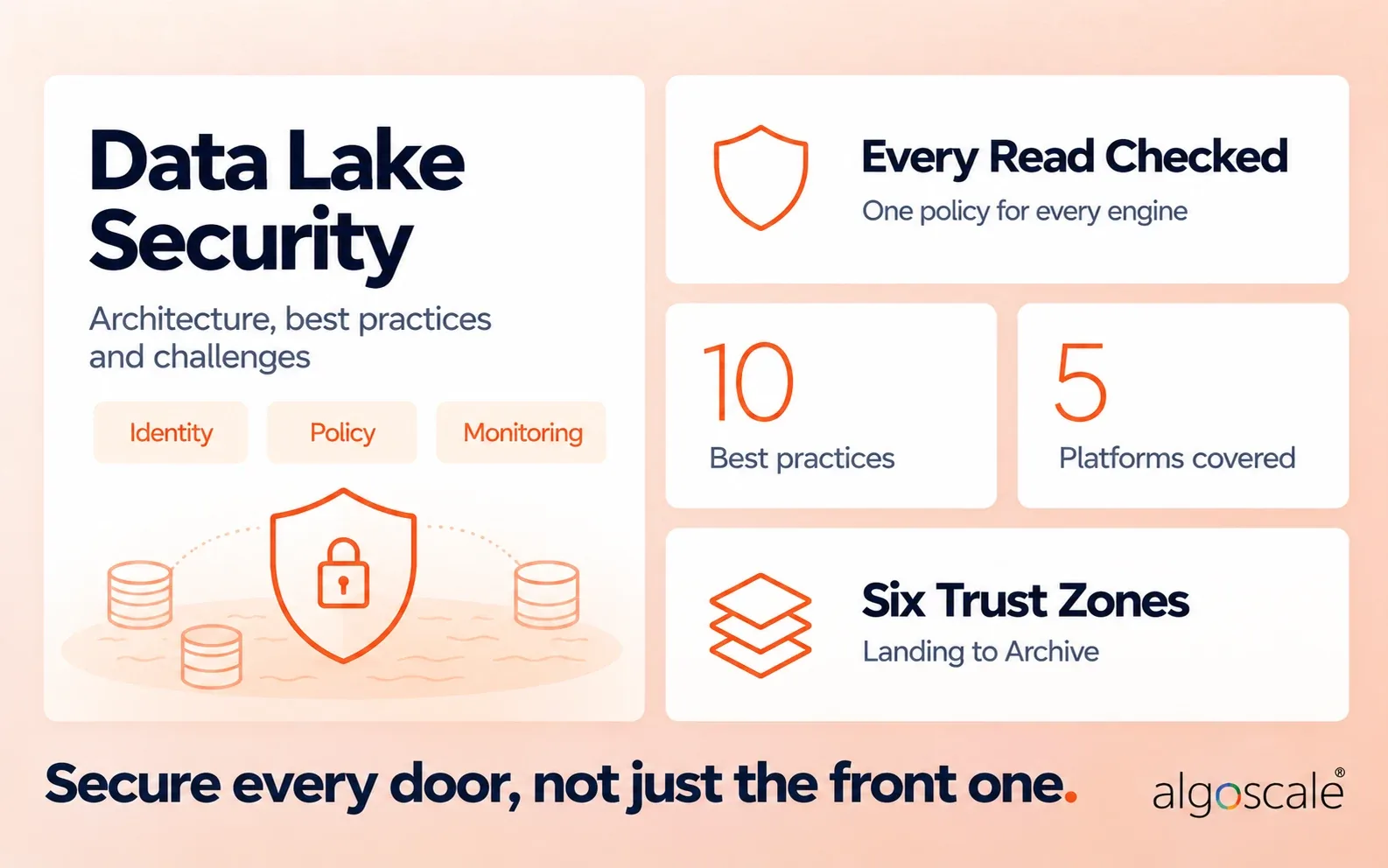

Key insights
- Data lake security is the set of controls that stops the wrong people, services and pipelines from reading, changing or exporting data in your lake.
- A lake has many front doors. Every pipeline, notebook, query engine and service account that touches storage is an entry point, unlike a warehouse’s single query engine.
- Most exposures come from misconfiguration, not broken encryption. Public buckets, overprivileged service accounts and unclassified PII are the usual culprits.
- Catalog rules mean nothing if storage is open. If a user can read the raw files directly, they skip every table, column and row rule you set.
- Zone the lake by trust. Landing, Raw, Curated, Serving, Sandbox and Archive each get their own writers, readers and controls.
- The controls are the same on every platform. AWS, Azure, Google Cloud, Databricks and Snowflake differ in service names and gaps, not in principles.
- Regulations require proof, not just controls. HIPAA, SOC 2, CCPA, PCI DSS and GLBA each need evidence you can show from the lake: logs, access reviews and deletion records.
- Start with an access audit. Knowing who and what can reach your lake today shapes every fix that follows.
What is data lake security, and why is it harder than securing a warehouse?
A warehouse has one front door. A data lake has dozens: every pipeline, notebook, query engine and service account that can touch storage. That’s why data lake security can’t rely on a single gatekeeper. It has to be designed into the lake from the start, which is how our data lake consulting services team approaches every build.
A data warehouse controls access at one layer. Data is modeled before it lands, users query through one engine, and permissions sit on tables the engine knows about.
A lake works the other way. Raw files land first, in any format, from many sources. Spark, SQL engines, notebooks and BI tools all read the same storage. Anyone with storage-level access can often read everything underneath the catalog.
| Data warehouse | Data lake | |
|---|---|---|
| Entry points | One query engine | Storage, catalog and every engine that reads it |
| Schema | Defined before data lands | Applied when data is read |
| Who writes data | A few controlled loads | Many pipelines, often automated |
| Where access is enforced | Inside the warehouse | Split across storage, catalog and engines |
| Typical blind spot | Over-broad roles | Direct reads that skip the catalog |
The goal of data lake security is to make those split controls behave like one. Every read of data lake data should pass the same policy check, whichever tool makes it.
Data lake security vs a security data lake
A security data lake stores security logs and alerts so a security team can hunt threats. Data lake security protects the business data inside your analytics lake. The names are close, but they solve different problems. This guide covers the second.
A security data lake collects telemetry from endpoints, networks, cloud accounts and SaaS apps into cheap object storage. Security analysts then query months or years of history. Amazon Security Lake and the Microsoft Sentinel data lake are two managed examples. Many use the Open Cybersecurity Schema Framework (OCSF) so logs from different tools share one format.
Is a data lake a SIEM? No. A SIEM watches events and raises alerts in near real time. A security data lake is the long-term store behind it. Teams often pair the two: the SIEM keeps recent, high-value data, and the lake keeps everything else at lower cost.
The rest of this article is about securing the lake that holds your customer, finance, health and operational data.
The biggest data lake security risks and challenges
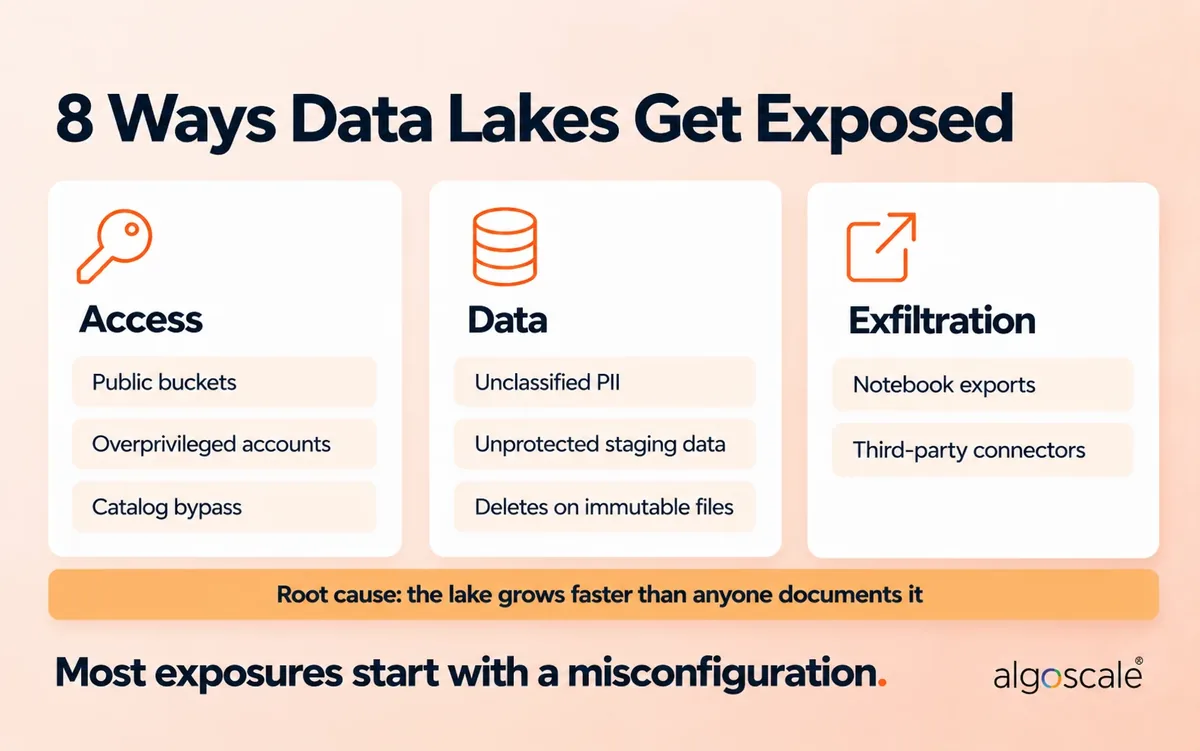
Most data lake exposures come from misconfiguration and over-broad access, not from attackers breaking encryption. These are the eight data lake challenges that show up most often.
- Public or cross-account exposure. A bucket or container opened “for testing” stays open. One permissive policy can expose the whole lake.
- Overprivileged service accounts. Pipelines collect permissions over time. A single compromised key can then read or delete far more than its job needs.
- Catalog bypass. You set careful table and column rules in the catalog. Then a user or job with direct storage access reads the raw files and skips every rule.
- Unclassified sensitive data. PII, health data or card numbers arrive inside a new feed. Nobody tags them, so no masking or access rule applies.
- Unprotected staging and temp data. Landing zones, scratch space and “temporary” extracts often hold the most sensitive data with the weakest controls.
- Exfiltration through exports. Notebooks, BI downloads and ad-hoc copies move data out of the governed zone without anyone noticing.
- Deletion requests on immutable files. Privacy laws require you to delete a person’s data. Lakes store data in large, append-only files, so a simple delete is hard to prove.
- Third-party connectors. Ingestion tools and SaaS integrations hold long-lived credentials. They’re easy to forget and hard to rotate.
Underneath most of these is the same problem: the lake grows faster than anyone documents it. When nobody knows which tables exist or who owns them, the lake becomes a data swamp, and you can’t protect data you don’t know is there.
Data lake security architecture: how to build a secure data lake

A secure data lake enforces policy on every read path, not just at the storage bucket. In practice that means five layers, with logging, keys and detection running across all of them.
- Identity. Every human signs in through single sign-on with MFA. Every pipeline and job gets its own workload identity with short-lived credentials.
- Governance and policy enforcement. A central catalog holds each table’s owner, classification and access rules. This is where table, column and row permissions live.
- Private processing. Compute runs in private networks with no public endpoints, and outbound traffic is restricted.
- Zoned storage. Data moves through zones that get more trusted as it gets cleaner, usually in a Medallion design.
- Cross-cutting controls. Audit logs, encryption keys and threat detection sit outside the layers they watch, managed by a separate team.
The design rule that matters most: storage permissions and catalog permissions must agree. If the catalog says an analyst can’t see a column but storage lets them read the file, the catalog rule means nothing.
Organize the lake into security zones
Zones let you apply stronger controls where the risk is higher. Use separate buckets, containers or accounts where the risk justifies it.
| Zone | What it holds | Who writes | Who reads | Key controls |
|---|---|---|---|---|
| Landing | Files as they arrive | Ingestion identities only | Validation jobs | Schema and malware checks; failed files go to quarantine |
| Raw | Unchanged source data | Ingestion pipelines | Data engineering only | Versioning, tight access, full audit trail |
| Curated | Cleaned, validated data | Transformation jobs | Approved services | Masking and tokenization applied here |
| Serving | Data products for BI and AI | Publishing jobs | Business users by role | Row and column rules, approved datasets only |
| Sandbox | Exploration | Data scientists | Data scientists | Masked or synthetic data, no writes to production |
| Archive | Retained history | Lifecycle policies | Few, by request | Retention locks, deletion workflow |
Case study: territory-level security on an AWS data lake
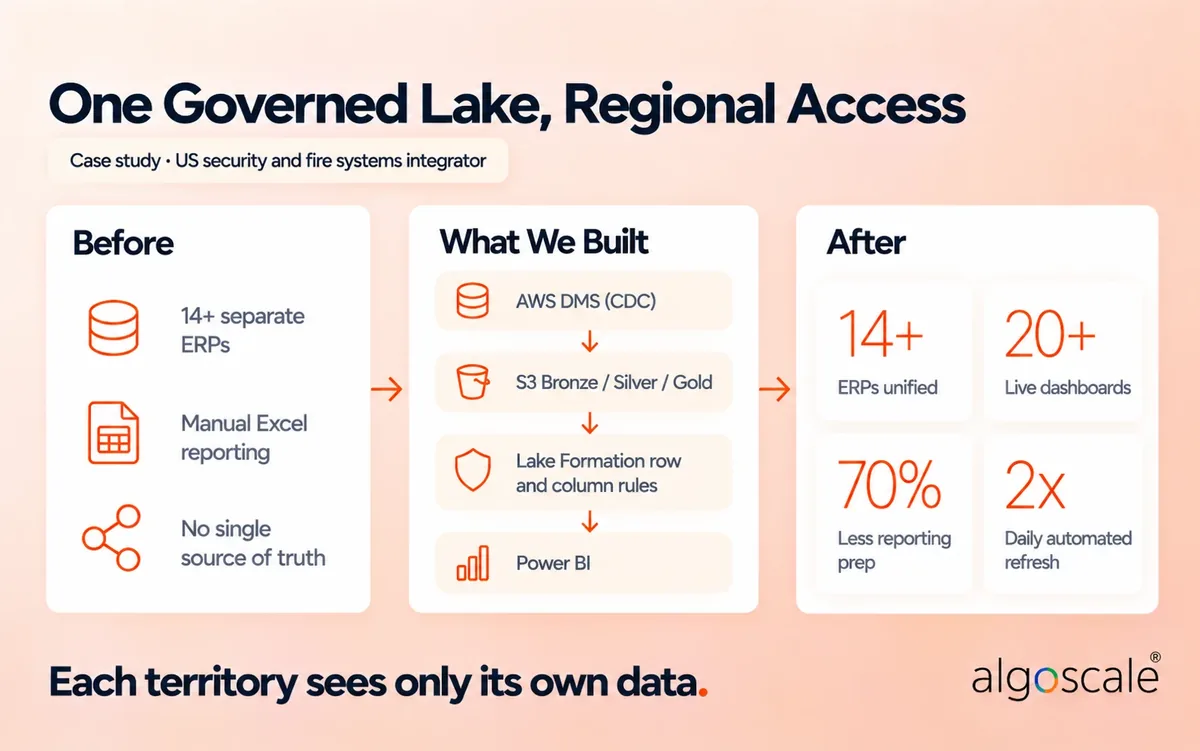
A large US physical security and fire systems integrator had grown to more than 14 subsidiaries through acquisitions. Each ran its own ERP, so leadership couldn’t see one set of numbers.
Algoscale built a single governed data lake on AWS, with Amazon S3 as the storage layer and a Bronze, Silver and Gold Medallion design. The key security decision: AWS Lake Formation applies row-level and column-level security per territory, so regional teams see only their own data. Business users needed no infrastructure changes to get this.
The platform now feeds more than 20 live Power BI dashboards, refreshes automatically twice a day, alerts on pipeline failures through CloudWatch, and cut reporting preparation time by 70%. Read the full case study.
Who owns the data and approves access?
Every dataset needs a named business owner who approves access to it. The platform team runs the controls, but it shouldn’t decide who sees payroll or patient data.
A workable split looks like this:
- Data owner: a business leader accountable for a domain. Approves access and sets the classification.
- Data steward: keeps definitions, quality rules and catalog entries current.
- Platform team: builds and runs storage, catalog, identity and pipelines.
- Security team: sets policy, reviews logs, runs access reviews and leads incidents.
Write these roles into the catalog, not a slide. The same ownership model is what makes a single source of truth hold up. If you’re setting this up for the first time, our data governance consulting team can help define ownership and policy.
10 data lake security best practices
Data lake security best practices come down to one idea: every request is checked against current policy, by identity, at the narrowest grain the data needs. Here are the ten that matter most, in rough order of impact. Together they apply the zero trust model from NIST SP 800-207 to your data.
1. Give every identity least-privilege access
Each person, pipeline and job gets its own identity and only the permissions its task needs. No shared service accounts, no wildcard access to the whole lake.
Use single sign-on with MFA for people. Use workload identities and short-lived credentials for jobs instead of static access keys. Separate the roles that run the platform from the roles that read data. Review and remove unused permissions every quarter.
2. Control access at the table, column and row level
Grant access by role for simple cases and by attribute or tag when access depends on sensitivity, region or purpose. Then apply it at the grain the data needs.
Role-based access control (RBAC) works when job roles map cleanly to datasets. Attribute-based access control (ABAC) scales better when the same table serves many groups. Tag-based policies let a rule follow a label: tag a column as PII once, and every masking policy that targets PII applies automatically.
Row filters limit which records a user sees. Column masks hide or redact sensitive fields. Together they let one governed table replace many risky copies.
3. Close every path around the catalog
Make sure no user or job can read the underlying files directly and skip your catalog rules. It’s one of the easiest gaps to miss, because the catalog looks correct.
Restrict raw storage access to the platform’s own service identities. Route all human and BI access through engines that enforce catalog policy. Then test it: try to read a restricted table’s files directly with a normal analyst account.
4. Encrypt everywhere and control the keys
Encrypt data at rest and in transit, including temp space, logs and backups. Use customer-managed keys for regulated data so you control rotation, revocation and key-use logs.
Cloud storage encrypts by default with provider-managed keys. That’s enough for low-risk data. For regulated data, use AWS KMS, Azure Key Vault or Google Cloud KMS with your own keys. Keep key administrators separate from data users, and alert on any key deletion or policy change.
5. Classify sensitive data as it lands, then mask it
Scan new data for PII, health data, card numbers and credentials at ingestion, and tag it in the catalog. Tags then drive masking, tokenization and access rules automatically.
Mask or tokenize sensitive fields before data reaches the curated zone. Use masked or synthetic data in sandboxes and test environments. Apply retention and deletion rules to every copy, not just the main table.
6. Keep storage and compute private
Your lake should not be reachable from the public internet. Block public access at the account or organization level, and use private endpoints for storage and processing.
Restrict outbound traffic from compute so a compromised job can’t send data to an unknown destination. Remember that a private network is not authorization. Every request still needs an identity check.
7. Keep secrets out of code and notebooks
Store every credential, token and connection string in a secrets manager. Never in code, notebooks, pipeline configs or logs.
Rotate secrets on a schedule and after any staff change. Give third-party connectors their own scoped credentials so you can revoke one without breaking the rest.
8. Send audit logs to a separate account
Log every access, query, permission change and export, and store the logs where data admins can’t edit or delete them.
Keep enough detail to answer “who read this table, when, and from where” without copying sensitive values into the logs. Retain logs as long as your regulations require.
9. Detect unusual access and feed your SIEM
Alert on behavior that doesn’t match normal use: a service account reading tables it never touched, mass exports, access from new locations, or permissions suddenly widened.
Send these signals to your SIEM so the security team sees lake activity next to everything else. Tie each alert type to an owner and a response step.
10. Manage security as code
Define storage policies, permissions and network rules in Terraform, CloudFormation or Bicep, and review every change.
Scan infrastructure code for misconfigurations before it deploys. Check for drift between what’s in code and what’s running. Block production policy changes that skip review.
Can strong security coexist with self-service access? Yes. Good controls are what make self-service safe. When classification, masking and row rules are automatic, you can open governed datasets to more people without a ticket for every request. That’s how security unlocks the business benefits of a data lake instead of blocking them.
Data lake security on AWS, Azure, Google Cloud, Databricks and Snowflake

The controls are the same on every platform. The service names, and the gaps between them, are not. Use this table to map the best practices to your stack.
| Platform | Storage | Access and governance | Keys | Network | Detection | Common gotcha |
|---|---|---|---|---|---|---|
| AWS | Amazon S3 with Block Public Access | IAM plus AWS Lake Formation (row, column and tag-based rules), Glue Data Catalog | AWS KMS | VPC endpoints, bucket policies | CloudTrail, GuardDuty, Macie, Security Hub | Lake Formation rules don’t stop a principal with direct S3 access to the same files |
| Azure | Azure Data Lake Storage Gen2 | Microsoft Entra ID, Azure RBAC plus POSIX-style ACLs, Microsoft Purview | Azure Key Vault | Private Link, storage firewall | Defender for Cloud, Azure Monitor | An RBAC role that grants data access means ACLs are never checked, so broad roles override careful ACLs |
| Google Cloud | Cloud Storage | IAM, Dataplex Universal Catalog, BigLake and BigQuery policies | Cloud KMS | VPC Service Controls | Cloud Audit Logs, Security Command Center, Sensitive Data Protection | VPC Service Controls blocks exfiltration but doesn’t replace IAM or column-level rules |
| Databricks | Your cloud storage, governed by Unity Catalog | Unity Catalog grants, row filters, column masks, ABAC with governed tags | Cloud KMS of your provider | Private connectivity to the workspace | System tables for audit and lineage | Users with direct access to the underlying storage can skip Unity Catalog rules |
| Snowflake | Snowflake-managed or external storage (Iceberg tables) | Role hierarchy, masking policies, row access policies, tag-based masking | Snowflake-managed keys or customer-managed keys | Network policies, PrivateLink | Access history in account usage views | Overuse of ACCOUNTADMIN and external stages that store credentials instead of using storage integrations |
Two patterns hold across all five. First, lock raw storage down to the platform’s own identities, so the catalog is the only door. Second, keep audit logs outside the account or workspace they watch.
For table-format controls in a lakehouse (Iceberg, Delta, Hudi), see our guide to data lakehouse security best practices.
Mapping US compliance requirements to your data lake
Regulations don’t mention data lakes. They require controls, and you have to prove those controls work inside the lake. Map each requirement to a specific control, owner and piece of evidence.
| Regulation | What it asks of a data lake | Controls that cover it |
|---|---|---|
| HIPAA Security Rule | Access controls, audit controls, integrity and transmission security for electronic health data; breach notice within 60 days of discovery | Least privilege, column masking for PHI, encryption, separate audit logs |
| SOC 2 | Evidence that security controls are designed well and, for Type II, work over time | Access reviews, change management as code, logging and alerting |
| CCPA / CPRA | Consumers can ask you to delete or disclose their data; “reasonable security” is expected | Catalog-driven discovery, row-level deletes, classification |
| PCI DSS v4.0 | Protect stored card data, restrict access by need to know, log access and keep logs at least 12 months | Tokenization, isolated zone for card data, audit log retention |
| GLBA Safeguards Rule | Encryption, MFA and access controls for customer financial data; notify the FTC within 30 days of a breach affecting 500 or more consumers (FTC guidance) | Encryption with managed keys, SSO with MFA, incident runbook |
| GDPR (if you hold EU data) | Right to erasure; notify the regulator within 72 hours of a qualifying breach | Deletion workflow, data residency, incident response |
End each row in your own version of this table with an owner and the evidence an auditor will ask for: a log query, an access review record, or a policy file in source control.
For how this plays out in a regulated industry, see our post on data lakehouse architecture for healthcare.
How do you delete personal data from immutable files?
Use a table format that supports row-level deletes, then remove the old file versions that still hold the data. A delete that leaves old snapshots behind isn’t a real delete.
- Find the records. Use catalog tags and lineage to locate every table and copy that holds the person’s data.
- Delete the rows. Run a row-level DELETE on Apache Iceberg or Delta Lake tables. Plain Parquet folders need the affected files rewritten.
- Clean up old versions. Time travel keeps old files. Run Delta’s VACUUM, or expire snapshots and remove orphan files in Iceberg, once your retention window allows.
- Keep the proof. Log the request, the tables touched and the completion time. That record is what you show an auditor.
Incident response, backup and ransomware recovery
Decide who can revoke access, and test a restore, before you need either. A plan written during an incident is too late.
Your plan should answer five questions in advance:
- Who can act? Name the people who can disable an identity, rotate a key or block a bucket at any hour.
- How do you contain it? Know how to isolate one dataset, pipeline or account without taking the whole platform down.
- Who must you tell, and by when? List your regulatory and contractual notice deadlines in one place.
- How do you recover? Turn on object versioning, keep immutable backups in a separate account, and give backup admins different credentials from data admins.
- What did you learn? Run a review after every incident and ask why existing controls didn’t catch it sooner.
Rehearse the plan at least once a year. A test restore of a real table tells you more than any document.
Data lake security audit checklist and roadmap
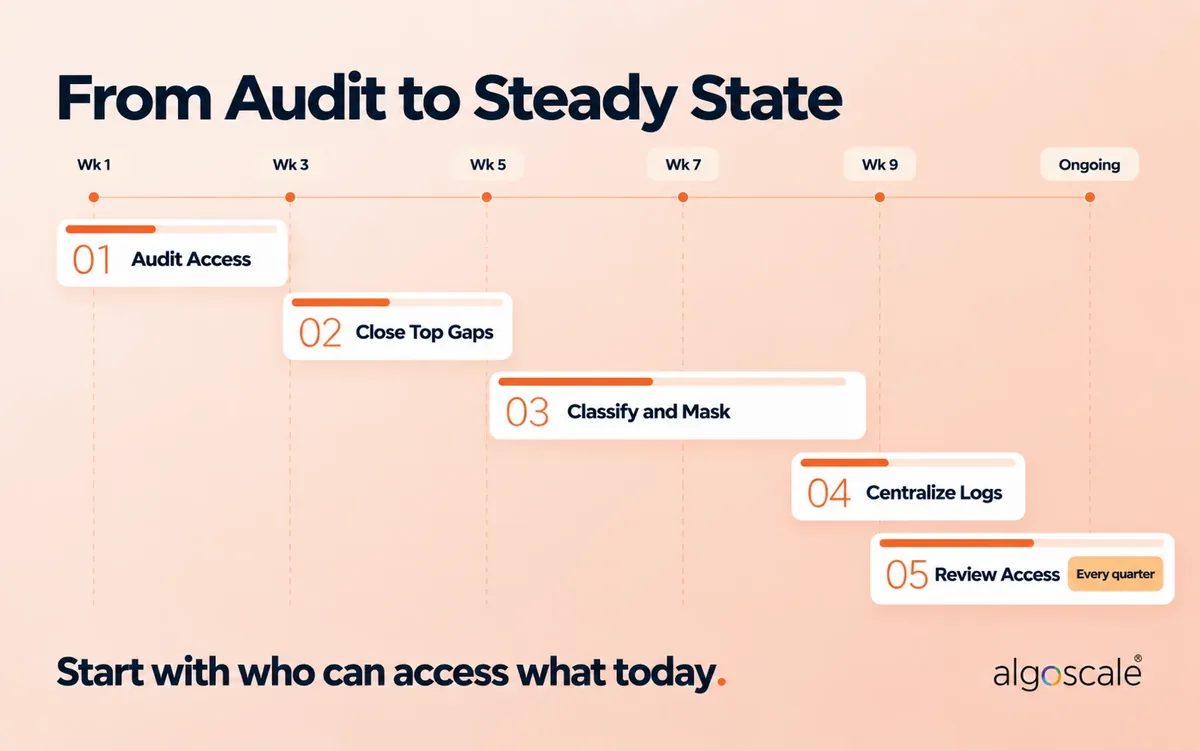
Start with who and what can access your lake today. Every other fix depends on that answer. Use this checklist to audit an existing lake, then follow the roadmap to close the gaps.
Audit checklist, by layer:
- Identity: SSO and MFA for every human? A separate identity per pipeline? No long-lived access keys?
- Access: Every table has an owner and a classification? Row and column rules on sensitive data? Direct storage reads blocked for users?
- Data protection: Encryption everywhere, including staging and backups? Customer-managed keys for regulated data? Sensitive fields masked before the curated zone?
- Network: Public access blocked at the account level? Private endpoints for storage and compute? Outbound traffic restricted?
- Monitoring: Audit logs in a separate account? Alerts on mass exports and permission changes? Logs feeding the SIEM?
- Recovery and compliance: Versioning and immutable backups on? A tested restore in the last year? A working deletion workflow?
Roadmap:
- Audit current access (weeks 1-2). List every identity with lake access and remove what’s no longer needed.
- Close the highest-risk gaps (weeks 3-4). Public access and overprivileged service accounts are usually the biggest risk for the least effort.
- Classify and mask sensitive data (weeks 5-8). Start with the datasets that carry the most regulatory risk.
- Centralize logging and alerting (weeks 9-10). Get visibility first, then tune detection on top.
- Formalize reviews (ongoing). Put access reviews, key rotation and policy audits on a fixed schedule.
The timeline fits a mid-size lake with a dedicated platform team. Larger estates take longer, but the order stays the same.
How Algoscale helps you secure your data lake
We audit existing data lakes for security gaps and build new ones with security designed in from day one. That covers access design, catalog and policy enforcement, encryption and key management, and the evidence your auditors will ask for.
On AWS, we’ve delivered territory-level row and column security with Lake Formation for a US security and fire systems integrator, without changing how business users work. Algoscale is ISO 27001 certified.
If you’re planning a new lake or want a second opinion on an existing one, talk to our data lake consulting team.
Frequently Asked Questions
What is a security data lake?
A security data lake is a central store for security logs, alerts and telemetry, used for threat hunting and long-term investigation. It’s different from data lake security, which protects the business data inside an analytics lake. Amazon Security Lake and the Microsoft Sentinel data lake are managed examples.
Is a data lake a SIEM?
No. A SIEM watches security events and raises alerts in near real time. A security data lake stores security data for the long term at lower cost. Many teams use both: the SIEM for recent, high-value events, and the lake for history and deep investigation.
Is Amazon S3 a data lake, and is it secure by default?
S3 is the storage layer of a data lake, not the whole lake. New S3 buckets block public access and encrypt objects by default. You still own the rest: bucket policies, IAM permissions, Lake Formation rules, customer-managed keys where needed, and logging.
What is the difference between IAM and AWS Lake Formation?
IAM controls who can use AWS services and resources. Lake Formation controls which databases, tables, columns and rows they can see in the data lake. They work together. A principal with direct S3 permissions on the same files can bypass Lake Formation, so restrict that access.
Is Snowflake a data lake, and does that change who secures the data?
Snowflake is a cloud data platform that supports data lake and lakehouse patterns, including Iceberg tables on external storage. Snowflake secures the platform. You own roles, masking policies, row access policies, network policies and how data is shared.
What are the security downsides of a data lake?
A lake gathers raw data from many systems in one place, needs broad access for engineering, and stores data in files that are hard to change. Without catalog-driven governance, sensitive data goes untagged, access spreads, and deletion requests become hard to prove.
Who owns a data lake and approves access to it?
Each dataset should have a named business owner who approves access and sets its classification. The platform team runs storage, catalog and identity. The security team sets policy and reviews logs. Record these owners in the catalog so every access decision is traceable.
How do you delete personal data from a data lake?
Find every copy through catalog tags and lineage, then run row-level deletes on Iceberg or Delta Lake tables. Remove old file versions with VACUUM or snapshot expiry once retention allows. Log the request and completion so you can prove it to an auditor.
Do we need customer-managed encryption keys?
Not for every dataset. Provider-managed encryption is usually fine for low-risk data. For regulated or highly sensitive data, customer-managed keys give you control over rotation, revocation and key-use logs, which many compliance frameworks and customers expect.
How often should data lake access be reviewed?
Quarterly is a common baseline. Review highly sensitive datasets monthly, and run an extra review after reorganizations, team changes or a project ending. Automate the review list from your catalog and identity provider so it doesn’t depend on memory.










