


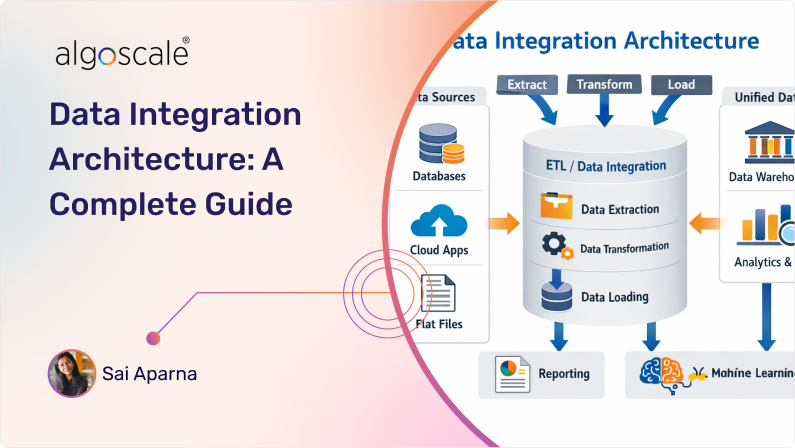

Does all your data really live in one place? No we don’t think so. We understand that data is everywhere and businesses have multiple departments and piles of data to handle. Sales data sits in one system, customer data in another, operational data somewhere else and your team might not even know which file is “Q3 sales data final”. As data sources grow and platforms multiply, moving the data becomes harder than storing it. That’s where data integration stops being a backend task and starts becoming an actual concern.
The data integration architecture gives you an idea of how your multiple data sources flow across your systems, how often it moves and how these transformations are handled. Without a clear architecture, integrations turn into weak connections that are difficult to scale, debug, or change. Teams keep spending more time fixing these broken pipelines than using the data.
Modern organizations need data integration consulting services to face these data demands. Data needs to move faster, sometimes in real time. It also needs to support analytics, applications, and machine learning at the same time. And it needs to work across on premise systems, cloud companies and may be SaaS tools without constant rework.
In this guide we will break down about the architecture in a clear and practical way. We’ll explain what it is, how does it work, modern approaches and the challenges teams face while building one.
Lets dive in!
What is Data Integration Architecture?
Data integration architecture is a framework to design how data moves between IT systems so that it can be combined into a single, consistent view. It defines how data is extracted from multiple sources, how it is transformed, and how it is delivered to platforms such as data warehouses, data lakes or applications.
Because data exists in different formats, schemas, and storage systems, integration cannot be handled in an ad-hoc manner. A well defined architecture of data integration provides your business with clear rules for how to capture the data, applying transformations, and maintaining consistency as data flows across various systems.
Core Components of Data Integration Architecture

A data integration architecture works best when every part of the data flow has a clear role. Instead of building one long pipeline for eCommerce companies, the architecture can be broken down into components so that it can handle ingestion, processing, control and consumption. This modular approach is what makes modern integration of data architecture easier to scale and monitor over time.
We have mentioned below the core components that typically form a reliable and easy to maintain integration.
1. Data Sources
As the name suggests, the data sources are the systems where data originates. These can be your transactional databases, SaaS applications, ERP, CRM systems, log, APIs and event streams. In an enterprise data integration architecture, sources often vary widely in structure, frequency, and reliability, which is why the architecture must be designed in such a way that it can handle data diversities from the start.
2. Data Connectors/ Ingestion
This component is responsible for pulling or receiving data from source systems. Connectors may work in batch mode, real time, or fully streaming depending on the use case. In a real time data integration architecture, ingestion actually focuses on low latency and change capture, meanwhile batch ingestion priority would be completeness.
3. Staging Area
The staging area acts as a temporary landing zone for the incoming data. This isolates source systems from downstream processing and provides a safe place for validation, deduplication, and basic data checks. This layer helps prevent partial or corrupted data from further flowing into the system.
4. Transformation Layer
The transformation layer applies a business logic to your raw data. This includes cleansing, normalizing, enrichment and aggregation. Transformation ensures that data from different sources aligns in structure and makes sense before it is consumed. Many data integration patterns rely on this layer to standardize data across systems.
5. Storage/Target Systems
This is where integrated data is ultimately stored. Target systems may include data warehouses, data lakes, operational databases or some specific application stores. In a big data integration architecture, this layer seems to be supporting high volumes and different role based access patterns.
6. Orchestration
Orchestration controls when and how integration processes should run. This manages workflow, scheduling, monitoring, logging, notifications and failure handling. Without orchestration, integrations become a bit challenging to monitor and even harder to debug as complexity grows.
7. Data Governance & Metadata
This component ensures data remains secure, traceable and trustable. It manages your business metadata, data lineage, access controls, and quality rules. Data governance is especially critical in regulated environments and large scale customer data integration architecture setups.
8. Data Access/Consumption
The final component enables data to be used. Analytics tools, applications, dashboards and APIs access are integrated through this layer. A properly designed access layer ensures consumers get the data they need without compromising on governance or duplicating the logic.
Altogether, these architecture components form a strong foundation for a scalable data integration architecture, by bringing all disconnected systems into a coordinated and one reliable data flow.
Common Data Integration Architecture Patterns
Understanding data integration architecture patterns helps you design integration systems that are reliable, maintainable, and fit for the real world applications and demands. Patterns are not rigid rules that need to be followed, rather they are proven ways to structure how data flows, and how the systems communicate, and how complexity is controlled as scale increases.
Here are the five of the most commonly used patterns businesses use and you can encounter in modern data integration setups:
1. Hub and Spoke Pattern
This is actually one of the most traditional and widely adopted patterns for integration. A central hub acts as the integration engine here, it receives data from source systems, applies transformations or validations, and routes to target systems. This pattern simplifies management because the logic is always centralized and makes it easier to control data movement.
2. Enterprise Service Bus (ESB) Pattern
In this pattern, an ESB acts as a central bus that enables different systems to communicate through one standard messaging and mediation service. This provides loose coupling between endpoints, supports protocol transformations, and can also include routing, orchestration, and security policies. ESB patterns are often used where message related integration and flexible transformation logics are required.
3. Point to Point Pattern
This is the simplest pattern where systems connect directly to one another with no requirement of a central coordinator. It works fine when there are only a few systems, but as connections grow, it can be a bit challenging to maintain. This pattern is often seen in smaller or early stage integration efforts.
4. Real Time/Event Driven Integration Pattern
This pattern focuses on moving data as events occur using messaging or streaming mechanisms. Instead of waiting for scheduled batches, this setup keeps processing data continuously so that systems react to the changes quickly. It is suitable for use cases like fraud detection, alerts, or operational dashboards where latency matters.
5. Data Mesh Pattern
Rather than centralizing all integration logic at once, the data mesh pattern distributes this responsibility to domain teams. Each domain owns and publishes its data products under one common governance standard. This pattern actually is useful for large enterprises to scale integration and support a more domain aligned approach.
These patterns provide standard templates for structuring data flow covering traditional centralized designs to modern domain oriented approaches. The right choice depends on factors such as the amount of data your business handles, team requirements and governance.
Benefits of Implementing Data Integration Architecture
When data integration is designed intentionally and not worked on parts over time, the benefits show up very quickly. A well planned architecture of data integration changes how teams trust their data, how faster can the systems talk to each other, and scalable the overall set becomes.
Here are the key benefits, explained in practical terms.
1. Clear and Consistent Data Flow
A well structured architecture of enterprise data integration controls where data comes from and how it moves. Instead of multiple versions of the same data that keeps floating across systems, integrations follow defined paths and rules. This reduces dependencies.
2. Faster Data Movement
With a modern data integration architecture, data need not wait for batches. Real time data and batch flows can coexist in the same setup. This flexibility is more valuable when business operational systems need fresh data while analytical platforms would be still working with the scheduled loads.
3. Better Data Control
As businesses scale, point to point integrations will definitely break down. A federated data integration hub architecture helps you manage growing pipelines by standardizing how connections, transformations, and routing logic are being handled.
4. Improved Decision Making
Integrating data from various sources helps you understand your business as well as customers better. This also allows you to stay aligned across CRM systems, marketing platforms, and operational tools. This avoids sync issues and improves your decision making and ensures downstream systems work with the same customer context.
Common Challenges of Data Integration Architecture

Even with the right intent and purpose, data integration rarely stays simple for long. As your data grows and data volumes increase things get complicated and few challenges tend to keep showing up. Understanding these pitfalls early helps teams design integrations that last.
1. Managing Too Many Connections
When integrations grow organically, point to point connections start to pile up. What begins as a few simple pipelines quickly turns into a tangled setup that would be a bit difficult to maintain, change or debug.
2. Handling Different Data Speeds
Some systems produce data in real time, while others update only a few times a day. Designing integrations that can handle both without any delays or duplicating logic is a bit harder than expected.
3. Data Quality Issues at the Source
Integration pipelines are only as reliable as the data they receive. Missing fields, inconsistent formats, and unexpected schema changes can break down processes if validations are not properly built in.
4. Lack of Visibility and Monitoring
Without proper observability, system failures can go unnoticed. Pipelines may silently stop running or deliver partial data, leaving the teams to discover issues much more late through reports or application errors.
5. Orchestration and Dependency Complexity
As these pipelines depend on one another, executing them in order becomes critical. Managing retries, failures, and downstream impacts without a clear orchestration layer can be a result of a heavy manual work.
6. Scaling with Business Growth
What works for a few systems often struggle under higher volumes and more frequent data changes. Scaling integrations without constant rework would require an upfront architectural approach.
6 Data Integration Architecture Tools

Since we’ve covered data integration architecture best practices, let’s discuss a few tools that can make your data journey easier, because we know choosing the right tool is the big part of making this architecture work in practice. The tools mentioned below play specific roles like moving, transforming, orchestrating or enriching data.
1. Fivetran

Fivetran is built for teams that want stable, low maintenance pipelines. It focuses on moving data from common SaaS applications and databases into analytical systems with very minimal setup, Fivetran handles schema changes automatically, which removes a lot of manual operational work from the data teams and that’s why businesses choose it.
2. Airbyte

This tool gives the team a bit more control over how the integrations are built and deployed. Being open source, it allows customization at the connector level and supports cloud, on-prem, and hybrid data integration architecture setups. If your teams need flexibility without fully building pipelines from scratch then Airbyte would be the perfect solution for your business. It’s actually often chosen by many.
3. Apache Kafka

Apache Kafka is a core building block of real time data streaming capabilities. Instead of moving the data in batches, Kafka enables continuous event streaming between systems. It is commonly used when systems need to react to the changes instantly, suppose application events, user activity or any operational signals. Kafka fits naturally into your data architectures where it can generate instantly, not hours later.
4. AWS Glue

If your business works with cloud native environments, especially if your teams are already on AWS, then this tool is the best choice. It can run ETL jobs with no coding required and simplifies ingestion and transformation by providing serverless execution and built-in schema discovery. Glue is often used for large scale batch integrations and designed to assist teams in finding, preparing and combining data for both analytics and machine learning.
5. Talend Data Fabric

These tools offer a broader platform that combines data ingestion, transformation, management, data quality, and governance, Talend data integration architecture is commonly used in enterprise environments where logic needs to be standardized and monitored closely across many systems.
6. Integrate.io

Integrate.io focuses on making integration workflow easier to build and manage a low code interface. It supports both ETL and ELT patterns and is actually used by teams that need quick delivery without sacrificing control over the transformations and scheduling.
Together, these tools cover different integration needs, from scheduled batch pipelines to real time streaming and data transformations. In practice, most architectures use a combination of tools rather than relying on one single tool.
Best Practices of Data Integration Architecture

Strong architectures are never about choosing the best tools. They come from a set of practical decisions and best practices that keep data flows reliable, flexible and easy to manage as the environment evolves.
Here are some best practices that we mentioned that can consistently make a difference.
1. Design for Change, Not Perfection
Source systems keep changing. Schemas will evolve. New data can appear out of nowhere. Businesses need to build integrations that can absorb change without breaking everything downstream. Metadata driven configurations can help a lot here.
2. Separate Ingestion from Transformation
Landing the data first and transforming it later gives you more control. It makes the reprocessing easier, reduces data loss, and allows different teams to apply their own logic without disturbing the data ingestion layer.
3. Support Multiple Integrations
All the data cannot be forced into batch or real time. Some use cases need streaming updates, others would be perfectly fine with scheduled loads. A good architecture supports both without duplicating pipelines.
4. Centralize Orchestration and Monitoring
Execution logic, alerts, messaging, and retries, all should live in one place. Central orchestration improves reliability and makes it easier to understand how pipelines behave under any failure condition.
5. Treat Integration Logic as Code
Version control, testing, and deployment pipelines are just as important for integration workflows as they are for applications. This helps you keep changes traceable and reduces accidental breakage.
6. Build Governance Into the Flow
Protecting your data should always be the first priority. Businesses need to establish policies for ownership, privacy and stewardship. Using encryption, access control, and compliance checks keeps your data safe and secure, This also ensures that the data you are working with is trustworthy.
The architecture of data integration is not about adding layers. It’s about making data movement easier, observable and also adaptable to the data that keeps flowing in.
Examples of How Data Integration Architecture is Used
The architecture becomes meaningful when you see how it works in real situations. Below are practical examples that show how integration supports different business and technical needs, without reworking on the same architecture all time.
1. Customer Data Unification
In many businesses, customer data lives in CRM systems, support tools, marketing platforms, and product databases. A perfectly designed integration continuously extracts updates from each system and syncs changes across platforms. This keeps customer profiles consistent without having teams to manually recheck the data.
2. Real-Time Event Processing
For applications that rely on live signals mainly in ecommerce websites metrics such as user activity, transactions, or system events, data keeps coming as activities happen on the website. Data pipelines route these events for alerts, monitoring, or operational workflows, allowing systems to respond immediately instead of waiting for batch updates.
3. Analytics Ready Data for Reporting & BI
Operational data from multiple sources is integrated on a scheduled basis, transformed into one consistent structure, and would be delivered to analytical systems. This allows reporting and analytics teams to work from clean, aligned datasets without working again on logic for every dashboard or query.
4. Data Synchronization
Some use cases are not analytical at all. Data integration by nature is used to keep all data sources in sync, such as pushing order updates from an ecommerce platform into ERP or inventory systems. These integrations are designed to be reliable and resilient, or else it can directly impact the operations.
5. Supporting Data Science and ML Workflows
Integration pipelines feed this data into experimentation and are used in model training environments. Raw datasets will be delivered according to schedules, making it easier for your data scientists to focus on modeling instead of chasing data from different sources.
This s not always about one specific outcome. It quietly supports analytics, operations, and real time applications by making sure the right data reaches the right system at the right time.
How Algoscale Designs Scalable Data Integration Architectures
Algoscale designs data integration architectures with a strong focus on how data actually moves across the business operations. Instead of starting with the tools itself, we begin by understanding the data sources, dependencies, and the frequency of the data that needs to flow.
The process starts with mapping real data movement, no we don’t believe in theoretical flows. Source systems, update frequencies, data ownership, failure impact are analyzed in detail. We help you understand the difference between critical operational integrations and analytics to prevent everything from being treated the same way.
Architectures are designed to be intentionally modular. Ingestion, transformation, and delivery are separated so pipelines can keep evolving based on the data. This allows teams to introduce new data sources, switch tools, or change data targets without disrupting the existing integrations.
Our team focuses on orchestration and control. Execution order, dependency handling, retries, and observability are designed upfront, based on how these data integrations might behave under failure as well. Many integration architectures fail in practice, and this where experience matters the most, and don’t worry we handled it many times.
Governance is embedded directly into integration flows itself. Metadata, lineage, and access controls are treated as part of the architecture, ensuring that integrations remain auditable and manageable even if the data piles up and environment scales.
Most importantly, Our team of data architects design data architectures with long term operability in mind. Our goal is not just to move data today, but to ensure that teams can operate, debug and extend their integrations months and years ahead without any rework.
This experience driven design philosophy is what enables us to deliver data integration solutions that remain stable under environment changes and continue to support evolving business needs.
Conclusion
Data integration architecture is no longer a technical concern. As businesses grow, the data keeps piling up and it moves at different speeds. The way your data integrations are designed will directly impact reliability, scalability, and day to day operations.
A well designed architecture of data integration brings a solid structure to data movement. It helps teams manage data complexity, adapt to change, and keep the data flowing across all the platforms. More importantly, this sets the foundations for analytics, applications, and operational systems to work from consistent and trusted data. This also helps businesses to understand their customers better and make data driven decisions.
As we already mentioned that designing architecture requires more than just choosing the right tools or patterns, it actually requires understanding real integration challenges, understanding how systems evolve, and building for long term operability.
This is where Algoscale data integration consulting services step in. Algoscale works closely with organizations to design and enterprise data integration architectures that are reliable and aligned with real business and technical requirements.
If you are evaluating your current integration setup or planning for growth, a well designed architecture can make all the difference.
FAQ:
What is the best data integration architecture?
There is no single best architecture. The right choice depends on the volume of data, data sources, scale, latency needs, and how frequently your systems change. So you need to understand your business needs before choosing the best architecture.
ETL vs ELT: which is better?
ETL works well for controlled, structured processing, while ELT is better suited for cloud platforms where transformation can happen at scale after the loading.
How much does data integration architecture cost?
Costs vary based on tools, data volume, and complexity. Well designed architectures reduce long term operational and maintenance costs. Annual software licensing typically ranges from $10,000 to over $100,000. Whereas custom enterprise solutions can range from $5,000 to $50,000 or more.
Can data integration architecture support real-time data?
Yes, modern integration architectures support real time and streaming data alongside traditional batch pipelines.
Is cloud data integration secure?
Cloud-based data integration can be highly secure when access controls, encryption, and governance are designed into the architecture from the start.










