


Modern businesses generate large amounts of data from CRM systems, marketing platforms, websites, mobile apps, databases, and enterprise applications. However, this data often remains scattered across different systems, creating data silos that make it difficult for organizations to gain a complete view of their operations.
According to industry reports, over 60% of organizations struggle with data silos, which slows down analytics and decision-making. At the same time, companies are using more tools than ever before, making data integration a critical part of modern data management.
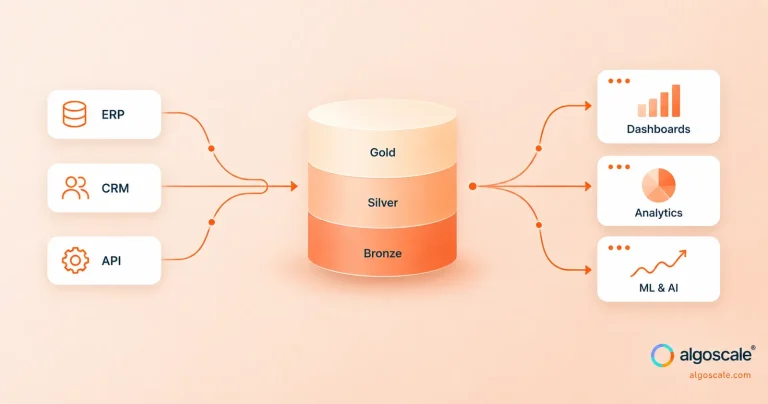
Data integration tools help solve this problem by collecting and combining data from multiple sources into centralized platforms like data warehouses, data lakes, and analytics systems. These tools automate data ingestion, transformation, and synchronization, enabling teams to build reliable data pipelines for reporting, business intelligence, and AI.
With the rise of cloud computing, real-time analytics, and AI-driven insights, the demand for modern data integration platforms continues to grow. Many organizations also rely on data integration consulting services to design scalable integration architectures, implement reliable data pipelines, and connect multiple data sources efficiently. In this guide, we explore the top data integration tools used by modern data teams, along with their key features, use cases, and benefits for building a scalable modern data stack.
What Are Data Integration Tools?
Data integration tools are software platforms that combine data from multiple sources and move it into a centralized system for analysis, reporting, and business intelligence.
Organizations today collect data from many systems such as:
- CRM platforms
- ERP systems
- Marketing tools
- Databases
- SaaS applications
- IoT devices
- Cloud platforms
A data integration tool helps bring all this data together into a single unified data environment.
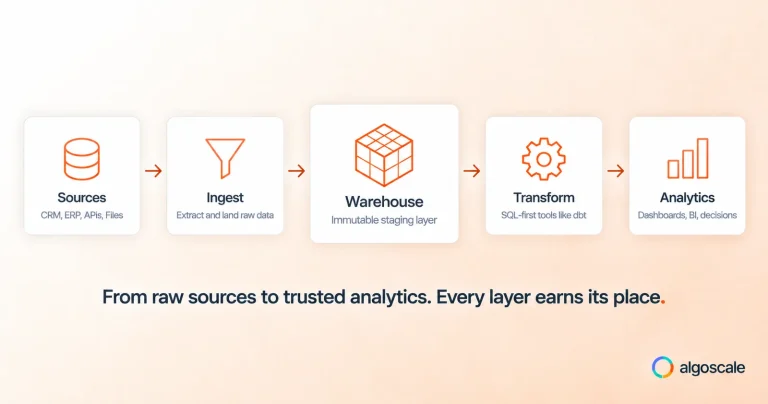
Most modern integration tools automate the process of:
- Data ingestion – collecting data from multiple sources
- Data transformation – cleaning, structuring, and formatting data
- Data loading – moving data into a target system like a warehouse or data lake
These processes are often referred to as ETL (Extract, Transform, Load) or ELT (Extract, Load, Transform) pipelines.
With the rise of cloud data warehouses like Snowflake, BigQuery, and Redshift, many organizations are adopting ELT pipelines where raw data is loaded first and then transformed within the data warehouse.
Data integration tools help ensure that data flows smoothly across systems so that business teams, analysts, and data scientists can work with accurate and up-to-date information.
Why Businesses Need Data Integration Tools
As companies grow, their data ecosystem becomes more complex. Data is generated across many departments, platforms, and digital channels. Without proper integration, organizations face data silos, inconsistent reporting, and limited visibility.
Data integration platforms help solve these problems by connecting systems and automating data pipelines.
1. Eliminate Data Silos
Many organizations store data in different applications such as CRM, marketing tools, finance systems, and analytics platforms. When these systems are not connected, data remains isolated in silos.
Data integration tools help break down these silos by combining information from multiple sources into a unified data platform. This makes it easier for teams to access consistent and complete data.
2. Enable Real-Time Analytics
Modern businesses increasingly rely on real-time data analytics to make faster decisions. For example, e-commerce companies need real-time insights on customer data integration tools, sales performance, and marketing campaigns.
Data integration tools enable real-time data pipelines tools that continuously move and update data across systems, allowing organizations to monitor performance and react quickly to changes.
3. Improve Data Quality
When data is collected from multiple sources, it often contains errors, duplicates, or inconsistent formats.
Many data integration platforms include data cleansing, transformation, and validation features that improve overall data quality. This ensures that analytics reports and dashboards are based on accurate and reliable data.
4. Power Business Intelligence and AI
Business intelligence tools such as Power BI, Tableau, and Looker depend on integrated data to generate insights. Similarly, machine learning and AI models require large volumes of structured data.
Data integration tools help prepare and deliver the data needed for advanced analytics, predictive modeling, and AI applications.
5. Automate Data Pipelines
Manual data integration processes can be time-consuming and error-prone. Many organizations previously relied on scripts or manual exports to move data between systems.
Modern data integration platforms automate these workflows by building automated data pipelines that continuously extract, transform, and load data without manual intervention.
Types of Data Integration Tools
There are several types of data integration tools available today. Each category serves different use cases depending on the organization’s data infrastructure and integration needs.
1. ETL / ELT Tools
ETL and ELT tools are the most common types of data integration platforms.
ETL (Extract, Transform, Load) tools extract data from different systems, transform it into a structured format, and then load it into a target database or warehouse.
ELT (Extract, Load, Transform) tools follow a slightly different approach. They first load raw data into a cloud data warehouse and perform transformations afterward using the warehouse’s processing power.
ELT has become more popular with the rise of cloud data warehouses and scalable computing resources.
2. Cloud-Native Data Integration Platforms
Cloud-native integration platforms are designed specifically for modern cloud environments.
These tools integrate easily with cloud data warehouses, SaaS applications, and cloud storage services. They often provide features such as:
- Scalable data pipelines
- Serverless architecture
- Automated data ingestion
- Pre-built connectors for cloud applications
Cloud-native tools are widely used by organizations adopting the modern data stack.
3. iPaaS (Integration Platform as a Service)
iPaaS platforms focus on application integration and workflow automation.
These tools connect different business applications such as CRM, ERP, marketing platforms, and finance systems. They are often used by non-technical teams to automate business processes and data synchronization.
iPaaS platforms typically provide low-code or no-code interfaces, making them accessible to business users.
4. Open-Source Data Integration Tools
Open-source integration tools allow organizations to build and customize their own data pipelines.
These tools are popular among data engineering teams because they provide flexibility and community-driven development. Organizations can modify connectors, create custom transformations, and integrate with various data platforms.
However, open-source tools often require more technical expertise to manage and maintain.
5. Enterprise Data Integration Platforms
Enterprise data integration tools are designed for large organizations with complex data environments.
These platforms offer advanced capabilities such as:
- Data governance
- Metadata management
- Data lineage tracking
- Master data management
- Security and compliance features
Enterprise tools are commonly used in industries such as banking, healthcare, telecom, and manufacturing, where data reliability and governance are critical.
Let’s Go Through With Table First
| Tool Name | Headquarters | Core Expertise | What Makes It Different |
|---|---|---|---|
| Fivetran | Oakland, California, USA | Automated ELT data pipelines | Known for fully automated data connectors and minimal maintenance for cloud data warehouses |
| Informatica | Redwood City, California, USA | Enterprise data integration & governance | Strong AI-powered data management and governance capabilities for large enterprises |
| Talend | Suresnes, France / Boston, USA | Open-source ETL and data quality | Popular for its open-source ecosystem and strong data quality tools |
| Azure Data Factory | Redmond, Washington, USA | Cloud data pipeline orchestration | Deep integration with Microsoft Azure ecosystem and analytics services |
| AWS Glue | Seattle, Washington, USA | Serverless ETL and big data processing | Fully serverless ETL service built for AWS data environments |
| Matillion | Manchester, United Kingdom | Cloud-native ELT for data warehouses | Designed specifically for cloud data warehouses like Snowflake and BigQuery |
| SnapLogic | San Mateo, California, USA | iPaaS and AI-powered integration | Uses AI-assisted workflow automation and low-code pipelines |
| Boomi | Conshohocken, Pennsylvania, USA | Low-code enterprise integration | Strong application integration and API management capabilities |
| Stitch | Philadelphia, Pennsylvania, USA | Lightweight ELT data pipelines | Known for simple setup and affordable cloud data ingestion |
| Hevo Data | San Francisco, California, USA | No-code real-time data pipelines | Focuses on real-time streaming pipelines with minimal engineering effort |
| Airbyte | San Francisco, California, USA | Open-source data integration | Highly flexible with 600+ connectors and custom connector development |
| Qlik | King of Prussia, Pennsylvania, USA | Real-time data replication & analytics | Strong change data capture (CDC) for real-time analytics pipelines |
| Oracle Data Integrator | Austin, Texas, USA | Enterprise ELT data processing | High-performance ELT architecture optimized for Oracle databases |
| Coupler.io | Kyiv, Ukraine | No-code SaaS data integration | Focuses on marketing and analytics data automation for non-technical users |
| Jitterbit | Alameda, California, USA | API-led integration and automation | Combines iPaaS, API management, and low-code automation platform |
List of Top 15 Data Integration Tools
Below are 15 of the most widely used data integration tools that help organizations build scalable data pipelines, automate ETL/ELT processes, and connect multiple data sources.
1. Fivetran
Fivetran is one of the most popular cloud-based data integration tools used by modern data teams. It helps organizations automatically move data from various sources such as SaaS applications, databases, and APIs into cloud data warehouses.
The platform focuses on ELT pipelines, where raw data is first loaded into a data warehouse and then transformed for analytics. Fivetran is widely used because it offers hundreds of ready-to-use connectors and requires minimal manual configuration.
This makes it a great choice for companies that want to build reliable and automated data pipelines without spending too much time on maintenance.
Key Features
- 700+ pre-built data connectors
- Automated schema management
- Incremental data updates
- Native integration with cloud data warehouses
- Built-in data pipeline monitoring
Pros
- Very easy to set up and maintain
- Large connector ecosystem
- Highly reliable automated pipelines
- Strong support for modern data stacks
Cons
- Pricing can be expensive for high data volumes
- Limited customization compared to open-source tools
Pricing
Fivetran uses a usage-based pricing model based on monthly active rows (MAR).
Best For
- Data engineering teams
- Cloud data warehouse integrations
- Businesses building modern analytics platforms
2. Informatica Cloud Data Integration
Informatica provides one of the most comprehensive enterprise data integration platforms available today. Its Cloud Data Integration tools allows organizations to build scalable ETL and ELT pipelines across cloud and on-premise systems.
The platform includes advanced features such as data governance, metadata management, and AI-driven automation, making it a popular choice for large organizations managing massive volumes of data.
Many enterprises use Informatica to integrate data from ERP systems, legacy databases, cloud platforms, and business applications into a centralized data warehouse.
Key Features
- Advanced ETL and ELT capabilities
- AI-powered automation with CLAIRE engine
- Data quality and governance tools
- Hybrid and multi-cloud integration
- Enterprise security and compliance features
Pros
- Very powerful enterprise platform
- Strong data governance capabilities
- Supports complex integration workflows
- Highly scalable for large organizations
Cons
- Expensive compared to many other tools
- Requires skilled teams for implementation
Pricing
Pricing is typically enterprise-based and customized depending on usage and deployment.
Best For
- Large enterprises
- Complex data ecosystems
- Organizations needing strong data governance
3. Talend Data Integration
Talend is a well-known data integration and ETL platform that offers both open-source and enterprise versions. It helps organizations connect, clean, and manage data from multiple systems.
Talend is widely used by data engineers because it provides strong data transformation, data quality, and data governance capabilities. The platform supports both batch and real-time data pipelines, making it suitable for a variety of integration use cases.
Its open-source foundation also allows organizations to customize pipelines according to their specific requirements.
Key Features
- Open-source ETL platform
- Advanced data transformation tools
- Data quality and profiling features
- Real-time and batch data integration
- Integration with big data companies
Pros
- Strong open-source community
- Flexible and customizable
- Good data quality capabilities
- Supports big data environments
Cons
- Setup and maintenance can require technical expertise
- Enterprise features require paid licensing
Pricing
Talend offers:
- Free open-source version
- Paid enterprise subscription plans
Best For
- Data engineering teams
- Organizations needing customizable ETL pipelines
- Companies using big data platforms
4. Azure Data Factory
Azure Data Factory is a cloud-based data integration service provided by Microsoft. It allows organizations to create and manage data pipelines for cloud and hybrid environments.
Azure Data Factory provides a visual interface where users can design workflows, automate ETL processes, and integrate data from hundreds of sources.
The platform integrates seamlessly with other Azure services such as Azure Synapse Analytics, Azure Data Lake, and Power BI, making it a popular choice for organizations already using the Azure ecosystem.
Key Features
- Visual pipeline builder
- Hybrid data integration support
- Built-in connectors for cloud and on-premise sources
- Integration with Azure analytics services
- Scalable serverless architecture
Pros
- Strong integration with Azure services
- Flexible pipeline orchestration
- Supports large-scale data processing
- Cost-effective for Azure users
Cons
- Works best within the Azure ecosystem
- May require technical expertise for advanced workflows
Pricing
Azure Data Factory uses a pay-as-you-go pricing model based on pipeline activities and data movement.
Best For
- Organizations using Microsoft Azure
- Hybrid cloud data integration tools
- Large-scale data pipeline orchestration
5. AWS Glue
AWS Glue is a serverless data integration service developed by Amazon Web Services. It helps organizations discover, prepare, and integrate data for analytics and machine learning.
AWS Glue automatically generates ETL code using Apache Spark, which allows data engineers to build scalable data pipelines without managing infrastructure.
The service also includes a data catalog, which helps organize metadata and makes it easier to discover and manage datasets across the AWS environment.
Key Features
- Serverless ETL pipelines
- Automatic schema discovery
- Built-in data catalog
- Apache Spark-based processing
- Native integration with AWS analytics services
Pros
- Fully managed and serverless
- Highly scalable
- Strong integration with AWS data services
- Supports big data processing
Cons
- Best suited for AWS environments
- Debugging ETL jobs can sometimes be complex
Pricing
AWS Glue pricing is based on compute usage and data processing time.
Best For
- Organizations using AWS infrastructure
- Big data analytics pipelines
- Machine learning data preparation
6. Matillion
Matillion is a cloud-native data integration and ELT platform designed for modern cloud data warehouses. It helps organizations move and transform data from multiple sources into platforms like Snowflake, Amazon Redshift, Google BigQuery, and Azure Synapse.
Matillion focuses on ETL techniques, where data is first loaded into a cloud data warehouse and then transformed within the warehouse environment. The platform provides a visual interface that allows data teams to build complex data pipelines and transformations without writing large amounts of code.
Because it is optimized for cloud environments, Matillion is widely used by organizations building a modern data stack.
Key Features
- Visual data pipeline builder
- ELT workflows for cloud data warehouses
- Pre-built connectors for cloud applications
- Scalable cloud architecture
- Built-in orchestration and scheduling
Pros
- Strong integration with cloud data warehouses
- Easy-to-use visual interface
- Highly scalable for large data workloads
- Good support for ELT transformations
Cons
- Mainly designed for cloud environments
- Licensing can be expensive for smaller teams
Pricing
Matillion offers subscription-based pricing depending on deployment size and data usage.
Best For
- Cloud data warehouse users
- Data engineering teams
- Organizations building modern analytics platforms
7. SnapLogic
SnapLogic is a cloud-based integration platform as a service (iPaaS) that helps organizations connect applications, data sources, and APIs.
The platform provides a low-code interface where users can design integration workflows using drag-and-drop components called “Snaps.” SnapLogic also uses AI-powered features to recommend pipeline designs and improve integration efficiency.
It supports both application integration and data integration, making it useful for connecting business systems while also building data pipelines for analytics.
Key Features
- Low-code drag-and-drop pipeline builder
- AI-powered workflow recommendations
- Large library of connectors
- API and application integration
- Cloud and hybrid deployment options
Pros
- User-friendly visual interface
- Supports both application and data integration
- Strong automation features
- AI-powered assistance for building pipelines
Cons
- Pricing can be high for smaller businesses
- Some advanced features require technical expertise
Pricing
SnapLogic provides enterprise subscription pricing based on usage and integration requirements.
Best For
- Organizations needing both application and data integration
- Businesses automating workflows across systems
- Teams looking for low-code integration platforms
8. Dell Boomi
Boomi (formerly known as Dell Boomi) is a widely used iPaaS platform that enables organizations to connect applications, data sources, and devices.
Boomi provides a low-code development environment that allows users to design integration workflows without extensive coding. It supports data synchronization, API management, and application integration across cloud and on-premise systems.
Many organizations use Boomi to automate business processes and ensure consistent data flow between enterprise systems such as ERP, CRM, and marketing platforms.
Key Features
- Low-code integration platform
- API management capabilities
- Application and data integration
- Real-time data synchronization
- Cloud-native architecture
Pros
- Easy to use for both technical and non-technical users
- Strong enterprise integration capabilities
- Large connector library
- Supports hybrid deployments
Cons
- Pricing may be expensive for small businesses
- Advanced customization can require technical expertise
Pricing
Boomi offers subscription-based enterprise pricing depending on the number of integrations and services used.
Best For
- Enterprise application integration
- Workflow automation
- Hybrid cloud environments
9. Stitch
Stitch is a simple and lightweight cloud data integration tool designed for quickly building ELT pipelines.
It allows organizations to extract data from various sources such as SaaS applications, databases, and APIs and load it directly into a cloud data warehouse.
Stitch is known for its easy setup and simple configuration, making it a good choice for small to medium-sized teams that need reliable data pipelines without complex infrastructure.
The platform supports integration with popular analytics destinations like Snowflake, BigQuery, and Amazon Redshift.
Key Features
- Simple ELT pipeline setup
- Pre-built data connectors
- Automated data replication
- Integration with major cloud data warehouses
- Scheduling and monitoring tools
Pros
- Easy to set up and use
- Good for quick data integration projects
- Affordable for smaller teams
- Reliable automated pipelines
Cons
- Fewer advanced features compared to enterprise tools
- Limited customization options
Pricing
Stitch offers tiered pricing plans based on data volume and integration usage.
Best For
- Startups and small data teams
- Lightweight analytics pipelines
- Organizations building early-stage data infrastructure
10. Hevo Data
Hevo Data is a modern no-code data integration platform that helps organizations move data from multiple sources into cloud data warehouses.
The platform focuses on real-time data integration, enabling businesses to continuously stream data from SaaS applications, databases, and cloud services.
Hevo provides automated schema management, built-in transformations, and monitoring features that make it easy to build reliable data pipelines without writing code.
Because of its simplicity and automation capabilities, Hevo is widely used by companies that want to quickly implement modern analytics pipelines.
Key Features
- No-code data pipeline builder
- Real-time data streaming
- Automated schema mapping
- 150+ pre-built connectors
- Built-in data transformation features
Pros
- Very easy to use
- Real-time data pipeline support
- Minimal maintenance required
- Good monitoring and alerting features
Cons
- May not support extremely complex pipelines
- Pricing increases with higher data volume
Pricing
Hevo provides subscription-based pricing depending on data volume and integrations.
Best For
- Businesses needing real-time data pipelines
- Analytics teams without heavy engineering resources
- Organizations adopting the modern data stack
11. Airbyte
Airbyte is a popular open-source data integration platform that helps organizations move data from multiple sources into data warehouses, lakes, and analytics platforms. It has quickly gained popularity among data engineers because of its flexible architecture and large connector ecosystem.
Airbyte allows teams to build custom connectors when a specific integration is not available. It supports both cloud and self-hosted deployments, making it suitable for organizations that want full control over their data pipelines.
Because it is open source, many companies use Airbyte to build scalable ELT pipelines within the modern data stack.
Key Features
- Open-source data integration platform
- 600+ pre-built connectors
- Custom connector development
- Cloud and self-hosted deployment options
- Automated data pipeline scheduling
Pros
- Highly flexible and customizable
- Strong open-source community
- Large connector library
- Supports modern data stack architectures
Cons
- Requires technical expertise to manage
- Enterprise features require paid plans
Pricing
Airbyte offers:
- Free open-source version
- Paid cloud and enterprise plans
Best For
- Data engineering teams
- Organizations needing customizable pipelines
- Companies building open-source data platforms
12. Qlik Data Integration
Qlik provides a powerful data integration platform designed to support real-time data movement and analytics workflows. Its integration tools help organizations collect, transform, and deliver data to analytics platforms and cloud data warehouses.
Qlik Data Integration includes features like change data capture (CDC) and real-time data streaming, which allow businesses to continuously replicate data from operational systems into analytics environments.
The platform is often used alongside Qlik’s analytics tools to create end-to-end data and analytics pipelines.
Key Features
- Real-time data replication
- Change data capture (CDC) technology
- Automated data pipeline orchestration
- Integration with cloud data warehouses
- Built-in monitoring and management tools
Pros
- Strong support for real-time integration
- Scalable for large enterprise data environments
- Reliable data replication capabilities
- Integrates well with analytics platforms
Cons
- Enterprise pricing may be expensive
- Setup may require experienced data engineers
Pricing
Pricing is generally enterprise-based and customized depending on deployment size and features.
Best For
- Real-time analytics pipelines
- Large enterprise data environments
- Organizations requiring continuous data replication
13. Oracle Data Integrator
Oracle Data Integrator is a powerful enterprise ELT platform developed by Oracle. It helps organizations integrate large volumes of data across databases, applications, and cloud environments.
Oracle Data Integrator uses an ELT architecture, where data transformations are performed directly within the target database. This approach improves performance and scalability for large data processing workloads.
The platform is commonly used by enterprises that rely on Oracle databases and enterprise applications.
Key Features
- High-performance ELT architecture
- Integration with Oracle databases and applications
- Advanced data transformation capabilities
- Enterprise security and governance features
- Hybrid cloud and on-premise deployment
Pros
- Very powerful for large data workloads
- Strong integration with Oracle technologies
- Highly scalable architecture
- Advanced enterprise security features
Cons
- Complex setup and configuration
- Best suited for Oracle-based environments
Pricing
Oracle Data Integrator typically follows enterprise licensing models.
Best For
- Large enterprises
- Oracle ecosystem users
- Complex enterprise data integration projects
14. Coupler.io
Coupler.io is a simple no-code data integration tool designed for marketing teams, analysts, and small businesses. It helps users automatically move data from various SaaS platforms into spreadsheets, databases, or business intelligence tools.
Coupler.io is widely used to integrate data from platforms such as advertising tools, CRM systems, and marketing analytics platforms. The tool allows users to schedule automatic data imports so dashboards and reports always stay up to date.
Because of its ease of use, Coupler.io is a great option for teams that need quick and simple data synchronization without complex data engineering work.
Key Features
- No-code data pipeline setup
- Automated data imports and scheduling
- Integration with marketing and analytics platforms
- Supports Google Sheets, Excel, and BI tools
- Easy dashboard data automation
Pros
- Very easy to use
- Quick setup for non-technical users
- Ideal for marketing analytics workflows
- Affordable pricing
Cons
- Limited advanced data transformation features
- Not suitable for large-scale enterprise pipelines
Pricing
Coupler.io offers subscription-based pricing plans depending on data sources and automation frequency.
Best For
- Marketing analytics teams
- Small businesses and startups
- Automated reporting workflows
15. Jitterbit
Jitterbit is an integration platform as a service (iPaaS) that helps organizations connect applications, APIs, and data systems. It enables companies to automate workflows and integrate data across cloud and on-premise environments.
Jitterbit provides tools for API integration, application integration, and data synchronization, making it useful for connecting enterprise systems such as CRM, ERP, and marketing platforms.
The platform includes a visual interface that allows users to design integration workflows while also supporting advanced customization for developers.
Key Features
- API integration platform
- Application and data integration
- Workflow automation tools
- Drag-and-drop integration designer
- Hybrid cloud deployment support
Pros
- Strong API integration capabilities
- Good automation features
- Supports complex enterprise integrations
- Flexible deployment options
Cons
- Enterprise pricing may be high for small teams
- Advanced workflows require technical knowledge
Pricing
Jitterbit offers custom enterprise pricing based on integrations and usage.
Best For
- API-led integration strategies
- Enterprise application integration
- Workflow automation across business systems
How to Choose the Right Data Integration Tool
Choosing the right data integration platform depends on several factors such as the size of the organization, the complexity of data pipelines, and the existing technology stack.
Here are some key factors businesses should consider.
1. Connector Availability
A good data integration tool should support a wide range of connectors for databases, SaaS platforms, APIs, and cloud services.
Organizations should ensure that the platform can easily connect with their existing systems such as CRM, ERP, marketing tools, and data warehouses.
2. Scalability
As businesses grow, their data volumes increase significantly. A reliable data integration platform should be able to handle large datasets and scale with growing data needs.
Cloud-native tools often provide better scalability because they can automatically allocate resources as workloads increase.
3. Real-Time vs Batch Processing
Some organizations require real-time data integration, while others rely on batch processing.
Real-time pipelines are useful for use cases like fraud detection, customer data integration tools, and operational monitoring. Batch processing may be sufficient for periodic reporting or data warehousing tasks.
The right tool should support the integration model that fits the organization’s needs.
4. Ease of Use
Ease of use is another important factor when selecting a data integration platform.
Many modern tools provide visual pipeline builders, drag-and-drop interfaces, and low-code capabilities. These features allow both technical and non-technical users to create and manage data pipelines more easily.
5. Pricing Model
Data integration tools follow different pricing models such as:
- Subscription-based pricing
- Usage-based pricing
- Volume-based pricing
- Enterprise licensing
Organizations should evaluate pricing based on data volume, number of connectors, pipeline complexity, and scalability requirements.
Key Trends in Data Integration (2026)
The data integration landscape continues to evolve as organizations adopt new technologies and modern data architectures. Several trends are shaping the future of data integration.
1. Rise of ELT Pipelines
ELT pipelines are becoming the preferred approach for modern analytics architectures. By loading raw data directly into cloud data warehouses, organizations can perform transformations more efficiently using the warehouse’s computing power.
This approach simplifies pipeline management and supports scalable analytics.
2. AI-Powered Data Integration
Artificial intelligence is increasingly being used to automate data integration tasks.
Modern tools use AI to automatically detect schema changes, recommend transformations, monitor data pipelines, and identify anomalies in data workflows.
This reduces manual effort and improves the reliability of data pipelines.
3. Real-Time Data Streaming
Businesses are increasingly adopting real-time data streaming technologies to process data instantly.
Streaming data integration allows organizations to capture events from applications, IoT devices, and user interactions in real time, enabling faster insights and decision-making.
4. Growth of the Modern Data Stack
The modern data stack is a collection of cloud-based tools used for data ingestion, storage, transformation, and analytics.
Data integration platforms play a central role in this ecosystem by connecting various components such as:
- Cloud data warehouses
- Data transformation tools
- Business intelligence platforms
- Machine learning systems
5. Increasing Focus on Data Governance
As organizations collect more data, data governance and compliance are becoming critical priorities.
Modern integration platforms are incorporating features such as data lineage, access control, metadata management, and audit tracking to ensure secure and compliant data management.
Our Verdict on These 15 Data Integration Tools
Choosing the right data integration tool depends on your organization’s data infrastructure, technical expertise, and scalability needs. For enterprises managing complex data environments, platforms like Informatica and Azure Data Factory provide strong governance, automation, and enterprise-grade capabilities. Tools such as Fivetran and Hevo Data are excellent for building automated and modern cloud data pipelines with minimal engineering effort.
Meanwhile, open-source platforms like Airbyte offer flexibility for teams that want greater control over their data pipelines. Ultimately, the best solution depends on your data ecosystem, analytics goals, and whether you need real-time, batch, or hybrid data integration.
Conclusion
Data integration tools play a critical role in helping organizations connect data from multiple sources and build reliable data pipelines for analytics and decision-making. As businesses continue to adopt cloud platforms, AI, and real-time analytics, the need for scalable and automated data integration solutions will only grow. The right tool depends on factors such as your data architecture, scalability needs, and integration requirements. By choosing the right platform—or working with experienced data integration consulting services—organizations can streamline data workflows, eliminate data silos, and unlock more value from their data to support smarter business insights and innovation.