



Key insights
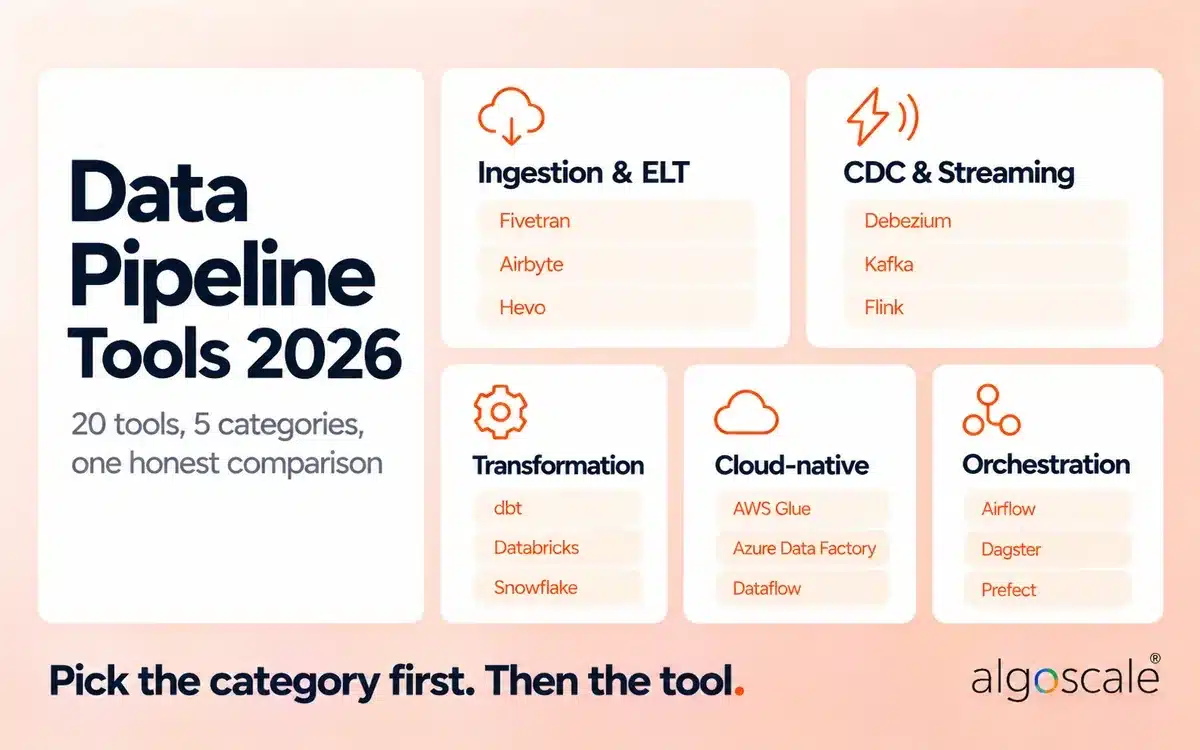
- No single tool runs a whole pipeline. The market splits into five categories: ingestion (managed ELT), CDC and streaming, transformation, orchestration, and cloud-native platforms. Most production stacks combine two or three.
- Pick the category first, then the tool. Airflow, Fivetran and dbt are not alternatives to each other. One schedules, one moves data, one transforms it.
- Pricing units differ more than prices. Fivetran bills by monthly active rows, Databricks by DBUs, AWS Glue by DPU-hours, Snowflake by credits, and Prefect Cloud by seats. Model next year’s volume against each unit before you sign.
- Open source is not the same as free. Kafka, Flink, Airflow, Dagster, Prefect, dbt Core, Debezium and dlt are Apache 2.0. Airbyte’s connectors are source-available under ELv2. All of them still need people and infrastructure to run.
- Latency decides the category. Hourly or daily reports suit batch ELT. Fraud checks, live inventory and AI features need log-based CDC or streaming.
- AWS Data Pipeline is closed to new customers (since July 25, 2024). AWS points teams to AWS Glue, Step Functions and Amazon MWAA instead.
- Proof from our work: we unified 14+ ERP systems into one AWS lake with DMS-based CDC, 20+ Glue PySpark jobs and Step Functions orchestration, cutting reporting prep time by more than 70%.
Quick picks by category
| If you need… | Start with | Strong alternative |
|---|---|---|
| Managed ingestion from SaaS apps | Fivetran | Hevo Data |
| Open-source / self-hosted ingestion | Airbyte | dlt |
| Log-based CDC from databases | Debezium (open source) | Estuary or Striim (managed) |
| Event streaming | Apache Kafka | Confluent (managed Kafka) |
| Transformation in the warehouse | dbt | Matillion |
| Large-scale processing and ML | Databricks | Apache Spark (self-run) |
| Orchestration | Apache Airflow | Dagster |
| AWS-native | AWS Glue + Step Functions | Amazon MWAA |
| Azure-native | Azure Data Factory | Fabric Data Factory |
| Google Cloud-native | Google Cloud Dataflow | Cloud Composer (managed Airflow) |
This guide compares the 20 data pipeline tools we see most often in client stacks, grouped by the job each one does, with pricing models, licenses, honest limitations and example stacks. Algoscale builds pipelines on these tools for clients through our data engineering services and data integration consulting, and we don’t sell any of them, so no tool here is ranked first because we make it.
What is a data pipeline tool?

A data pipeline tool is software that moves data from where it is created (databases, SaaS apps, event streams, files) to where it is used (a warehouse, lake, dashboard or AI model), and changes it on the way. Some tools do one step well; full pipelines usually combine several.
Every pipeline has three main stages:
- Ingest: pull data from sources, in batches or continuously with change data capture (CDC).
- Process: clean, join, enrich and model it.
- Serve: deliver it to the places that use it, such as BI dashboards, applications and machine learning features.
Many teams describe the same flow in five steps: collect → ingest → store → transform → serve, with orchestration and monitoring running across all of them.
An example of a data pipeline: a retailer copies Salesforce opportunities and Postgres orders into Snowflake every 15 minutes with Fivetran, models revenue in dbt, schedules both with Airflow, and serves the result to a Power BI dashboard. Four tools, one pipeline.
Is a data pipeline the same as ETL?
No. ETL (extract, transform, load) is one kind of data pipeline. “Data pipeline” is the broader term: it also covers ELT, streaming, CDC replication and reverse ETL, and the orchestration that ties them together.
| Pattern | What happens | Typical tools |
|---|---|---|
| ETL | Transform before loading into the warehouse | Informatica, AWS Glue, SSIS |
| ELT | Load raw data first, transform inside the warehouse | Fivetran or Airbyte + dbt |
| Streaming / CDC | Capture every change and move it continuously | Debezium, Kafka, Flink, Estuary |
| Reverse ETL | Push modelled warehouse data back into business apps | Hightouch, Census |
For the full comparison, see our guide to ETL vs ELT. If you are specifically shortlisting ETL software, our list of top ETL tools for data engineering goes deeper on that category.
The 5 types of data pipeline tools

Data pipeline tools fall into five categories: ingestion (managed ELT), CDC and streaming, transformation and processing, orchestration, and cloud-native platforms. Each solves a different problem, and choosing from the wrong category is a bigger mistake than choosing the wrong tool inside the right one.
| Category | What it does | Typical latency | Example tools | Hidden tradeoff |
|---|---|---|---|---|
| Ingestion / managed ELT | Copies data from SaaS apps and databases into a warehouse | Minutes to hours | Fivetran, Airbyte, Hevo | Row- or volume-based pricing grows fast on busy tables |
| CDC and streaming | Captures every change from database logs or events and moves it continuously | Sub-second to seconds | Debezium, Kafka, Flink, Estuary, Striim | You operate (or pay for) always-on infrastructure |
| Transformation and processing | Cleans, joins and models data, in the warehouse or on a cluster | Scheduled or triggered | dbt, Databricks, Snowflake | Doesn’t ingest; needs a separate loader |
| Orchestration | Decides what runs when, retries failures and alerts | Scheduled or event-driven | Airflow, Dagster, Prefect | Coordinates other tools; doesn’t move data itself |
| Cloud-native platforms | One cloud’s managed ETL, integration and orchestration services | Minutes to hours | AWS Glue, Azure Data Factory, Dataflow | Strong inside one cloud, weaker across clouds |
ByteByteGo’s five-minute explainer is a good visual summary of how these pieces connect:
Data pipeline tools compared
The table below covers all 20 tools in this guide. Pricing describes the billing unit, not a list price, because list prices change often; each tool section links to the vendor’s own pricing page.
| Tool | Category | Open source / license | Pricing unit | Latency | Deployment | Best for |
|---|---|---|---|---|---|---|
| Fivetran | Managed ELT | Commercial | Monthly active rows (MAR) | Minutes | SaaS | Hands-off SaaS-to-warehouse ingestion |
| Airbyte | ELT | ELv2 (source-available) + commercial cloud | Free self-hosted; cloud usage-based | Minutes | Self-hosted or cloud | Connector breadth with self-hosting |
| Hevo Data | Managed ELT | Commercial | Events per month (tiers) | Minutes | SaaS | No-code pipelines for small teams |
| Matillion | ELT / transformation | Commercial | Credits | Minutes | SaaS / hybrid | Visual ELT pushed down into the warehouse |
| Informatica IDMC | Enterprise ETL / ELT | Commercial | Processing units (IPUs) | Batch to near real-time | Cloud / hybrid | Large enterprises with governance needs |
| Debezium | CDC | Apache 2.0 | Free (you run it) | Seconds | Self-hosted on Kafka Connect | Open-source log-based CDC |
| Apache Kafka / Confluent | Event streaming | Apache 2.0 / commercial | Free / capacity-based | Milliseconds | Self-hosted or managed | Sharing events across many systems |
| Apache Flink | Stream processing | Apache 2.0 | Free / managed services vary | Milliseconds | Self-hosted or managed | Stateful real-time processing |
| Estuary | Managed CDC + streaming + batch | Commercial | Per GB moved + per connector | Sub-second | SaaS / BYOC | Managed CDC without running Kafka |
| Striim | CDC + streaming | Commercial | Subscription | Sub-second | SaaS / self-hosted | Enterprise real-time integration |
| dbt | Transformation | Apache 2.0 (Core) + commercial cloud | Free Core; cloud per seat | Scheduled | Self-hosted or cloud | SQL modelling with tests and lineage |
| Databricks | Processing platform | Commercial (built on open-source Spark) | DBUs | Batch and streaming | Managed on AWS, Azure, GCP | Large-scale data and ML |
| Snowflake | Warehouse with native pipelines | Commercial | Credits | Near real-time (Snowpipe) | SaaS | Pipelines that live inside Snowflake |
| AWS Glue | Cloud-native ETL | Commercial | DPU-hours | Minutes | AWS | Serverless Spark ETL on AWS |
| Azure Data Factory | Cloud-native integration | Commercial | Per activity run and integration runtime hours | Minutes | Azure | Hybrid integration on Azure |
| Google Cloud Dataflow | Cloud-native processing | Commercial (runs Apache Beam) | vCPU, memory and data processed | Seconds | GCP | Unified batch and streaming on GCP |
| Apache Airflow | Orchestration | Apache 2.0 | Free / managed (Astronomer, MWAA, Composer) | Scheduled | Self-hosted or managed | Complex workflows across many tools |
| Dagster | Orchestration | Apache 2.0 + Dagster+ | Free / commercial cloud | Scheduled or event-driven | Self-hosted or cloud | Asset-based pipelines with lineage |
| Prefect | Orchestration | Apache 2.0 + Prefect Cloud | Free / seats and workspaces | Scheduled or event-driven | Self-hosted or cloud | Python-native workflows |
| dlt | Python ingestion library | Apache 2.0 | Free | Batch | Runs anywhere Python runs | Code-first ingestion from APIs |
How we picked these tools
We chose and assessed these tools from what we see in real client builds, not vendor demos. Algoscale is a services firm and has no commercial stake in any tool listed. Each tool was judged on seven criteria:
- Reliability: retries, backfills and recovery from partial failures.
- Observability: logs, lineage, freshness checks and alerts.
- Connector depth: vendor-maintained, up-to-date connectors, not just a long list.
- Latency in practice: how fast data actually arrives in production, not the marketing claim.
- Total cost: license plus compute plus engineering time to run it.
- Governance: access control, audit logs and data masking.
- Team fit: whether it suits a SQL, Python or low-code team.
The 20 best data pipeline tools in 2026
Each tool follows the same format: what it is, who it suits, how it is billed, whether it is open source, what to watch out for, and what it pairs well with. For more ingestion-focused options, see our roundup of data integration tools.
Ingestion and managed ELT tools
1. Fivetran
Fivetran is a fully managed ELT service that copies data from SaaS apps and databases into a warehouse or lake and handles schema changes and incremental syncs for you. Its pricing page lists 700+ managed connectors.
- Best for: analytics teams that want SaaS and database data in Snowflake, BigQuery, Redshift or Databricks without maintaining extraction code.
- Pricing: monthly active rows (MAR), with a free plan for low volumes.
- Open source: no.
- Watch out for: MAR grows with how many rows change, so busy tables (payments, events, inventory) can push costs up quickly. Sample a week of change volume before you sign.
- Pairs well with: dbt for transformation and Airflow or Dagster for scheduling.
- Fivetran alternatives: Airbyte if you want to self-host, Hevo Data for simpler pricing at smaller volumes, and Estuary or Debezium when you need real-time CDC.
2. Airbyte
Airbyte covers the same ELT job with connectors you can run yourself or use in Airbyte Cloud. It has one of the largest connector catalogs, including community-built connectors for long-tail APIs.
- Best for: engineering-led teams that want to self-host, inspect or extend connectors.
- Pricing: self-hosted Airbyte Core is free; Airbyte Cloud is usage-based (pricing).
- Open source: source-available. Connectors are under the Elastic License 2.0, which is not an OSI open-source license; this matters if you plan to resell it as a service.
- Watch out for: community connectors vary in quality, and self-hosting at scale needs Kubernetes skills.
- Pairs well with: dbt, and Dagster, which has a native Airbyte integration.
3. Hevo Data
Hevo is a no-code, fully managed ELT platform with 150+ sources, built for teams without dedicated data engineers.
- Best for: small and mid-size teams that want pipelines running in a day with little engineering.
- Pricing: tiered plans by event volume, with a free tier (pricing).
- Open source: no.
- Watch out for: micro-batch rather than true streaming, a smaller connector library than Fivetran or Airbyte, and limited on-premises support.
- Pairs well with: dbt Core, which Hevo can run natively.
4. Matillion
Matillion is a visual ELT platform that pushes transformations down into your cloud warehouse (Snowflake, Databricks, Redshift, BigQuery), so the warehouse does the compute.
- Best for: teams that prefer a low-code designer to writing dbt models, while keeping the work inside the warehouse.
- Pricing: credit-based consumption (pricing).
- Open source: no.
- Watch out for: you pay twice for compute (Matillion credits plus warehouse compute), and complex logic can be harder to version and review than plain SQL.
- Pairs well with: Snowflake and Databricks.
5. Informatica Intelligent Data Management Cloud (IDMC)
Informatica is the long-standing enterprise choice for integration, data quality and governance. PowerCenter is classic ETL; the cloud platform (IDMC) adds ELT pushdown, CDC and a data catalog.
- Best for: large enterprises with legacy sources, strict governance and existing Informatica skills.
- Pricing: consumption-based Informatica Processing Units (IPUs).
- Open source: no.
- Watch out for: higher cost and a steeper learning curve than modern cloud tools; migrations off PowerCenter are often multi-quarter projects.
- Pairs well with: Snowflake, Databricks and Informatica’s own catalog and data quality modules.
CDC and streaming tools
6. Debezium
Debezium is the most widely used open-source change data capture project. It reads database transaction logs (Postgres WAL, MySQL binlog, SQL Server, Oracle, MongoDB) and streams every insert, update and delete as an event, usually through Kafka Connect (debezium.io).
- Best for: teams that need log-based CDC and are comfortable running Kafka Connect.
- Pricing: free; you pay for the infrastructure.
- Open source: yes, Apache 2.0.
- Watch out for: monitor replication slot lag and WAL retention. A stalled consumer can fill a Postgres disk.
- Pairs well with: Apache Kafka and Flink. Airbyte also embeds Debezium for its database CDC connectors.
7. Apache Kafka (and Confluent)
Kafka is a distributed, durable event log: producers write events to topics and any number of consumers read them independently. Since Kafka 4.0 (March 2025) it runs without ZooKeeper, in KRaft mode only. Confluent sells a fully managed version.
- Best for: event-driven systems where many services need the same stream of events.
- Pricing: open-source Kafka is free; Confluent Cloud bills by capacity, networking and storage.
- Open source: yes, Apache 2.0.
- Watch out for: Kafka moves and stores events but doesn’t transform them on its own; partitioning, schema management and cluster operations take real expertise.
- Pairs well with: Debezium (in), Flink (process), and a lakehouse or warehouse (out).
8. Apache Flink
Flink is a stream processor for stateful computation over unbounded data, with exactly-once state consistency and event-time processing (flink.apache.org).
- Best for: windowed aggregations, joins across streams, fraud detection and real-time features that must stay correct when events arrive late.
- Pricing: free to run; managed Flink is offered by Confluent, AWS (Managed Service for Apache Flink) and others.
- Open source: yes, Apache 2.0.
- Watch out for: running a stateful cluster is demanding; skip Flink if simple per-record filtering is all you need.
- Pairs well with: Kafka.
9. Estuary
Estuary is a managed platform that combines log-based CDC, streaming and batch in one service, so teams can get real-time replication without operating Kafka or Debezium themselves.
- Best for: teams that need sub-second CDC from Postgres, MySQL, SQL Server or MongoDB into Snowflake, BigQuery or a lake, with little operations work.
- Pricing: per GB moved plus a monthly fee per connector, with a free tier (pricing).
- Open source: no (commercial SaaS, with a bring-your-own-cloud option).
- Watch out for: CDC needs transaction logging enabled on the source database, and it is not an orchestrator.
- Pairs well with: dbt for modelling and Airflow when you need multi-step workflows.
10. Striim
Striim is an enterprise platform for real-time CDC, in-flight transformation and delivery, with 100+ connectors spanning legacy databases, clouds and SaaS.
- Best for: enterprises streaming from Oracle, SQL Server or mainframe-era systems into cloud warehouses and operational apps.
- Pricing: subscription; contact sales for enterprise tiers.
- Open source: no.
- Watch out for: an enterprise-grade price and setup effort that is hard to justify for simple batch loading.
- Pairs well with: Snowflake, BigQuery, Databricks and Kafka targets.
Transformation and processing tools
11. dbt

Source: dbt Labs documentation.
dbt turns SQL select statements into tested, documented tables and views inside your warehouse, and tracks the dependencies between them as a lineage graph. It only does the T in ELT; it never moves data into the warehouse.
- Best for: analytics engineering teams modelling data in Snowflake, BigQuery, Databricks or Redshift.
- Pricing: dbt Core is free; dbt Cloud is priced per developer seat with higher tiers for enterprise features.
- Open source: dbt Core is Apache 2.0 (GitHub).
- Watch out for: you still need an ingestion tool and a scheduler (dbt Cloud’s or an orchestrator’s).
- Pairs well with: Fivetran or Airbyte upstream, Airflow or Dagster for scheduling.
12. Databricks
Databricks is a managed lakehouse platform built on Apache Spark. It handles ingestion (Auto Loader, Lakeflow), batch and streaming processing, Delta Lake storage, orchestration (Workflows) and machine learning in one place, on AWS, Azure or Google Cloud.
- Best for: large data volumes, streaming, and teams that run analytics and ML on the same data.
- Pricing: Databricks Units (DBUs) plus your cloud compute.
- Open source: the platform is commercial; Spark, Delta Lake and MLflow are open source.
- Watch out for: costs depend heavily on cluster sizing and job design; govern access with Unity Catalog from day one.
- Pairs well with: dbt, Fivetran or Airbyte, and Kafka for streaming input.
13. Snowflake (Snowpipe, Streams and Tasks)
Snowflake is a cloud data warehouse with native pipeline features: Snowpipe for continuous loading, Streams for change tracking, Tasks for scheduling and Dynamic Tables for declarative transformations.
- Best for: teams already on Snowflake that want simple pipelines without another tool.
- Pricing: Snowflake credits for compute, plus storage.
- Open source: no.
- Watch out for: native features cover loading and in-warehouse transformation, not extraction from most SaaS sources.
- Pairs well with: Fivetran, Estuary or Airbyte for extraction and dbt for modelling. Our Snowflake consulting team designs these setups.
Cloud-native data pipeline tools
14. AWS Glue
AWS Glue is a serverless data integration service that runs Spark (and Python) ETL jobs, crawls sources into the Glue Data Catalog and integrates with S3, Redshift, RDS and Lake Formation (docs).
- Best for: AWS-native teams building data lakes and batch ETL without managing clusters.
- Pricing: per DPU-hour.
- Open source: no.
- Watch out for: Spark cold starts make many small jobs inefficient, and portability outside AWS is limited.
- Pairs well with: AWS DMS for CDC, Step Functions or Amazon MWAA for orchestration, and Lake Formation for access control. Available in AWS India regions (Mumbai, Hyderabad) as well as the US.
15. Azure Data Factory (and Fabric Data Factory)
Azure Data Factory is Microsoft’s cloud integration service, built for hybrid ETL, ELT and data integration projects, with 90+ connectors and a self-hosted integration runtime for on-premises sources (docs). Microsoft Fabric includes Data Factory as part of its unified analytics platform.
- Best for: Microsoft shops with SQL Server, Dynamics or on-premises sources moving into Azure or Fabric.
- Pricing: per activity run, data movement and integration runtime hours; in Fabric, it draws from Fabric capacity.
- Open source: no.
- Watch out for: complex transformation logic in mapping data flows can become hard to maintain; many teams pair ADF with dbt or Spark.
- Pairs well with: Azure Databricks, Synapse or Fabric. See our Azure development services.
16. Google Cloud Dataflow
Dataflow is Google Cloud’s managed service for running Apache Beam pipelines, with one programming model for batch and streaming and automatic scaling.
- Best for: streaming analytics on GCP, such as Pub/Sub to BigQuery.
- Pricing: vCPU, memory and data processed per job.
- Open source: the service is commercial; Apache Beam is open source.
- Watch out for: debugging distributed pipelines is hard, and it is strongest inside Google Cloud.
- Pairs well with: Pub/Sub, BigQuery and Cloud Composer.
Orchestration tools
17. Apache Airflow
Source: Apache Airflow documentation.
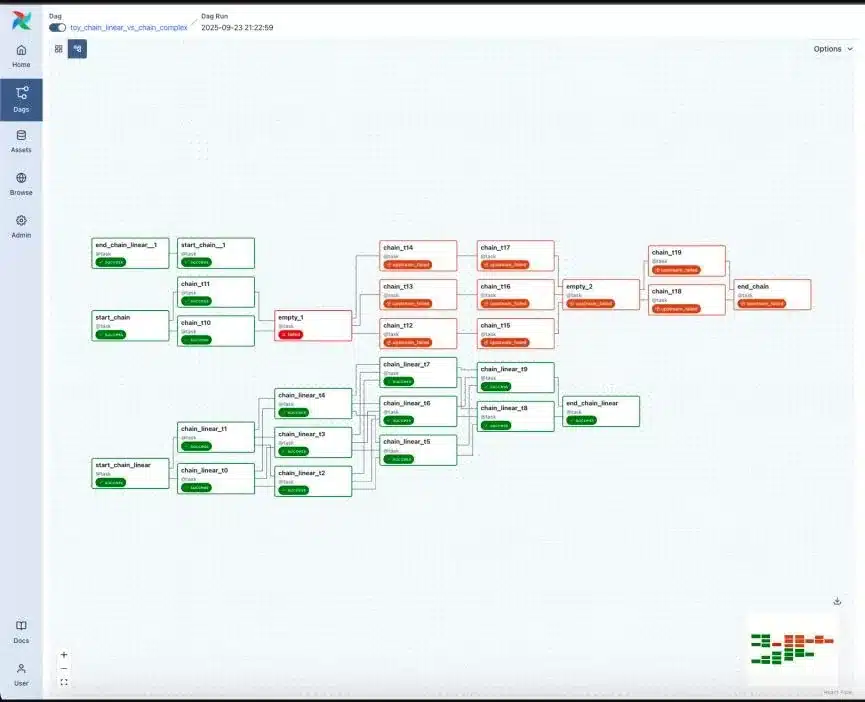
Airflow is the most widely used open-source orchestrator. You write workflows as Python DAGs; Airflow schedules them, retries failures and shows every run in its UI. Airflow 3 added a redesigned UI and data-aware (asset-based) scheduling.
- Best for: coordinating many dependent jobs across different tools.
- Pricing: free to self-host; managed by Astronomer, Amazon MWAA and Google Cloud Composer.
- Open source: yes, Apache 2.0.
- Watch out for: Airflow schedules work; it is not built to move or transform large data volumes inside its tasks. Self-hosting adds real DevOps overhead.
- Airflow alternatives: Dagster for asset-based lineage, Prefect for plain-Python flows, and Kestra for YAML-defined workflows.
18. Dagster

Source: Dagster documentation.
Dagster models pipelines as the data assets they produce (tables, files, ML models) rather than as tasks, so lineage and freshness are built in.
- Best for: teams starting fresh who care about which tables are stale and why.
- Pricing: open source is free; Dagster+ is the commercial cloud (pricing).
- Open source: yes, Apache 2.0.
- Watch out for: a learning curve for its concepts, and migrating a large working Airflow estate rarely pays off.
- Pairs well with: dbt, Airbyte, Fivetran and Snowflake integrations.
19. Prefect
Prefect turns ordinary Python functions into flows and tasks with decorators, with retries, caching and scheduling handled for you.
- Best for: Python-heavy teams that want the least framework around their code.
- Pricing: open source is free; Prefect Cloud is priced by seats and workspaces, with a free tier (pricing).
- Open source: yes, Apache 2.0.
- Watch out for: a smaller integration ecosystem than Airflow.
- Pairs well with: dlt, dbt and cloud warehouses.
Python-first ingestion
20. dlt (data load tool)
dlt is an open-source Python library that extracts data from APIs and databases, normalizes nested JSON into tables and loads it into warehouses and lakes, all as code (dlthub.com).
- Best for: developers who want pipelines-as-code instead of operating an ingestion platform.
- Pricing: free.
- Open source: yes, Apache 2.0.
- Watch out for: you own scheduling, monitoring and connector maintenance.
- Pairs well with: Prefect, Dagster or Airflow, and DuckDB, Snowflake or BigQuery.
Also worth considering
- Talend (Qlik): enterprise ETL with built-in data quality.
- Apache NiFi: visual, flow-based routing with strong data provenance.
- Redpanda: Kafka-compatible streaming in a single binary.
- Stitch (Qlik): simple, low-cost batch ELT for small teams.
- Kestra: open-source, YAML-based orchestration.
- Monte Carlo: data observability for monitoring pipeline freshness, volume and schema changes.
Which data pipeline tools are open source?
Apache Kafka, Apache Flink, Apache Spark, Apache Airflow, Dagster, Prefect, dbt Core, Debezium and dlt are open source under the Apache 2.0 license. Airbyte is source-available under the Elastic License 2.0, which allows self-hosting but restricts offering it as a managed service. Open-source tools have no license fee but still cost infrastructure and engineering time.
| Tool | License | Managed option |
|---|---|---|
| Apache Kafka | Apache 2.0 | Confluent Cloud, Amazon MSK |
| Apache Flink | Apache 2.0 | Confluent, AWS Managed Service for Apache Flink |
| Apache Spark | Apache 2.0 | Databricks, AWS EMR, Google Dataproc |
| Apache Airflow | Apache 2.0 | Astronomer, Amazon MWAA, Cloud Composer |
| Dagster | Apache 2.0 | Dagster+ |
| Prefect | Apache 2.0 | Prefect Cloud |
| dbt Core | Apache 2.0 | dbt Cloud |
| Debezium | Apache 2.0 | Via Confluent or managed CDC tools |
| dlt | Apache 2.0 | dltHub |
| Airbyte | Elastic License 2.0 (source-available) | Airbyte Cloud |
Is Airflow (or dbt, Snowflake, Kafka, AWS Glue, SQL) a data pipeline tool?
These are the questions people ask AI assistants most often about pipeline tools. Short answers:
- Is Airflow a data pipeline tool? It’s an orchestrator. Airflow schedules and monitors the steps of a pipeline and triggers other tools, but it isn’t designed to move or transform large volumes of data itself.
- Is dbt a data pipeline tool? Partly. dbt handles the transformation step inside the warehouse. It doesn’t extract or load data.
- Is Snowflake a data pipeline tool? It’s a data warehouse with built-in pipeline features (Snowpipe, Streams, Tasks, Dynamic Tables) for loading and transforming data that is already reachable from Snowflake.
- Is Kafka a data pipeline tool? It’s the transport layer of streaming pipelines: a durable event log that moves events between systems. You add Kafka Connect, Debezium or Flink for capture and processing.
- Is AWS Glue a data pipeline tool? Yes. Glue is AWS’s managed ETL and data integration service, and with a scheduler (Glue workflows, Step Functions or MWAA) it can run complete pipelines.
- Is SQL a data pipeline? No. SQL is the language most pipeline transformations are written in, through dbt, warehouse procedures or Spark SQL, but a pipeline also needs extraction, loading and scheduling.
Which data pipeline stack should you choose?
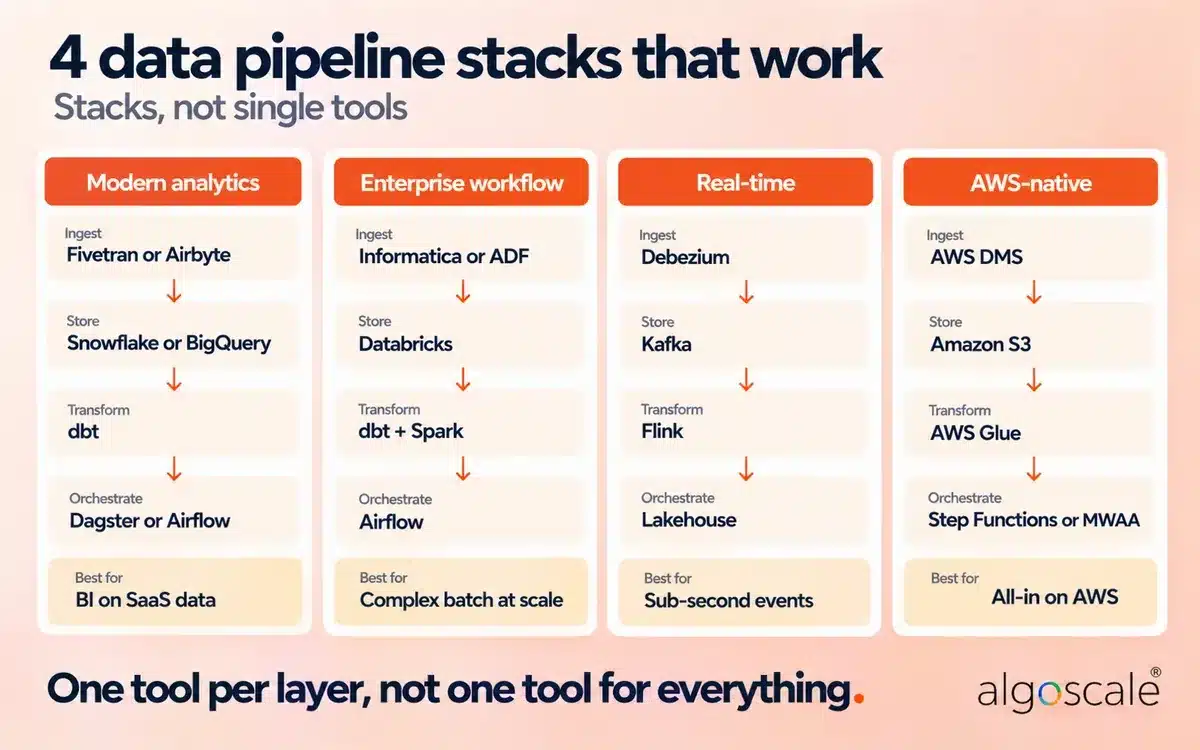
Choose a stack, not a single tool. Most teams combine one tool per layer: ingestion, transformation, orchestration and storage. These four stacks cover most of the projects we see.
- Modern analytics stack: Fivetran or Airbyte → Snowflake or BigQuery → dbt → Dagster or Airflow. Best for BI on SaaS and database data, with minimal infrastructure.
- Enterprise workflow stack: Informatica or Azure Data Factory → Databricks → dbt and Spark → Airflow. Best for complex batch processing at scale with many dependencies and legacy sources.
- Real-time stack: Debezium → Kafka → Flink → a lakehouse or operational database. Best for sub-second events such as fraud checks, live inventory and AI features. Estuary or Striim replace the first three if you’d rather not run them.
- AWS-native stack: AWS DMS (CDC) → Amazon S3 → AWS Glue → Step Functions or Amazon MWAA → Redshift or Athena. Best for teams standardized on AWS.
If you’re choosing an orchestrator for one of these stacks, this side-by-side breakdown of Airflow and Dagster is worth 15 minutes:
Quick decision guide
| Your situation | Recommended tool |
|---|---|
| SaaS data into a warehouse, small team, no infrastructure | Fivetran or Hevo Data |
| Same, but you want to self-host or customize connectors | Airbyte or dlt |
| Database changes needed in seconds | Debezium + Kafka, or Estuary / Striim managed |
| Transforming data already in the warehouse with SQL | dbt |
| Many dependent jobs across tools, Python team | Apache Airflow |
| Starting fresh and want lineage and freshness built in | Dagster |
| Large volumes, streaming and ML on the same data | Databricks |
| All-in on AWS, Azure or Google Cloud | AWS Glue, Azure Data Factory or Dataflow |
What replaced AWS Data Pipeline?
AWS closed AWS Data Pipeline to new customers on July 25, 2024. Existing pipelines keep running, but no new features are planned. AWS recommends moving workloads to AWS Glue (ETL), AWS Step Functions (workflow orchestration) or Amazon MWAA (managed Airflow), depending on the job (AWS Big Data Blog).
| If your AWS Data Pipeline job… | Move it to |
|---|---|
| Copies and transforms data between S3, RDS, DynamoDB and Redshift | AWS Glue |
| Chains several AWS services with retries and branching | AWS Step Functions |
| Is one of many Python-defined workflows, or needs non-AWS tools | Amazon MWAA |
| Replicates database changes continuously | AWS DMS with CDC |
The case study below uses exactly this replacement pattern: DMS for change capture, Glue for processing and Step Functions for orchestration.
How Algoscale built a CDC data pipeline on AWS for a US security integrator

We unified 14+ subsidiary ERP systems, a CRM, an HR system and a planning tool into one governed AWS data lake for a large US physical security and fire systems integrator. The pipeline now refreshes twice a day with no manual triggers, powers 20+ Power BI dashboards and cut reporting preparation time for Finance and Operations by more than 70%.
The problem. The client grew through acquisitions. Each of its 14+ operating companies ran its own Microsoft Business Central ERP, alongside Dynamics 365 CRM, UKG for HR and OneStream for financial planning. Revenue, billing and backlog were calculated differently in each, so leadership meetings started with conflicting numbers, and Finance spent hours every week reconciling Excel exports.
What we built.
- CDC ingestion: AWS DMS captures changes from all 14+ Business Central instances and Dynamics 365 CRM into Amazon S3.
- Medallion lake: S3 holds bronze (raw), silver (cleaned) and gold (business-ready) layers.
- Processing: 20+ production AWS Glue PySpark jobs cover HR turnover, MTTR, revenue bridge, sales pipeline, Customer 360, FP&A and AR/GL. We rebuilt existing Power BI DAX measures in PySpark and reconciled them against the old dashboards.
- Orchestration: AWS Step Functions runs the gold-layer jobs in parallel with per-job retries, exponential backoff and CloudWatch alerting.
- Governance: AWS Lake Formation applies row- and column-level security by territory, and a custom Lambda-based master data service resolves duplicate customer names across subsidiaries.
Results:
- 14+ subsidiary ERPs unified into a single AWS data lake for the first time
- 20+ live Power BI KPI dashboards across Finance, Operations, HR and Sales
- 70%+ reduction in reporting preparation time
- 100% automated daily pipeline execution with retries and failure alerts
Read the full AWS data warehouse modernization case study. Lake Formation security was part of a wider governance design; see our data governance consulting.
How to choose a data pipeline tool

Start with the job and the latency you need; those two usually narrow the choice to one category. Then pick the tool inside that category based on where your data lives, who will run it and how it is billed.
- The job. Ingesting SaaS data, capturing database changes, transforming in the warehouse and scheduling are different problems.
- Latency. Hours or minutes suit batch ELT. Seconds need CDC or streaming, which you run continuously.
- Where the data lives. List every source and destination, on-premises and in the cloud, and the region it must stay in.
- Who operates it. Open-source tools save license fees and cost engineering time. Managed services trade that time for a bill.
- Pricing unit. Rows, GB, compute units and seats each grow with a different part of your business. Model next year’s volume, not today’s.
- Connector depth. Check that the connectors you need are maintained by the vendor and updated recently, not just listed.
- Governance. Access control, masking, lineage and audit logs are much harder to add later.
If you’d like a second opinion on your architecture, our data architecture services team reviews pipelines like these.
How much do data pipeline tools cost?
Cost depends on the pricing unit as much as the price. Managed ELT tools bill by rows or events moved, streaming services by capacity or GB, processing platforms by compute units, warehouses by credits, and orchestration clouds by seats. Open-source tools have no license fee but need infrastructure and people.
| Category | Typical pricing unit | What drives the bill |
|---|---|---|
| Managed ELT (Fivetran, Hevo) | Monthly active rows or events | How many rows change, not total data size |
| Managed CDC (Estuary) | GB moved + connectors | Change volume and number of sources |
| Processing (Databricks, Glue) | DBUs or DPU-hours | Job runtime and cluster size |
| Warehouse pipelines (Snowflake) | Credits | Warehouse size and how often jobs run |
| Orchestration clouds (Prefect, Dagster+) | Seats, workspaces or usage | Team size and number of runs |
| Open source (Airflow, Kafka, dbt Core) | Your infrastructure | Servers, upgrades, monitoring and on-call time |
5 data pipeline mistakes to avoid
- Using a batch tool for a real-time need. Minimum sync intervals in batch ELT tools are architecture limits, not settings.
- Treating Airflow as the thing that moves data. Airflow schedules work. Heavy processing inside Airflow tasks becomes a bottleneck.
- Underestimating row-based pricing. On busy tables, monthly active rows can be several times higher than first estimates. Measure a week of real changes first.
- Counting connectors instead of checking them. A list of 600 connectors means little if the one you need is community-maintained and out of date.
- Running CDC without monitoring. Watch replication lag and log retention, and alert on failures before users notice stale dashboards.
What changed in data pipeline tools since 2024
- AWS Data Pipeline closed to new customers (July 2024); AWS points users to Glue, Step Functions and MWAA.
- Apache Kafka 4.0 (March 2025) removed ZooKeeper; KRaft is now the only mode.
- Apache Airflow 3 shipped a redesigned UI and asset-aware scheduling; the docs are now on the 3.3 line.
- StreamSets is now part of IBM, Stitch and Talend sit under Qlik, and Rivery is now part of Boomi.
- Managed CDC and streaming platforms (Estuary, Striim, Confluent) have made real-time pipelines possible without running Kafka yourself.
Choosing your data pipeline tools
Start from the job, not the logo. Decide which categories your pipeline needs (ingestion, CDC, transformation, orchestration), set the latency you really require, then shortlist one or two tools per layer and test them on your own data and change volumes before committing.
If you want help designing or rebuilding a pipeline, from a lake on AWS to a warehouse on Snowflake, talk to our data lake consulting and data warehouse consulting teams.
Frequently Asked Questions
What is a data pipeline?
A data pipeline is a set of automated steps that moves data from sources such as databases, SaaS apps and event streams to a destination such as a data warehouse, lake or application, and cleans or transforms it along the way. It usually includes ingestion, processing, storage and serving, with orchestration and monitoring around them.
Is a data pipeline the same as ETL?
No. ETL (extract, transform, load) is one type of data pipeline, where data is transformed before it is loaded. Data pipelines also include ELT, streaming and CDC replication, and reverse ETL. Every ETL job is a data pipeline, but not every data pipeline is ETL.
What are the 3 main stages of a data pipeline?
The three main stages are ingestion (collecting data from sources), processing (cleaning, joining and transforming it) and serving (delivering it to warehouses, dashboards, applications or ML models). Orchestration and monitoring run across all three.
What are the 5 stages of a data pipeline?
A common five-stage view is collect, ingest, store, transform and serve. Collection gathers data from sources, ingestion moves it in batches or as a stream, storage lands it in a lake or warehouse, transformation models it, and serving delivers it to the people and systems that use it.
What is an example of a data pipeline?
A typical example: Fivetran copies Salesforce and Postgres data into Snowflake every 15 minutes, dbt models it into revenue and customer tables, Airflow schedules both steps, and Power BI dashboards read the result. A real-time example captures database changes with Debezium, streams them through Kafka and processes them with Flink.
What is the best data pipeline tool?
There is no single best tool, because tools do different jobs. For managed ingestion, Fivetran is the common default; for open-source ingestion, Airbyte; for CDC, Debezium or a managed service such as Estuary; for transformation, dbt; for orchestration, Apache Airflow or Dagster. Most teams combine two or three.
What are the best CDC tools?
The most widely used change data capture tools are Debezium (open source, on Kafka Connect), AWS DMS on AWS, and managed platforms such as Estuary, Striim, Fivetran’s HVR-based connectors and Qlik Replicate. Choose based on your source databases, the latency you need and whether you want to run Kafka yourself.
What is the difference between a data pipeline tool and an orchestration tool?
A data pipeline tool moves or transforms data. An orchestration tool such as Airflow, Dagster or Prefect decides when each step runs, manages dependencies, retries failures and sends alerts. Simple ingestion can run without an orchestrator; multi-step pipelines usually need one.
Which data pipeline tools are open source?
Apache Kafka, Flink, Spark and Airflow, plus Dagster, Prefect, dbt Core, Debezium and dlt, are open source under Apache 2.0. Airbyte is source-available under the Elastic License 2.0. Fivetran, Hevo, Matillion, Estuary and Striim are commercial.
Is SQL a data pipeline?
No. SQL is a query language used to write the transformation step of many pipelines, through dbt, warehouse procedures or Spark SQL. A complete pipeline also needs extraction, loading, scheduling and monitoring.
Airflow vs Prefect vs Dagster: which should you use?
Choose Airflow for the largest ecosystem and many dependent jobs across different tools. Choose Dagster if you want pipelines modeled as data assets with lineage and freshness built in. Choose Prefect if your team writes plain Python and wants minimal framework. All three are open source under Apache 2.0.
What replaced AWS Data Pipeline?
AWS closed AWS Data Pipeline to new customers on July 25, 2024 and recommends AWS Glue for ETL, AWS Step Functions for workflow orchestration and Amazon MWAA for Airflow-based workflows. Existing pipelines still run but get no new features.










