For years, data teams lived with a split infrastructure: a data lake for cheap, flexible storage of raw and unstructured data, and a separate data warehouse for fast, reliable BI queries on clean, structured data. Keeping both in sync meant duplicate pipelines, duplicate storage costs, and data that was perpetually a little out of date in one system or the other.
The Databricks Lakehouse architecture was built to close that gap. It combines the low-cost, flexible storage of a data lake with the reliability, performance, and governance features of a data warehouse – in a single platform, on top of open data formats you actually control. That’s why it’s become one of the fastest-growing architectural patterns among data engineering teams over the past few years.
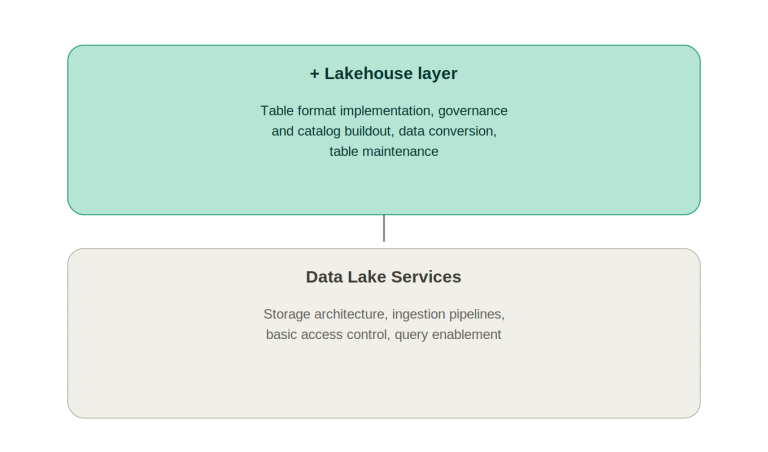
In this guide, we’ll walk through how the Databricks Lakehouse actually works, its core components, and the reasons teams are increasingly standardizing on it instead of running separate lake and warehouse systems. If you’re evaluating whether a lakehouse architecture fits your data stack, our Data Lake Services team at Algoscale has designed and implemented lakehouse architectures across retail, healthcare, and BFSI clients.
What Is the Databricks Lakehouse?
A lakehouse is an architectural pattern that layers data warehouse-style reliability and performance features directly on top of data lake storage – rather than moving data between two separate systems. Databricks pioneered this approach and remains the platform most closely associated with it.
The technical foundation that makes this possible is Delta Lake, an open-source storage layer that adds ACID transactions, schema enforcement, and time travel (the ability to query previous versions of a table) directly on top of files sitting in cloud object storage like Amazon S3, Azure Data Lake Storage, or Google Cloud Storage. In other words, your raw files start behaving like reliable database tables – without the cost or lock-in of moving them into a proprietary warehouse.
For background on how this compares to the traditional two-system approach, see our earlier piece on data lake vs. data warehouse: which architecture is right for your business.
Core Components of the Databricks Lakehouse
1. Delta Lake – The Storage Foundation
Delta Lake is what separates a lakehouse from a plain data lake. It brings:
● ACID transactions on data stored in cloud object storage, preventing the partial writes and corrupted reads that plague raw data lakes
● Schema enforcement and evolution, so bad data doesn’t silently break downstream pipelines
● Time travel, letting teams query or roll back to previous table versions for auditing or debugging
● Unified batch and streaming, so the same table can be written to and read from by both real-time and scheduled jobs
2. Unity Catalog – Governance and Cataloging
Unity Catalog is Databricks’ unified governance layer. It provides a single place to manage access control, auditing, lineage, and data discovery across all your lakehouse assets – tables, files, ML models, and dashboards – regardless of which cloud they sit on. This is what keeps a large, multi-team lakehouse from turning into an ungoverned free-for-all.
3. Photon – The Query Engine
Photon is Databricks’ native vectorized query engine, written in C++ and designed to accelerate SQL and DataFrame workloads on Delta Lake. It’s largely why Databricks SQL can compete directly with dedicated cloud data warehouses on performance, without requiring data to be duplicated into a separate warehouse system.
4. Databricks SQL – The BI and Analytics Layer
Databricks SQL provides a data-warehouse-style SQL experience – including a query editor, dashboards, and alerting – directly against Delta Lake tables. This is the layer that lets business analysts and BI tools query the lakehouse without needing to understand the underlying Spark infrastructure.
5. MLflow and Workflows – The Machine Learning Layer
Because the same Delta tables serve both analytics and machine learning, data scientists can train models directly against production data without waiting for a separate export or ETL process. MLflow handles experiment tracking, model versioning, and deployment, while Databricks Workflows orchestrates the end-to-end pipeline from raw ingestion through model serving.
How the Databricks Lakehouse Works
Step 1: Data Lands in Cloud Object Storage
Raw data – from databases, applications, IoT devices, or SaaS platforms – is ingested into cloud object storage (S3, ADLS Gen2, or GCS) using tools like Databricks Auto Loader, which incrementally and efficiently processes new files as they arrive.
Step 2: Delta Lake Structures the Data
As data lands, it’s written into Delta tables rather than raw files. This is where ACID guarantees and schema enforcement kick in, ensuring downstream consumers never read a half-written or malformed dataset.
Step 3: The Medallion Architecture Organizes Quality Tiers
Most Databricks lakehouses follow a medallion structure:
● Bronze tables – raw data as ingested, with minimal transformation
● Silver tables – cleansed, deduplicated, and joined data
● Gold tables – business-level aggregates ready for BI and reporting
Step 4: Unity Catalog Governs Access
Every table, file, and model is registered in Unity Catalog, where permissions, lineage, and audit logs are centrally managed – regardless of which team or cloud region created the asset.
Step 5: Teams Consume the Same Data for BI and ML
Analysts query gold tables through Databricks SQL or connect their existing BI tool (Power BI, Tableau, Looker). Data scientists build models against the same underlying tables using notebooks and MLflow – with no separate export pipeline required.
Why Teams Are Adopting the Databricks Lakehouse
It eliminates duplicate infrastructure. Instead of maintaining separate ETL pipelines into a warehouse and a lake, teams write data once into Delta Lake and serve every downstream use case – BI, ML, streaming – from that single copy.
It’s built on open formats. Delta Lake is open source, and the underlying data sits in your own cloud storage as Parquet files. This avoids the vendor lock-in that comes with proprietary warehouse storage formats, and other engines (Spark, Trino, Presto) can read the same tables directly.
It unifies BI and machine learning workloads. Data science teams no longer need a separate export pipeline to get production data into a form they can train models on – they query the same governed tables analysts use.
It reduces cost at scale. Cloud object storage is significantly cheaper than warehouse-native storage, and Photon-accelerated queries mean teams don’t have to sacrifice performance to get that cost benefit.
It supports real-time and batch from one system. Delta Lake’s unified streaming and batch model means teams don’t need a separate real-time architecture bolted onto their warehouse.
It’s multi-cloud by design. Because Databricks runs on AWS, Azure, and GCP with the same underlying architecture, organizations with multi-cloud requirements aren’t locked into a single provider’s warehouse ecosystem.
Best Practices for a Databricks Lakehouse Implementation
● Adopt the medallion architecture from day one. Retrofitting bronze/silver/gold structure onto an existing unstructured lake is far more work than building it in from the start.
● Register everything in Unity Catalog early. Governance debt compounds quickly as more teams and pipelines get added.
● Use Auto Loader for incremental ingestion. It’s significantly more efficient than re-scanning entire directories for new files.
● Optimize Delta tables regularly. Run OPTIMIZE and VACUUM commands to compact small files and manage storage costs as tables grow.
● Separate compute clusters by workload type. Isolating ETL, BI, and ML workloads onto different cluster configurations avoids resource contention and makes cost attribution clearer.
● Version-control your notebooks and pipeline code. Treat lakehouse pipelines with the same engineering rigor as application code, including CI/CD.
For more on hardening a lakehouse environment against security and compliance risk, see our post on data lakehouse security best practices for cloud-native organizations.
Common Mistakes to Avoid
● Treating Delta Lake as just a file format. Skipping ACID-aware write patterns and schema enforcement undermines most of the reliability benefit.
● Ignoring small-file compaction. Streaming and micro-batch writes can generate huge numbers of small files, which slows queries if left unmanaged.
● Delaying Unity Catalog adoption. Bolting on governance after dozens of pipelines already exist is a significant, avoidable migration project.
● Running all workloads on one shared cluster. This creates unpredictable performance and makes cost tracking nearly impossible.
● Skipping data quality checks between medallion layers. Bad data that reaches gold tables directly affects business reporting and executive trust in the platform.
Databricks Lakehouse vs. Traditional Data Warehouses
The most common comparison teams make when evaluating a lakehouse is against dedicated cloud data warehouses like Snowflake. Both platforms have converged significantly in recent years – Databricks has added strong SQL and BI capabilities, while warehouse platforms have added support for semi-structured and unstructured data. The right choice often comes down to your team’s existing skill set, ML/AI workload volume, and how much you value open storage formats versus a fully managed proprietary system. Our comparison of Snowflake vs. Databricks for enterprise analytics breaks this down in more detail.
Why Work With a Databricks Lakehouse Implementation Partner
Standing up a Databricks workspace is straightforward. Designing a medallion architecture, governance model, and cluster strategy that scales cleanly across dozens of pipelines and teams takes real platform experience. At Algoscale, our Data Lake Services team has implemented Databricks lakehouse architectures for enterprises consolidating fragmented lake-and-warehouse environments into a single governed platform.
See how Algoscale approaches data engineering and analytics across the full stack, beyond just lakehouse projects.
You might also find our related post useful: creating a single source of truth using data lakehouse architecture.
For teams exploring AI use cases on top of their data platform, see how generative AI benefits from a data lakehouse foundation.
Why Algoscale
● Pre-built accelerators. We don’t start every engagement from a blank slate – proprietary accelerators built from prior implementations speed up common data source integration and analytics patterns.
● Faster time to value. For a focused initial scope covering core data sources and first analytics use cases, our accelerators typically compress development timelines to around four weeks, rather than the several months a from-scratch build often takes.
● Built on a scalable framework. Our implementation approach follows a repeatable, scale-ready framework, so the architecture built for your first use case extends cleanly as data volume and teams grow, rather than requiring a redo.
● Microsoft Solution Partner for Data & AI. Algoscale holds Microsoft Solution Partner status for Data & AI, including specific expertise implementing Microsoft Fabric as a modern data warehouse.
Frequently Asked Questions
1. What’s the difference between a data lake, a data warehouse, and a lakehouse?
A data lake stores raw data cheaply and flexibly but lacks the reliability guarantees of a database. A data warehouse offers strong reliability and query performance but requires structured, cleaned data and is typically more expensive to store at scale. A lakehouse combines both – warehouse-style reliability and performance layered directly on top of data-lake storage.
2. Is Delta Lake exclusive to Databricks?
No. Delta Lake is open source and can be read and written by other engines, including Apache Spark, Trino, Presto, and Flink. Databricks is the primary commercial steward of the project and offers the most integrated experience, but the format itself isn’t locked to their platform.
3. Can Databricks Lakehouse replace our existing data warehouse entirely?
For many organizations, yes – particularly those with significant ML and streaming workloads alongside BI needs. Others run Databricks alongside a warehouse during a transition period, or use both for different workload types depending on team skill sets and existing investments.
4. How does Unity Catalog compare to other data governance tools?
Unity Catalog is purpose-built for the lakehouse pattern, covering tables, files, ML models, and notebooks in a single governance layer across clouds. It’s tightly integrated with the Databricks platform itself, which is both its main advantage and a consideration if you’re running significant non-Databricks tooling elsewhere.
5. What skills does a team need to run a Databricks Lakehouse in production?
Core skills include Apache Spark (PySpark or Scala), SQL, and familiarity with Delta Lake’s table management commands. Teams with data engineering and analytics engineering backgrounds typically ramp up faster than teams coming purely from traditional warehouse SQL backgrounds.
6. How long does a typical Databricks Lakehouse implementation take?
A focused proof-of-concept covering a few key pipelines can be running in a few weeks. A production-grade implementation with full medallion architecture, Unity Catalog governance, and BI/ML integration across multiple teams typically takes 2-4 months depending on data source complexity and migration scope.