


Key insights
- Storage Is the Cheap Part: Amazon S3 Standard costs $0.023 per GB-month in US East, ADLS Hot about $0.021 and Google Cloud Storage Standard about $0.02. A 32 TB lake costs roughly $754 a month to store on S3 Standard. Compute is where budgets go.
- Tier the Old Raw Data: Moving 15 TB of older bronze data to S3 Glacier Instant Retrieval ($0.004 per GB-month) cuts that same storage bill by 39%.
- Small Files Cost Real Money: 10 TB stored as 128 KB files means 83.9 million objects. One full scan costs at least $33.55 in S3 GET requests alone. As 512 MB files, it costs under one cent.
- The Table Format Is Now a Layer: Apache Iceberg (1.12.0, September 2026) and Delta Lake (4.4.0, August 2026) turn a pile of Parquet files into tables with transactions, schema changes and row-level deletes.
- The Catalog Is the New Lock-In: Glue, Unity Catalog, Polaris, S3 Tables and OneLake all compete to own your table metadata. Pick one on purpose.
- Medallion Is a Convention, Not a Law: Bronze and gold earn their keep on almost every project. Silver is often optional for simple sources.
- Deletes Are a Design Problem: CCPA gives you 45 calendar days to respond to a deletion request, extendable once with notice. Plain Parquet files can’t delete a row; table formats can.
- Lakehouses Are the Default Direction: In a Dremio report published in January 2025, surveying 563 IT decision-makers, 55% said they already run most of their analytics on a lakehouse.
Most companies don’t have a data shortage. They have a data mess. Files sit in one bucket, CRM exports in another, IoT readings somewhere nobody remembers, and three teams calculate revenue three different ways.
So someone proposes a data lake. Put everything in one place, cheaply, and sort it out later.
That “sort it out later” is where most lakes die. A highly upvoted r/dataengineering thread from February 2026 is titled, bluntly, “In 6 years, I’ve never seen a data lake used properly.” It drew 216 comments, many of them describing lakes that cost a lot and delivered little.
The storage was never the problem. The layout was. This guide covers the architecture decisions that separate a working lake from a swamp: the layers, the zones, the table format, the catalog, the costs, and the point at which you shouldn’t build a lake at all.
If you’re still on the basics, start with what a data lake is. This page is about how to build one.
What Is Data Lake Architecture?
Data lake architecture is the design of how data enters a central object store, how it is organised into zones, how it is turned into governed tables, and how it is served to BI, machine learning and AI. A data lake is the storage. The architecture is everything that keeps that storage usable: the layers, the table format, the catalog, the access rules and the pipelines between them.
The Six Layers of a Modern Data Lake

Every vendor draws this differently, with anywhere from three to eight layers. Strip away the branding and a production lake in 2026 has six layers, with governance running across all of them.
| Layer | What it does | AWS | Azure | Google Cloud |
|---|---|---|---|---|
| 1. Sources | Apps, databases, SaaS tools, event streams, files | — | — | — |
| 2. Ingestion | Batch loads, change data capture (CDC), streaming | Amazon Data Firehose, DMS, Glue | Data Factory, Event Hubs | Pub/Sub, Dataflow, Datastream |
| 3. Storage | Cheap, durable object storage in open file formats | Amazon S3 | ADLS Gen2 / OneLake | Cloud Storage |
| 4. Table format & catalog | Turns files into tables; one place to find and govern them | Iceberg + Glue Data Catalog or S3 Tables | Delta + Unity Catalog or OneLake | Iceberg + Lakehouse runtime catalog |
| 5. Processing | Clean, join, aggregate | Glue, EMR, Athena | Databricks, Fabric Spark | Dataproc, BigQuery |
| 6. Consumption | BI, SQL, ML, AI agents | Athena, Redshift, QuickSight | Power BI, Fabric | BigQuery, Looker |
Two things changed since most guides were written.
First, layer 4 didn’t exist as a separate decision five years ago. You stored Parquet files and hoped the Hive metastore kept up. Now the table format and catalog are where transactions, schema changes, deletes and access control actually live. Get this layer wrong and the rest of the stack inherits the problem.
Second, the storage layer is boringly reliable. AWS, Microsoft and Google all design their standard object storage for at least 99.999999999% (11 nines) durability over a year. You will not lose data to the cloud provider. You will lose it to a pipeline that overwrote the wrong partition.
For the platform-specific build, we’ve written step-by-step guides for AWS data lake architecture and Azure Data Lake.
Zones and Medallion: Bronze, Silver, Gold

Every working lake separates data by how much you trust it. The names vary. AWS’s prescriptive guidance calls the zones Raw, Stage and Analytics, with at least three layers and a separate S3 bucket for each. Databricks and Microsoft Fabric call them bronze, silver and gold, the medallion architecture.
- Bronze (raw): source data exactly as it arrived. Append-only. Never edited. This is your replay button when a transformation turns out to be wrong.
- Silver (cleaned): typed, deduplicated, validated, conformed to shared keys.
- Gold (curated): business-ready tables, aggregated for a specific use, with one agreed definition per KPI.
Medallion gets a lot of grief online, some of it fair. The most upvoted answer in an August 2026 r/databricks thread, “Are we overusing the medallion architecture?”, argues that silver can often be skipped, but bronze and gold shouldn’t be. Another commenter calls medallion a marketing term for zones teams have used for twenty years.
Both are right. The value isn’t the three colours. It’s three rules:
- Never lose the raw data.
- Never let two teams define the same metric twice.
- Never let a dashboard read directly from bronze.
Microsoft’s Fabric guidance goes one step further and recommends putting each lakehouse layer in its own separate workspace, for more control and better governance at the layer level. We recommend the same at the storage level: separate buckets or containers per zone, so a misconfigured permission on gold can’t expose raw personal data.
Kahan Data Solutions explains what bronze, silver and gold are each for, weighs the pros and cons, and suggests a plainer raw-staging-warehouse-marts naming scheme if the medal metaphor doesn’t suit your team.
Data Lake vs Data Warehouse vs Lakehouse
A data warehouse stores structured, modelled data for reporting. A data lake stores everything, raw, for any future use. A lakehouse puts warehouse features (transactions, schema enforcement, fast SQL) on top of lake storage, using an open table format.
| Data warehouse | Data lake | Lakehouse | |
|---|---|---|---|
| Data types | Structured | Structured, semi-structured, unstructured | All three |
| Schema | On write | On read | Enforced on write, flexible to evolve |
| Typical load pattern | ETL | ELT | ELT |
| Storage cost | Highest | Lowest (object storage) | Low (object storage) |
| Transactions and deletes | Yes | No, not on plain files | Yes, via the table format |
| Best for | Governed reporting | Raw retention, data science, logs | BI, ML and AI on one copy of the data |
In practice, the line between the last two columns is just whether you’ve added a table format and a catalog. That’s why we recommend building most new lakes as lakehouses from day one. We cover the full comparison in data lake vs data warehouse and the deep technical version in our data lakehouse architecture breakdown.
IBM Technology compares the three side by side on purpose, data structure, storage cost, performance, schema-on-write versus schema-on-read, and scalability, in under eight minutes.
Open Table Formats in 2026: Iceberg, Delta and Hudi
A folder of Parquet files isn’t a table. It has no transactions, so two jobs writing at once can corrupt it. It has no reliable schema history. And you can’t delete one customer’s rows without rewriting files by hand.
Open table formats fix this by adding a metadata layer on top of the files. There are three serious options.
| Format | Latest release | Where it’s strongest |
|---|---|---|
| Apache Iceberg | 1.12.0 (Sep 30, 2026); spec versions 1–3 adopted, v4 in development | Multi-engine stacks: Spark, Trino, Snowflake, Athena, BigQuery on the same tables |
| Delta Lake | 4.4.0 (Aug 20, 2026) | Databricks-centred platforms; UniForm (now called “Iceberg reads”) also writes Iceberg metadata for other engines |
| Apache Hudi | 1.2.1 | Heavy upsert and CDC workloads |
Iceberg’s v3 spec added binary deletion vectors, row lineage and a variant type for semi-structured data. Delta 4.0 moved to Spark 4.0 and made variant generally available. The formats are converging, and Apache XTable (still incubating) can translate metadata between all three.
So which one? Practitioners on Reddit have mostly settled the argument. If you need Snowflake and Databricks to read the same tables, choose Iceberg. If you live inside Databricks, Delta is first-class and switching buys you little. In a December 2025 r/databricks thread, an engineer looking to cut cost by moving from Delta to Iceberg concluded that file layout, file size and file count mattered far more than the format.
We agree. Choose the format your main engine treats best, then spend your effort on layout. We compare all three in detail in Delta Lake, Iceberg and Hudi.
Tim Berglund of Confluent builds Iceberg from the bottom up on a lightboard, from Parquet files to manifests to snapshots to the catalog, and shows exactly how it adds schema, snapshots and transactions to files in object storage.
The Catalog Is the New Lock-In
The table format is open. The catalog that tracks where every table lives, who can read it and which snapshot is current is where vendors now compete.
| Catalog | What it is | Status (Oct 2026) |
|---|---|---|
| AWS Glue Data Catalog | AWS’s catalog, with an Iceberg REST endpoint | Generally available |
| Amazon S3 Tables | Managed Iceberg tables in a “table bucket”, with automatic compaction and snapshot clean-up | Launched Dec 3, 2024 |
| Unity Catalog | Databricks’ catalog; the open-source version is an LF AI & Data project and implements the Iceberg REST APIs | OSS v0.6.0 (Aug 2026) |
| Apache Polaris | Vendor-neutral Iceberg REST catalog; Snowflake Open Catalog is a managed service for it | Apache top-level project since Feb 19, 2026 |
| OneLake | Microsoft Fabric’s lake; reads Iceberg tables as Delta and Delta as Iceberg | Available; limits: Parquet only, source tables under 5,000 commits |
| Google Lakehouse runtime catalog | Formerly the BigLake metastore; Google renamed BigLake to “Lakehouse” in April 2026 | Iceberg v2 GA, v3 in preview |
Reddit is sceptical here too. When AWS launched S3 Tables, one thread asked whether it was just yet another Iceberg catalog, and commenters worried about vendors fragmenting the ecosystem. The advice that kept coming up: use the open Iceberg REST catalog protocol, so your engines can change without your metadata moving.
Our rule is simple. One catalog per platform, chosen deliberately, with the REST protocol as your exit route. Two catalogs registering the same tables is how you end up with two security models and nobody sure which one is enforced.
What a Data Lake Actually Costs

Most data lake guides say storage is “cheap” and stop there. Here are the actual list prices, US East, as of October 2026.
| Storage class | Price per GB-month |
|---|---|
| Amazon S3 Standard (first 50 TB) | $0.023 |
| S3 Standard-Infrequent Access | $0.0125 |
| S3 Glacier Instant Retrieval | $0.004 |
| S3 Glacier Deep Archive | $0.00099 |
| ADLS Gen2 Hot (LRS) | about $0.021 |
| ADLS Gen2 Cool / Cold (LRS) | about $0.015 / $0.0036 |
| Google Cloud Storage Standard | about $0.02 per GiB |
Now a worked example. Take a mid-sized lake: 20 TB in bronze, 10 TB in silver and 2 TB in gold. That’s 32 TB.
- All on S3 Standard: 32,768 GB × $0.023 = $753.66 a month.
- All on ADLS Hot: 32,768 GB × about $0.021 = roughly $680–690 a month.
- With a lifecycle rule moving 15 TB of bronze older than 90 days to S3 Glacier Instant Retrieval: (15,360 GB × $0.004) + (17,408 GB × $0.023) = $461.82 a month. That’s 39% less, and AWS describes Glacier Instant Retrieval as offering “milliseconds retrieval” when you need to replay.
Notice what that number is: under $1,000 a month for 32 TB. Practitioners make the same point. In an r/dataengineering thread on data lake architecture, one notes storage is far cheaper than processing, so keeping copies across bronze, silver and gold is cost-effective. Compute is where the bill grows. Another commenter in the same thread described cutting monthly spend from around $12,000 to around $7,500 simply by shutting down off-hours workloads and right-sizing compute. That’s an anecdote, not a benchmark, but the lesson holds.
So budget for storage, but design for compute. Partitioning, file size and query patterns decide your real bill. For tooling costs, see our roundup of data lake tools.
The Small-Files Problem Nobody Warns You About

Streaming ingestion, frequent micro-batches and over-eager partitioning all produce the same thing: millions of tiny files. Apache Iceberg’s own documentation is direct about it. Small data files create unnecessary metadata and less efficient queries, because every file has to be opened.
It also shows up on the bill. S3 charges $0.0004 per 1,000 GET requests. Take the same 10 TB of data:
- Stored as 128 KB files: 83,886,080 objects. A full scan needs at least one GET per file, so at least $33.55 in requests per scan, before compute, and much slower.
- Stored as 512 MB files: 20,480 objects. The same scan costs under one cent in requests.
Run that scan a few hundred times a month and the difference stops being academic.
The fix is compaction: periodically rewriting small files into large ones. The formats publish their targets:
- Iceberg: default
write.target-file-size-bytesis 512 MB; compact with therewrite_data_filesprocedure (docs). - Delta on Databricks: autotunes target file size from 256 MB for tables under 2.56 TB up to 1 GB above 10 TB; compact with
OPTIMIZE(docs). - S3 Tables: runs compaction for you, one reason it exists.
One practical pattern from an r/dataengineering thread on loading 10,000 tiny files a day into Iceberg: append blindly into bronze, buffer high-frequency writes through a queue or stream, and schedule compaction to run alongside ingestion. We’d add one more: alert when average file size in any table drops below 64 MB. It’s the earliest sign of a slow, expensive lake.
Reference Architecture on AWS, Azure and Google Cloud
The six layers map cleanly onto each cloud. These are the standard building blocks on each.
AWS. Ingest with Amazon Data Firehose (formerly Kinesis Data Firehose), DMS (for database CDC) or Glue. Land raw data in S3, one bucket per zone. Register Iceberg tables in the Glue Data Catalog, or use S3 Tables if you want AWS to handle compaction. Govern with Lake Formation, which supports database, table, column, row and cell-level security plus tag-based access. Query with Athena or Redshift; transform with Glue or EMR.
Azure. Ingest with Data Factory or Event Hubs. Store in ADLS Gen2, or OneLake if you’re on Microsoft Fabric. Process with Databricks or Fabric Spark, register tables in Unity Catalog or OneLake, govern with Microsoft Purview, and serve through Power BI.
Google Cloud. Ingest with Pub/Sub, Dataflow or Datastream. Store in Cloud Storage, register Iceberg tables in the Lakehouse runtime catalog, and query with BigQuery.
AWS walks through its reference flow for an S3 data lake: ingest with Firehose, store in columnar formats, partition sensibly, compact files to 128 MB or more with Glue, and query through Athena and Redshift.
How to Build a Data Lake Architecture: Seven Steps
This is the order we recommend for a new build. Skipping ahead to tools is one of the most common reasons lakes stall.
- Start from the questions, not the sources. List the five to ten decisions or reports the lake must support in its first six months. Anything that serves none of them can wait.
- Inventory sources and how they change. For each one: volume, format, update pattern (append, update, delete) and owner. Databases with updates need change data capture; files and events can be appended.
- Pick the storage, table format and catalog together. One cloud object store, one table format your main engine treats best, one catalog. Write the decision down with the reason.
- Define zones, naming and permissions before the first load. Bronze, silver and gold (or raw, stage, analytics), a bucket or container per zone, a naming convention for tables, and who can read each zone.
- Build ingestion into bronze with validation. Schema checks on every load, drift alerts, a quarantine table for rejected records, and partitioning by how data will be queried.
- Model silver and gold for the first use case only. Deliver one trusted dashboard or model end to end before onboarding the next source.
- Turn on operations from day one. Compaction, snapshot expiry, lifecycle rules, lineage, cost monitoring per pipeline, and a documented delete path for personal data.
For the platform-specific version of these steps, see our AWS data lake setup guide. For the tools at each step, see our roundup of data pipeline tools.
Processing Patterns: Lambda, Kappa and Data Mesh
Three older patterns still come up in architecture reviews.
- Lambda: separate batch and streaming pipelines feeding the same views. Low latency, but you maintain the same logic twice.
- Kappa: one streaming pipeline; reprocess history by replaying the event log. Simpler, if your sources are genuinely event-driven.
- Data mesh: shared lake infrastructure, with each business domain owning its own data products. It scales across teams but only works with strong catalog, access and interoperability standards. We compare it with data fabric and the lakehouse in data mesh vs data fabric vs data lakehouse.
With modern table formats supporting both streaming writes and batch reads on the same table, most teams no longer need full Lambda. A streaming ingest into bronze plus scheduled batch transformations to silver and gold covers the majority of use cases.
How Data Lakes Turn Into Swamps
A swamp isn’t a failure of technology. It’s a lake nobody can trust. In a September 2025 r/dataengineering thread, a junior engineer inherited 5–7 TB of date-partitioned JSONL on S3 that Athena could barely query. The advice from experienced practitioners was consistent: define schemas, register tables in a catalog, convert to partitioned Iceberg, and learn the fundamentals before buying a platform, or you just move the mess.
Here’s the checklist we use to keep a lake from getting there.
- Every dataset has a named owner before it lands.
- Every table is registered in one catalog, with a description.
- Raw, cleaned and curated zones are physically separate, with separate permissions.
- Schemas are validated on every load; schema drift stops the pipeline and alerts someone.
- Rejected records go to a quarantine table, not the floor.
- Files are columnar (Parquet) inside a table format, not loose CSV or JSON.
- Partitioning matches how data is queried, usually by date, not by every column someone thought of.
- Compaction runs on a schedule; file-size alerts are on.
- Personal data is tagged at ingestion and masked or tokenised by default.
- Lifecycle rules tier or expire raw data by age.
- Lineage is captured from source to dashboard.
- Compute is monitored per team and per pipeline, with budgets.
Points 4 and 5 come straight from the healthcare project described below.
Security, PII and the Right to Delete
Lakes are high-value targets: one bucket can hold every customer record the business has. Three controls matter most.
Access at the right grain. Bucket-level permissions are too coarse. Lake Formation, Unity Catalog’s attribute-based access control and Purview all support row filters and column masks. Use them, and drive them from tags so new tables inherit the right policy. More in our guide to data lake security.
Encryption by default. All three clouds encrypt object storage at rest. Use customer-managed keys where regulation requires it.
Deletes that actually delete. Under the CCPA, consumers can ask a business to delete personal information it collected, and the business must respond within 45 calendar days (California AG). In a plain Parquet lake, deleting one person means finding and rewriting every file that contains them. Table formats make the delete a single command. But the old data still sits in earlier snapshots until you expire them (Iceberg’s snapshot expiry, Delta’s VACUUM). If you hold health data, the HIPAA Security Rule adds its own safeguards for electronic protected health information.
Design the delete path on day one. Retro-fitting it across three years of raw files is far harder and far more expensive.
Designing a Data Lake for AI Workloads
AI raises the stakes on the same fundamentals rather than replacing them. Four design choices matter most.
- Keep unstructured data in the lake, with metadata. PDFs, emails, images and call transcripts belong in object storage like everything else, registered in the catalog with owner, source and sensitivity tags.
- Treat embeddings as derived data. Vector embeddings and chunked documents should be regenerated from bronze, not hand-maintained. When the embedding model changes, you rebuild from the raw copy.
- Point AI agents at gold, through the catalog. Natural-language query tools and AI agents should read curated, documented tables under the same row and column rules as human users. An agent with access to bronze will find, and repeat, every data quality problem you have.
- Log what the model saw. Lineage from source to gold, plus snapshot history in the table format, lets you answer which version of the data produced a given answer.
If you’re designing the platform for this, see our data architecture services.
Data Lake Architecture Examples From Our Projects
Three recent builds show what a data lake architecture looks like in practice.
A unified lake for a US security integrator. A physical security and fire systems integrator ran 14+ subsidiaries, each on its own ERP. Finance reconciled numbers in Excel before anyone could report. We built a medallion data lake on Amazon S3, using AWS DMS for change data capture from every ERP and the CRM, 20+ Glue PySpark jobs orchestrated by Step Functions, and Lake Formation row- and column-level security by territory. Result: 20+ KPI dashboards, 70% less reporting prep time, and pipelines that run twice daily with no manual triggers.
A governed lakehouse for a healthcare regulator. A Canadian healthcare regulator had seven sources and a weekly extract that took 12 hours. We built a medallion lakehouse on Azure and Microsoft Fabric: bronze stored as Parquet and partitioned by source and date, schema validation on every run, schema drift halting the pipeline with an alert, rejected records captured in silver, and Purview tracking column-level lineage. Result: 131 KPIs automated and weekly extraction cut from 12 hours to one.
Schema-driven XML processing on Databricks. A global life sciences and diagnostics company needed to process zipped XML exports from Oracle UCM at scale. We built a Databricks pipeline where a schema registry stored in Delta drives the parsing rules, with incremental MERGE loads and bronze, silver and gold tables in Unity Catalog. Result: 40% faster processing, 35% less setup for each new feed and query latency under 280 ms.
The common thread isn’t the cloud. It’s that each one decided the zones, the catalog and the failure behaviour before writing the first pipeline.
What Practitioners Say on Reddit
Vendor pages agree with themselves. Here’s what engineers who run lakes say, from threads we read in full.
- Many lakes shouldn’t exist. The February 2026 thread “In 6 years, I’ve never seen a data lake used properly” argues most lakes were adopted “because that’s how it’s done today.” Replies lean warehouse-first, and several say it depends on data size and needs.
- Storage is cheap; compute isn’t. In a data lake architecture thread, one practitioner notes storage is far cheaper than processing, so duplicating data across layers is cost-effective.
- Medallion is useful, not sacred. The most-upvoted view in “Are we overusing the medallion architecture?” is that silver is optional, but skipping bronze or gold causes pain.
- Iceberg for interoperability. For tables shared between Snowflake and Databricks, the top answer recommends Iceberg.
- Layout beats format. In Iceberg vs Delta in Databricks, the poster concluded that layout, file size and file count mattered more than format, and a commenter said real savings usually come from fixing compaction, clustering and query patterns.
- Fix the swamp in order. Schemas, then a catalog, then partitioned tables, then tools (thread).
Do You Even Need a Data Lake?
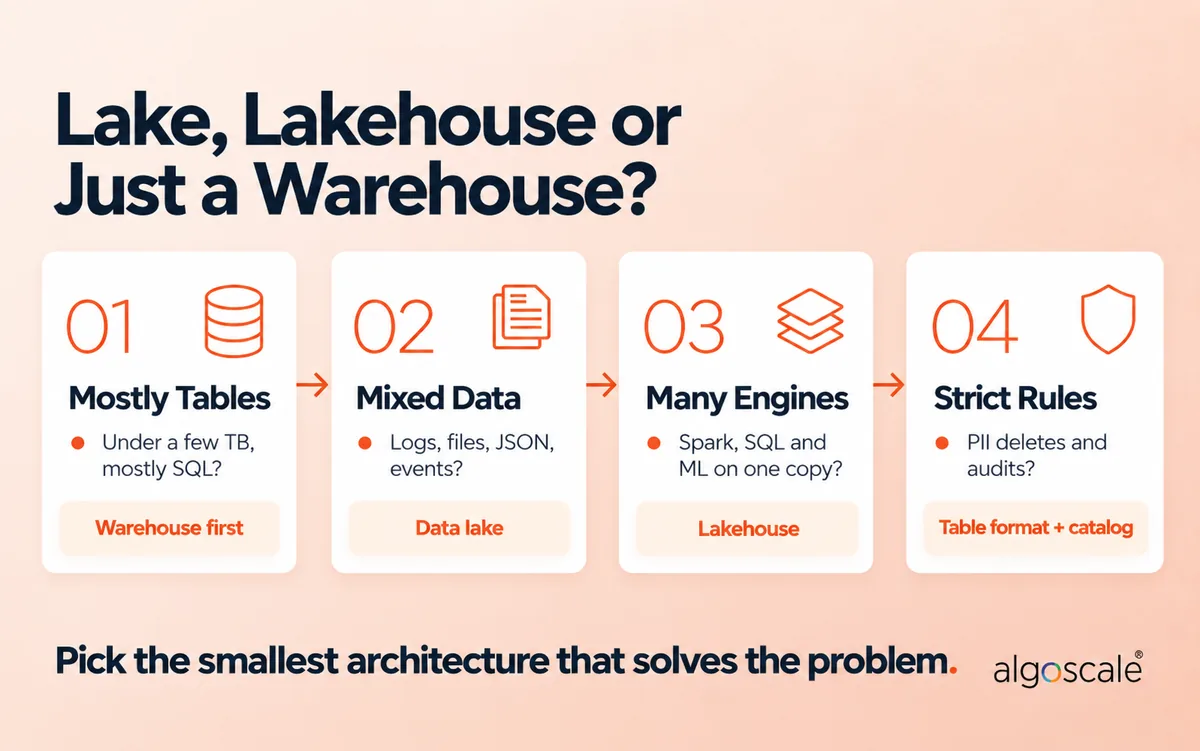
Honestly, not always. Run your situation through these four questions.
Step 1: Is your data mostly tables, and only a few terabytes? Start with a cloud data warehouse. A lake adds moving parts you won’t use yet. Otherwise, go to Step 2.
Step 2: Do you have logs, files, JSON, events or documents alongside tables? You need lake storage, because warehouses handle that variety poorly or expensively. Go to Step 3.
Step 3: Will more than one engine read the same data (Spark, SQL, ML, Snowflake, Power BI)? Build a lakehouse: lake storage plus an open table format and one catalog. Otherwise a simpler lake with a single engine is fine.
Step 4: Do you hold personal or regulated data? Then a table format and fine-grained access control aren’t optional, whatever you chose above.
Whichever you land on, pick the smallest architecture that solves the problem you have today, built on open formats so you can grow it later.
Still weighing it up? Our data lake consulting and data engineering teams can review your current setup and design the layers, catalog and governance before you build. If governance is the gap, start with our data governance consulting.
Frequently Asked Questions
What is data lake architecture?
Data lake architecture is the design of how data is ingested into central object storage, organised into zones, turned into governed tables with an open table format and catalog, and served to BI, ML and AI. The lake is the storage; the architecture is what keeps it usable.
What are the layers of data lake architecture?
A modern data lake has six layers: data sources, ingestion, storage, table format and catalog, processing, and consumption. Governance and security run across all of them. Inside the storage layer, data is usually organised into zones such as bronze, silver and gold.
Is a data lake ETL or ELT?
Usually ELT. Data is loaded raw into the lake first, then transformed inside it, typically as it moves from bronze to silver to gold. Warehouses traditionally use ETL, transforming data before loading.
What is the difference between Snowflake and a data lake?
Snowflake is a cloud data platform with its own managed storage and SQL engine. A data lake is an architecture built on object storage such as S3 or ADLS. The two now overlap: Snowflake can query Iceberg tables stored in your own data lake.
Is SQL a data lake?
No. SQL is a query language. You can use SQL engines such as Athena, Trino, BigQuery or Databricks SQL to query data stored in a data lake.
Is MongoDB a data lake?
No. MongoDB is an operational document database. It can be a source for a data lake, and its data can be landed in the lake’s bronze zone for analytics.
What is the medallion architecture?
Medallion is a way of organising lake data into three quality layers: bronze (raw source data), silver (cleaned, validated and deduplicated) and gold (aggregated, business-ready). Databricks and Microsoft Fabric both document it as their recommended pattern.
Should I use Apache Iceberg or Delta Lake?
Choose Iceberg if several engines (Snowflake, Trino, Athena, Spark) need to read the same tables. Choose Delta if your platform is built around Databricks. Either way, file size, partitioning and compaction will affect performance and cost more than the format.
How much does a data lake cost?
Storage is the smallest part. S3 Standard costs $0.023 per GB-month, so 32 TB is about $754 a month, or around $462 with lifecycle tiering of older raw data. Compute for ingestion, transformation and queries typically costs far more, and depends on file layout and how often data is scanned.










