


Key insights
- The architecture was formalised in 2021. It was set out in a CIDR paper by Michael Armbrust, Ali Ghodsi, Reynold Xin and Matei Zaharia of Databricks.
- Six layers, two that matter most. Ingestion, storage, table format, catalog, compute and consumption. The table format and catalog are what turn a lake into a lakehouse.
- Iceberg spec versions 1, 2 and 3 are adopted. Iceberg 1.12.0 was announced on 1 October 2026. Delta Lake’s latest release is 4.4.0 (August) and Apache Hudi’s is 1.2.1 (September).
- The catalog is the new lock-in. Apache Polaris became an Apache top-level project on 19 February 2026, and AWS Glue, Unity Catalog, Snowflake and Google all expose the Iceberg REST catalog API.
- Names changed in 2026. Google renamed BigLake to Lakehouse on 20 April 2026, and Databricks now calls UniForm “Iceberg reads”.
- Storage is cheap. 2 TB on Azure Data Lake Storage Hot costs about $42 a month at list price.
- Queries aren’t. Scanning that 2 TB table 3,000 times a month on Athena costs $30,000. Partition pruning cuts it to about $575.
- It works in practice. A lakehouse we built on Azure and Microsoft Fabric cut a regulator’s weekly data extraction from 12 hours to one.
A data lakehouse is a data lake that behaves like a warehouse. Your data sits as open files in cheap object storage, and a table format plus a catalog add the things a warehouse gave you: transactions, schemas, deletes and access control.
That’s the whole idea. The hard part is the decisions underneath it: which table format, which catalog, which engines, and how to stop the bill from growing faster than the data.
This guide walks through the architecture layer by layer, with a diagram, a layer-to-tool map for every major cloud, the platform versions current in October 2026, a worked cost example, and the architecture of three lakehouses we’ve built.
What Is Data Lakehouse Architecture?
Data lakehouse architecture is a design that stores all data as open files (usually Parquet) in cloud object storage and adds a transactional table format and a shared catalog on top, so BI, SQL, machine learning and AI can all work on one governed copy of the data.
It replaced the two-tier setup most companies ran for a decade: a data lake for raw files and data science, plus a warehouse holding a second, cleaned copy for reporting. Two copies meant two sets of pipelines, two security models and numbers that rarely matched.
The term was formalised in the 2021 CIDR paper “Lakehouse: A New Generation of Open Platforms that Unify Data Warehousing and Advanced Analytics“. Its authors predicted that the warehouse architecture “as we know it today will wither in the coming years”, replaced by platforms built on open, directly accessible formats such as Parquet. All four worked at Databricks, so read the prediction with that in mind, but the pattern has since been adopted by AWS, Google, Microsoft and Snowflake.
Intent to adopt is high, though most of the evidence comes from vendors. In a December 2025 survey of 101 data leaders commissioned by Dremio, a lakehouse vendor, 87% said they expect the lakehouse to be their primary architecture by 2027.
A lakehouse is a pattern, not a product. Databricks, Microsoft Fabric, Snowflake, AWS and Google Cloud each sell an implementation, and you can build one from open-source parts. If you want the basics first, start with our guide to what a data lakehouse is.
Data Lakehouse Architecture Diagram: The Six Layers

Vendors draw this with anywhere from three to nine layers. Strip out the branding and every production lakehouse has the same six, with governance running across all of them.
- Ingestion. Batch loads, change data capture (CDC) from databases, and event streams land data in storage.
- Storage. Cloud object storage holds everything as files, usually columnar Parquet. AWS designs S3 for 99.999999999% durability, so the files themselves are rarely the risk.
- Table format. Apache Iceberg, Delta Lake or Apache Hudi adds a metadata layer that turns a folder of files into a table with transactions, schema history, time travel and row-level deletes.
- Catalog. Tracks which tables exist, where their current metadata lives and who can read them. Every engine asks the catalog first.
- Compute. Spark, Trino, warehouse SQL engines and Python all read the same tables. Storage and compute scale separately.
- Consumption. BI dashboards, SQL users, ML training and, increasingly, AI agents.
Here’s how each layer maps to the major clouds and to open source.
| Layer | AWS | Azure / Microsoft Fabric | Google Cloud | Open source |
|---|---|---|---|---|
| Ingestion | Amazon Data Firehose, DMS, Glue | Data Factory, Event Hubs | Pub/Sub, Dataflow, Datastream | Kafka, Debezium, Flink |
| Storage | Amazon S3 | ADLS Gen2, OneLake | Cloud Storage | Any S3-compatible store |
| Table format | Iceberg (S3 Tables for managed) | Delta (Iceberg reads via OneLake) | Iceberg | Iceberg, Delta, Hudi, Paimon |
| Catalog | AWS Glue Data Catalog | Unity Catalog, OneLake | Lakehouse runtime catalog | Apache Polaris, Unity Catalog OSS |
| Compute | Athena, EMR, Redshift, Glue | Databricks, Fabric Spark and SQL | BigQuery, Spark | Spark, Trino, Flink, DuckDB |
| Governance | Lake Formation | Unity Catalog, Microsoft Purview | Catalog policies and IAM | Polaris role-based access |
| Consumption | QuickSight, SageMaker | Power BI | Looker | Any SQL or BI tool |
Two things to take from the diagram.
First, layers 3 and 4 are separate decisions. Older guides merge them into one “metadata layer”. In 2026 that hides the most important choice you’ll make, because you can pick an open table format and still end up locked in through the catalog.
Second, governance isn’t a layer you add at the end. Row filters, column masks and lineage live in the catalog, so whatever catalog you choose decides your security model.
ByteByteGo builds a lakehouse layer by layer on an e-commerce example (object storage, an open table format, a shared catalog, then governance) and is honest about the trade-offs, including small-file compaction.
How a Write and a Read Work in a Lakehouse
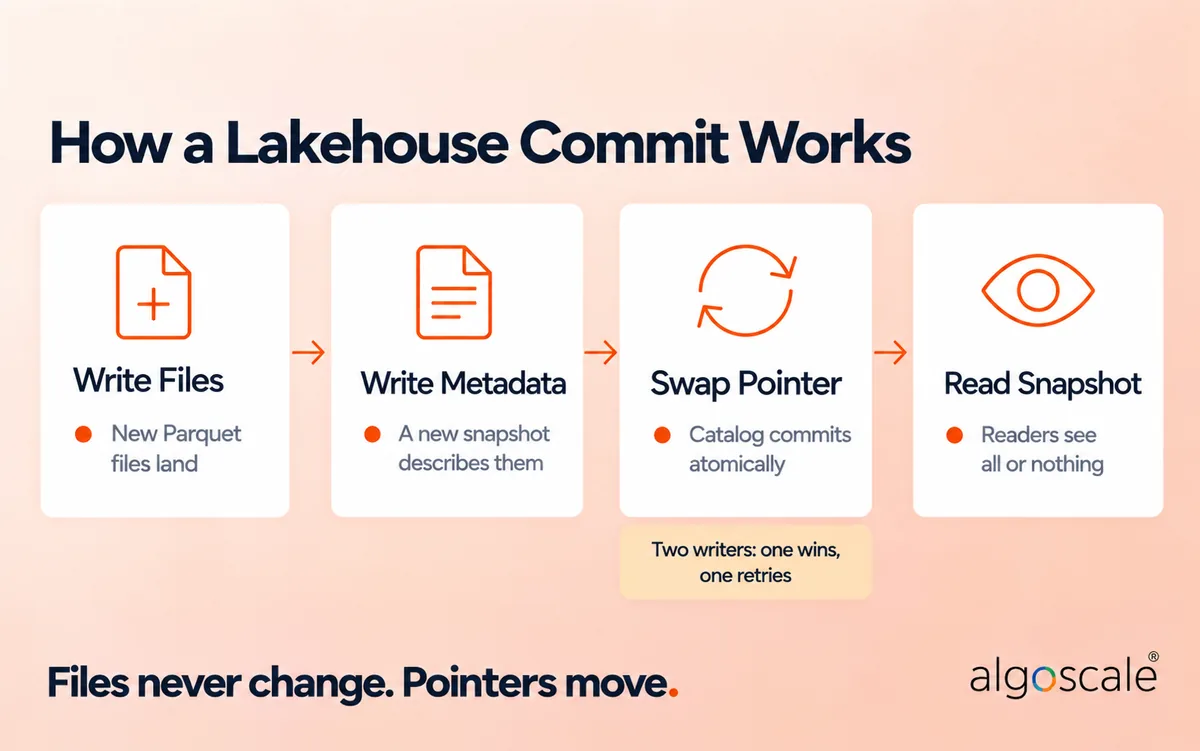
Most guides say table formats “add ACID transactions” and stop. Here’s what actually happens, using Iceberg as the example.
- Write files. A job writes new Parquet data files to object storage. Nothing points to them yet, so no reader can see them.
- Write metadata. The job writes manifest files listing those data files, then a new table metadata file describing a new snapshot of the table.
- Swap the pointer. The job asks the catalog to move the table’s “current metadata” pointer from the old file to the new one. This is a single atomic operation. If another writer committed first, the swap fails, and the job retries on top of the newer snapshot.
- Read a snapshot. A query asks the catalog for the current metadata at the moment it starts and reads exactly that snapshot. It sees all of a commit or none of it, never half.
Delta Lake reaches the same result differently: each commit adds the next numbered JSON file to an ordered transaction log, with periodic Parquet checkpoints so readers don’t replay the whole log.
Three practical consequences follow.
- Time travel is free-ish. Old snapshots still point to old files, so you can query yesterday’s table or roll back a bad load.
- Deletes aren’t immediate. Deleting a customer’s rows creates a new snapshot, but the old files stay until you expire old snapshots (Iceberg) or run
VACUUM(Delta). Build that into your retention process. - The catalog is on the critical path. Every commit and every query goes through it. If it’s slow, down or locked to one vendor, so is your lakehouse.
Lakehouse vs Data Lake vs Data Warehouse
| Data warehouse | Data lake | Data lakehouse | |
|---|---|---|---|
| Storage | Proprietary, managed by the vendor | Open files in object storage | Open files in object storage |
| Data types | Structured | Structured, semi-structured, unstructured | All three |
| Schema | Enforced on write | Applied on read | Enforced on write, can evolve |
| Transactions and deletes | Yes | Not on plain files | Yes, via the table format |
| Engines | Usually one | Many, but no shared guarantees | Many, on the same tables |
| Typical load pattern | ETL | ELT | ELT |
| Best for | Governed reporting | Raw retention, data science | BI, ML and AI on one copy |
The line between a lake and a lakehouse is simply whether you’ve added a table format and a catalog. The line between a warehouse and a lakehouse is who owns the storage format. We go deeper in data lake vs data warehouse, and if you’re still at the lake stage, our data lake architecture guide covers layers, zones and costs.
Open Table Formats: Iceberg, Delta and Hudi
The table format is the layer that defines a lakehouse. Three are in serious production use, and they’ve converged more than the marketing suggests.
| Format | Current release (Oct 2026) | Where it’s strongest |
|---|---|---|
| Apache Iceberg | 1.12.0, announced 1 Oct 2026. Spec versions 1, 2 and 3 adopted; version 4 in development | Stacks where several engines (Spark, Trino, Snowflake, Athena, BigQuery) share tables |
| Delta Lake | 4.4.0 | Databricks and Microsoft Fabric. Databricks’ Iceberg reads (formerly UniForm) also lets Iceberg clients read Delta tables |
| Apache Hudi | 1.2.1, announced 25 Sep 2026 | Heavy upsert and CDC workloads |
Iceberg’s version 3 spec added binary deletion vectors, row lineage, default column values and new types including variant, geometry and geography. Apache XTable, incubating at Apache since February 2024, translates metadata between all three formats.
Two newer options are worth knowing. Apache Paimon combines a lake format with an LSM-tree structure for real-time streaming updates. DuckLake, which reached version 1.0 in April 2026, keeps table metadata in an ordinary SQL database (PostgreSQL, MySQL, SQLite or DuckDB) rather than in metadata files, while data stays in Parquet.
Which should you choose? We recommend picking the format your main engine treats best. Choose Iceberg if more than one vendor’s engine will write to the same tables. Choose Delta if you live in Databricks or Fabric. Then spend your effort on file sizes, partitioning and compaction, which affect speed and cost far more than the format does. Our full comparison is in Delta Lake, Iceberg and Hudi compared.
The Data and AI Guy contrasts Iceberg’s snapshot tree, committed by swapping a pointer in the catalog, with Delta’s ordered transaction log, and shows how that one design choice drives write cost, time travel and whether you need a catalog at all.
The Catalog Is Where Lock-In Lives Now
Open table formats solved the file lock-in problem. The vendors moved up a layer. Today the catalog decides which engines can write to your tables, where permissions are enforced and how hard it is to leave.
The escape route is the Iceberg REST catalog API, an open specification for creating, committing and reading tables over HTTP, including multi-table commits and vended storage credentials. If your catalog speaks it, any compliant engine can work with your tables.
| Catalog | What it is | Status (Oct 2026) |
|---|---|---|
| AWS Glue Data Catalog | AWS’s catalog, with an Iceberg REST endpoint | Available; Iceberg spec v1 and v2 |
| Amazon S3 Tables | Iceberg tables in a “table bucket”, with automatic compaction, snapshot management and unreferenced-file removal | Launched 3 Dec 2024 |
| Unity Catalog | Databricks’ catalog; the open-source version implements the Iceberg REST APIs | OSS 0.5.1; LF AI & Data Sandbox project |
| Apache Polaris | Vendor-neutral Iceberg REST catalog | Apache top-level project since 19 Feb 2026; release 1.8.0 |
| Snowflake Open Catalog | Snowflake’s managed service for Apache Polaris | Available |
| Google Lakehouse runtime catalog | Formerly BigLake metastore; serverless, with an Iceberg REST endpoint | Renamed 20 Apr 2026 |
| OneLake | Microsoft Fabric’s tenant-wide lake and catalog | Delta by default; converts to Iceberg with limits (Parquet only, source tables under 5,000 commits) |
Our rule: one catalog per platform, chosen on purpose, with Iceberg REST support as your exit route. Two catalogs registering the same tables is how you end up with two security models and nobody sure which one is enforced.
Open Data Lakehouse Architecture: Four Tests
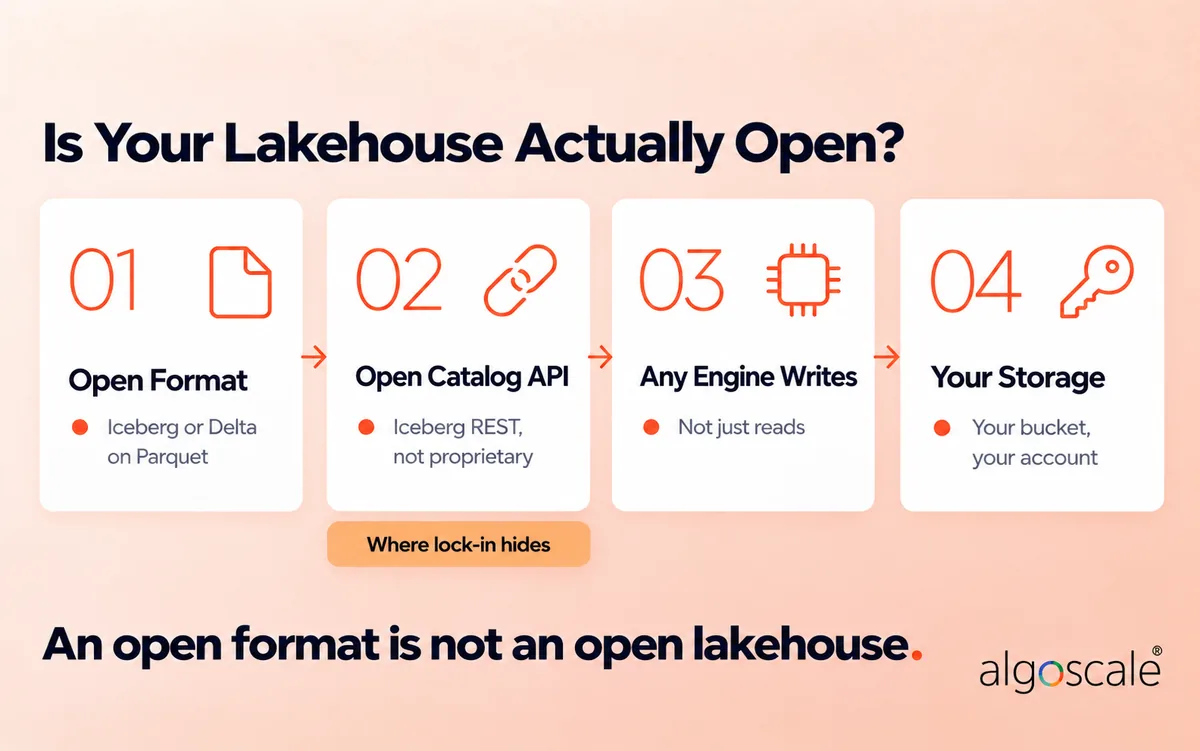
Every vendor now calls its lakehouse “open”. Databricks’ June 2026 explainer defines an open lakehouse as one where “every layer is built on open standards”. That’s the right goal. To check it, we use four tests.
- Open format. Tables are Iceberg, Delta or Hudi on Parquet, not a proprietary format behind an export button.
- Open catalog API. Engines reach the catalog through a published protocol (Iceberg REST), not a private API only one vendor implements.
- Any engine can write, not just read. Reading from many engines is the easy part. Check which engines your catalog lets commit to a table, and which platform runs maintenance such as compaction. If only one vendor’s engine can write, that vendor still controls your tables.
- Your storage. Files sit in a bucket or container in your own cloud account, so leaving doesn’t mean a migration.
Pass all four and you can swap any engine, or the catalog itself, without moving data. Fail the second or third and you have an open format inside a closed platform. A minimal fully open stack looks like this: object storage in your account, Iceberg tables, Apache Polaris as the catalog, and Spark or Trino as engines.
In this 2024 launch demo, Snowflake shows Spark creating an Iceberg table that Snowflake then queries, and the reverse, through one vendor-neutral REST catalog. Polaris has since graduated to an Apache top-level project.
Lakehouse Architecture on Databricks, Fabric, Snowflake, AWS and Google Cloud
The six layers stay the same. What changes is which ones the vendor manages for you.
Databricks. Delta tables in your cloud storage, governed by Unity Catalog, processed by Spark and Databricks SQL. Iceberg clients can read Delta tables through Iceberg reads. Databricks publishes reference architectures with downloadable diagrams for each use case, and a well-architected framework with seven pillars, from operational excellence to interoperability and usability. More in our Databricks lakehouse architecture breakdown.
Microsoft Fabric. OneLake, built on Azure Data Lake Storage, stores every Fabric engine’s tables in Delta Parquet and can present them as Iceberg through metadata virtualisation. Microsoft’s medallion guidance recommends putting each lakehouse layer in its own workspace. Capacity drives the bill, so see our Microsoft Fabric pricing guide and Fabric vs Databricks before you choose.
Snowflake. Snowflake started as a warehouse with its own storage. With Iceberg tables it can keep data in your storage instead, acting as the catalog itself or connecting to an external one such as Open Catalog. Its Horizon Iceberg REST Catalog API lets outside engines read and write Snowflake-managed Iceberg tables. Compare the two big platforms in Databricks vs Snowflake.
AWS. Iceberg tables in S3, registered in the Glue Data Catalog, governed by Lake Formation and queried by Athena, EMR or Redshift. S3 Tables is the managed option if you’d rather AWS handled compaction and snapshot clean-up.
Google Cloud. Iceberg tables in Cloud Storage, registered in the Lakehouse runtime catalog and queried through BigQuery or Spark. Note the April 2026 rename: older guides, including some of Google’s own pages, still say BigLake.
Guy in a Cube explains OneLake as the single lake for a Fabric tenant, demoing zero-copy shortcuts, layered security from workspace down to folder level, and the OneLake catalog.
Medallion Layers Inside the Lakehouse
Most lakehouses organise tables into three quality tiers, known as the medallion architecture. In a lakehouse each tier is simply a set of tables in the same catalog, so moving data up a tier is an INSERT or MERGE between tables, and access per tier is a catalog grant rather than a separate system.
| Tier | What it holds | Who reads it | Rule that matters |
|---|---|---|---|
| Bronze | Source data exactly as it arrived, append-only, plus load metadata | Data engineers | Never edited, so you can replay from it |
| Silver | Typed, deduplicated and validated data with shared keys | Engineers, data scientists | Schema enforced; rejected rows go to a quarantine table |
| Gold | Business-ready facts, dimensions and aggregates | BI, analysts, AI agents | One agreed definition per KPI, with a named owner |
Microsoft’s Fabric guidance goes a step further and recommends putting each lakehouse in its own workspace. We’d add one rule: never let a dashboard or an AI agent read bronze. Silver can sometimes be folded into the other two; bronze and gold are the ones you shouldn’t skip. Our data lake architecture guide covers zone design in more depth.
What a Lakehouse Costs to Query
Most lakehouse guides stop at “storage is cheap”. Here’s a worked example, using list prices as of October 2026.
Storage is the small number. Azure Data Lake Storage Gen2 Hot (LRS, East US) lists at $0.021 per GB-month for the first 50 TB. A 2 TB table costs 2,000 GB × $0.021 = about $42 a month.
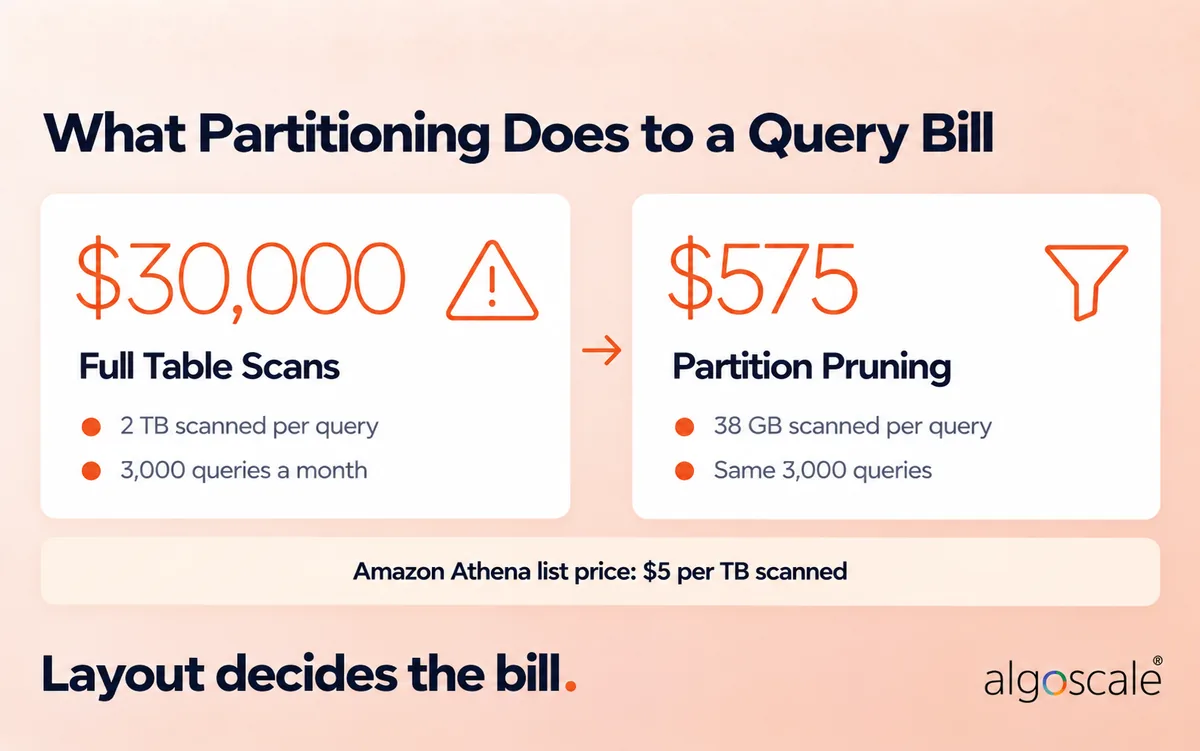
Queries are the big one. Amazon Athena charges $5 per TB scanned. BigQuery on-demand charges $6.25 per TiB, with the first TiB each month free. Both bill by data read, so file layout decides the bill.
Take that 2 TB Parquet table holding one year of orders. Dashboards query the last seven days, 100 times a day, for 30 days: 3,000 queries a month.
- No useful partitioning, every query scans the table: 3,000 × 2 TB = 6,000 TB. At $5 per TB, that’s $30,000 a month.
- Partitioned by day, so each query reads 7 of 365 days: about 38 GB per query, 115 TB in total. At $5 per TB, that’s about $575 a month, 98% less.
The example is simplified. It assumes data is spread evenly across days and ignores column pruning, which cuts both numbers further. But the shape holds on every platform: storage costs tens of dollars, careless scans cost thousands. Partitioning by how data is queried, keeping files large and compacting regularly matter more to your bill than which vendor you pick.
Data Lakehouse Architecture Examples From Our Projects
Three builds show what this looks like in practice, and where the decisions above actually bite.
A medallion lakehouse on Azure and Microsoft Fabric for a healthcare regulator. The College of Massage Therapists of Ontario had seven SaaS sources and a weekly extract that took 12 hours. We built a lakehouse on Fabric and OneLake: bronze stored as Parquet and partitioned by source and date, schema validation on every run, schema drift stopping the pipeline with an alert, rejected records captured in silver, and Microsoft Purview catalog scanning with column-level lineage. Access is role-based for 61 named users across six roles. Result: 131 KPIs automated with business-owner sign-off, and weekly extraction cut from 12 hours to one.
A Delta lakehouse on Databricks for a global life sciences company. The client needed to process zipped XML exports from Oracle UCM across regions. We built a schema-driven Databricks pipeline where parsing rules live in a schema registry stored as Delta tables, loads run as incremental MERGEs, and bronze, silver and gold tables are governed in Unity Catalog. Result: 40% faster processing, 35% less manual setup for each new feed, and average query latency under 280 ms.
A governed S3 lake for a US security integrator. A physical security and fire systems integrator ran 14+ subsidiaries on separate ERPs. We built a medallion data lake on Amazon S3 with AWS DMS for change data capture, 20+ Glue PySpark jobs orchestrated by Step Functions, and Lake Formation row- and column-level security by territory. Result: 20+ live Power BI dashboards and 70% less reporting prep time.
We also built a lapse-prediction pipeline on an existing Databricks lakehouse for a US annuity carrier, with raw Delta tables, MLflow for model governance, and catalog-level access policies that keep the retention and actuarial teams read-only on their output layers. It’s a good example of the payoff the CIDR paper promised: the model trains and scores directly on governed lakehouse tables, with no export pipeline in between.
The common thread is a single catalog and governance model per platform, with clear rules for what happens when a source changes shape.
What Practitioners Say on Reddit
Vendor pages agree with themselves. Here’s what engineers in r/dataengineering and r/databricks say, from threads we read in full.
- Catalogs are the new battleground. When AWS launched S3 Tables, one thread asked whether it was just yet another Iceberg catalog, and commenters worried about vendors fragmenting the ecosystem.
- Iceberg for shared tables. For tables shared between Snowflake and Databricks, the top answer in an Iceberg-or-Delta thread recommends Iceberg.
- Layout beats format. In a December 2025 r/databricks thread, an engineer looking to cut cost by moving from Delta to Iceberg concluded that file layout, size and count mattered more than the format. A commenter added that real savings usually come from fixing compaction, clustering and query patterns.
- Medallion is useful, not sacred. The most-upvoted answer in “Are we overusing the medallion architecture?” says silver is often optional, but skipping bronze or gold causes pain.
- Fix the foundations before buying a platform. Advice to an engineer turning a JSON swamp into a lakehouse ran in a consistent order: schemas, then a catalog, then partitioned Iceberg tables, then tools (thread).
Common Data Lakehouse Architecture Mistakes
Most lakehouse problems aren’t caused by the technology. They come from decisions skipped at the start.
- Choosing the format before the engines. The format should follow from which engines write to your tables, not from which project is trending.
- Running two catalogs over the same tables. Two catalogs means two permission models and two versions of “current”. Pick one and route every engine through it.
- Calling it open because the format is open. Iceberg tables behind a catalog only one vendor can write to are still locked in. Run the four tests above.
- Never expiring snapshots. Old snapshots keep old files alive, so storage keeps growing and deleted personal data isn’t really gone.
- Ignoring file layout. Millions of small files and partitions that don’t match query filters are what turn a $575 query bill into a $30,000 one.
- Letting dashboards read bronze. Raw tables change shape without warning. BI should read gold tables with agreed definitions.
- No owner for table maintenance. Compaction, snapshot expiry and partition reviews are ongoing jobs. If nobody owns them, performance degrades quietly.
- Migrating everything at once. Moving every source and report in one cut-over multiplies the risk. Deliver one use case end to end, then expand.
How to Build a Data Lakehouse Architecture: Eight Steps
This is the order we recommend for a new build.
- Start from the use cases. List the five to ten reports, models or AI features the lakehouse must serve in its first six months. They decide everything below.
- Inventory sources and how they change. Volume, format, owner and update pattern (append, update or delete) for each. Databases with updates need CDC.
- Choose the engines first, then the format. If only one platform writes, use its native format. If several will write, use Iceberg.
- Choose one catalog and check the four openness tests. Write down the decision and the exit route.
- Design zones, naming and permissions before the first load. Bronze, silver and gold, separate storage per zone, and who can read each.
- Build ingestion into bronze with validation. Schema checks on every load, drift alerts and a quarantine table for rejected rows.
- Deliver one use case end to end. One trusted dashboard or model from source to gold before onboarding the next source.
- Turn on operations from day one. Compaction, snapshot expiry, partition review, lineage, a documented delete path for personal data, and cost monitoring per pipeline.
Moving from an existing warehouse? Our data warehouse migration strategy covers the cut-over, and our data lake tools roundup covers the tooling at each step. For regulated data, see lakehouse security best practices for regulated industries.
Do You Need a Lakehouse?
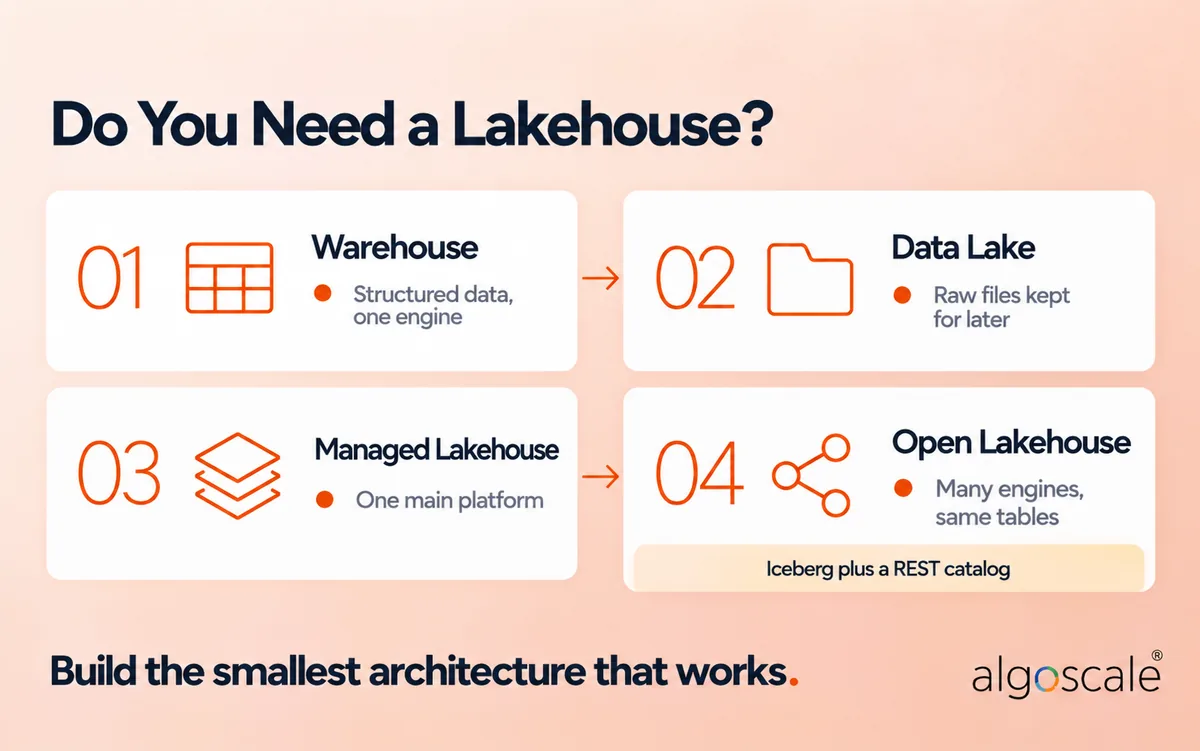
Not always. A lakehouse adds a table format, a catalog and ongoing table maintenance, and those only pay off when you use what they give you. Match the architecture to the situation you’re in today, not the one a vendor deck describes.
| Your situation | Build this | Why |
|---|---|---|
| Mostly structured data, a few terabytes, one BI tool | A cloud data warehouse | Fewest moving parts. You can land raw files in a lake later without migrating. |
| Raw logs, files or exports kept for audit or occasional data science, with little BI on top | A data lake with lifecycle rules | Cheapest storage. Add a table format when people start querying it regularly. |
| One main platform, such as Databricks or Microsoft Fabric, does nearly all the work | That platform’s managed lakehouse, in its native format | Transactions, governance and one copy of data without running your own catalog. Check it against the four openness tests before you commit. |
| Two or more vendors’ engines need to write the same tables (for example Databricks and Snowflake, or Spark and Trino) | An open lakehouse: Iceberg plus a REST catalog such as Polaris, Glue or Snowflake Open Catalog | Only a shared format and a shared catalog keep one copy of data consistent across engines. |
| A warehouse that works, but ML, semi-structured data or duplicate copies are piling up | A lakehouse alongside the warehouse, not a rip-and-replace | Land new and raw data in open tables, and let the warehouse read them where it supports Iceberg. |
One rule applies whatever you pick: if you hold personal or regulated data, you need row-level deletes, snapshot expiry and column masking. A plain lake of Parquet files can’t give you those.
Signs you’ve outgrown a warehouse-only setup:
- You copy the same data into a second system for data science or ML.
- JSON, logs, documents or events are a growing share of what you keep.
- More than one engine or vendor needs the same tables.
Signs a lakehouse is premature:
- One team, one BI tool, and data that sits comfortably in a warehouse.
- Nobody would own compaction, snapshot expiry and partition reviews.
- None of the use cases on your list needs anything a warehouse can’t do.
If you’d like a second opinion before committing, our data architecture team reviews current setups and designs the layers, catalog and governance for the platform you’re on, and our data lake consulting and data engineering teams build them.
Frequently Asked Questions
What is the architecture of a data lakehouse?
A data lakehouse has six layers: ingestion, storage (open files in object storage), a table format (Iceberg, Delta or Hudi), a catalog, compute engines and consumption. Governance and security run across all of them. The table format and catalog are what distinguish it from a plain data lake.
Is a data lake ETL?
No. A data lake is storage, and ETL is a process. Data lakes and lakehouses usually use ELT: data is loaded raw first, then transformed inside the platform, typically from bronze to silver to gold.
Is Databricks a data lakehouse?
Databricks is a platform built on lakehouse architecture. It stores Delta tables in your own cloud storage, governs them with Unity Catalog and processes them with Spark and Databricks SQL.
Is Snowflake a data lakehouse?
Snowflake began as a cloud data warehouse with its own managed storage. With Iceberg tables it can store data in your own cloud storage and act as the catalog or engine in a lakehouse, alongside other engines.
Why choose a lakehouse over a data warehouse?
A lakehouse keeps one copy of data, in open formats, for BI, data science, ML and AI, and handles unstructured and semi-structured data well. A warehouse is simpler when your data is mostly structured and only one engine needs it.
What is an open data lakehouse?
An open data lakehouse uses open table formats on storage you own, exposes its catalog through an open protocol such as Iceberg REST, and lets any compatible engine read and write the same tables. An open format alone doesn’t make the lakehouse open.
What is the difference between a table format and a lakehouse?
A table format such as Iceberg or Delta is one layer of a lakehouse. It turns files into tables with transactions and history. A lakehouse also needs storage, a catalog, compute engines and governance.
Do you need the medallion architecture in a lakehouse?
No, but most teams use it. Keeping raw bronze data and a curated gold layer matters most; a silver layer is often useful but not always needed.
What is DuckLake?
DuckLake is a lakehouse format from the DuckDB ecosystem that stores table metadata in a SQL database (PostgreSQL, MySQL, SQLite or DuckDB) instead of metadata files, with data in Parquet. Version 1.0 was released in April 2026.
How much does a data lakehouse cost?
Storage is cheap: 2 TB on Azure Data Lake Storage Hot is about $42 a month at list price. Query compute is where the cost sits. Scanning that table 3,000 times a month on Athena costs $30,000 without partition pruning and about $575 with it.










